
 ™
™Does all your marketing. Shows you what it did.
Your ads, website, content, social, search and AI answers run on their own every day, whether or not anyone at your business had time this week. Every lead is counted from your own forms, one screen shows what ran and what it cost, and the team that built it runs it for you.
15 minutes, no contract to see it. Just need a website? Build it free.
Trusted to drive growth for
Run the business. The next customer keeps coming.
You sell a service and people choose you on trust: a law firm, a chiropractic or injury clinic, an advisory firm, or a trade with a name in town. This was built for you, whether the owner runs the marketing or a marketer does.
Marketing runs whether or not you have time. It finds demand first, so what gets written is what people already search for. Campaigns and creatives go live in your ad accounts, and every prospect email is logged. You stay with your customers.
Every submission from your own forms lands on one list, newest first, with the source that produced it on the row. You read what happened while it is still happening. Three pages below show what changes for you.
For a firm or a clinic, reviews, rankings and the answer an AI engine gives decide who gets the call, so those are on the screen first. Content can wait for the person you name to approve it, so your own review happens before anything publishes.
Firms and practices working with TruLata: Reddy & Associates, family law in Tulsa; Estate Planners for Life, estate planning in Norman, Oklahoma; Spine Health & Wellness, six chiropractic and physical therapy clinics in North Texas. And the trades too: The Doorman Service Co., garage doors in the Puget Sound area.
No marketing team
Prospects get sourced weekly, topics pass a demand gate on real search volume before they are written, and your ad account's change history gets read every morning. The schedule is the department.
02You are the marketing department
Reporting, chasing vendors and checking spend stop being your evening work. A site, content or targeting change you want goes to the team from that same page and is logged.
03Know which channel produced the lead
The row names the source in plain words: paid with the campaign, AI search with the engine, or organic. Phone leads count where your CRM records them, and you set the outcome from the same row.
One system does the work.
The screen is where it shows up.
A dashboard at your own web address. The people you give a seat sign in with a single-use link, and it is the software doing the work, not a report about it.
It publishes your ads and their creatives, writes and publishes the content on your site, sources prospects and sends the outbound, and counts every lead your own forms catch. What it did is on the same screen as what it cost.
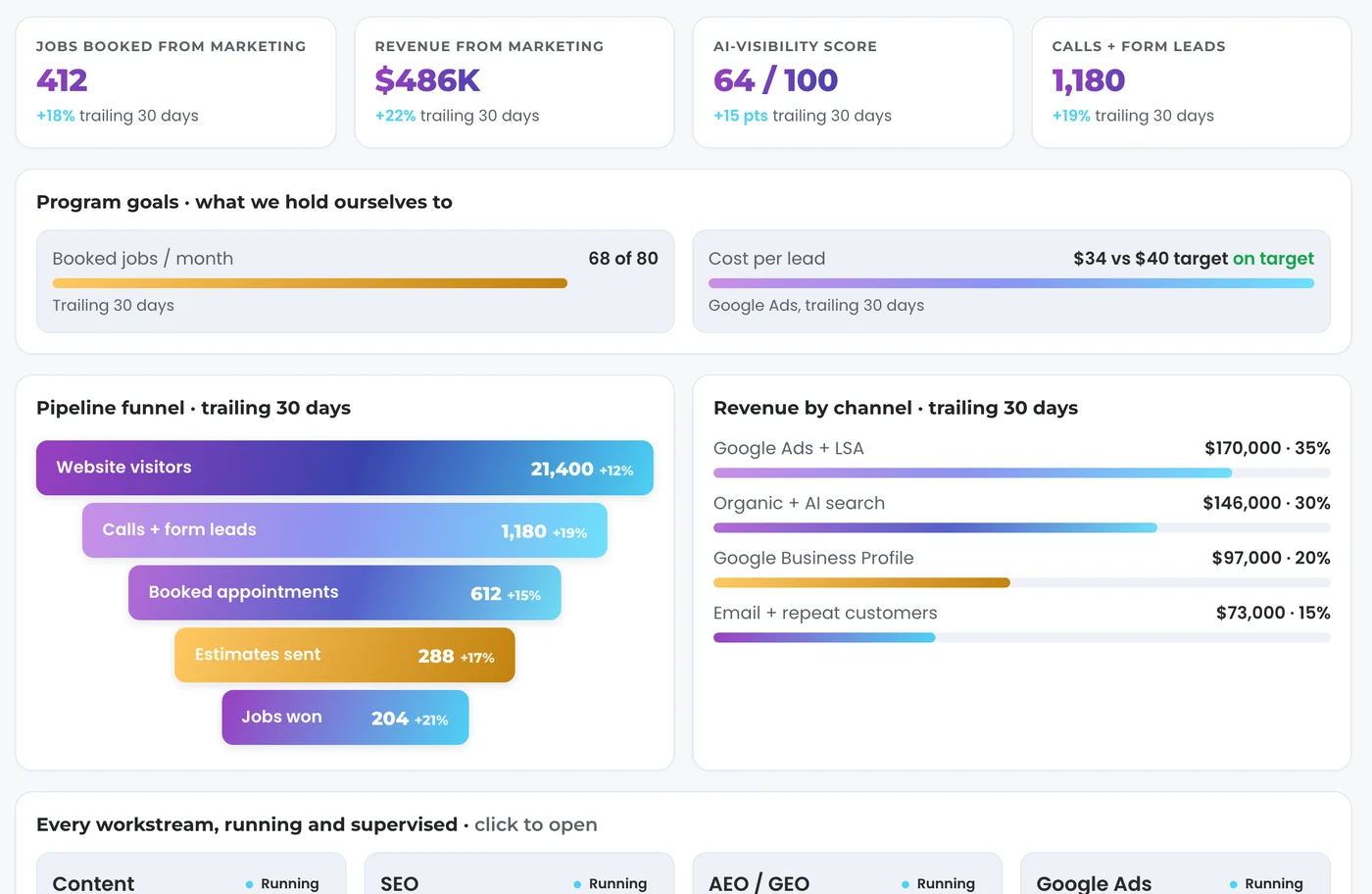
You see what came in this week, what each lead cost and which channel sent it, without opening five tools or waiting for a report at the end of the month.
Our operators run it with you, and a change you want goes to them from that same page, where it is logged. Tools wait to be driven. This does not.
Ask it anything in plain English. Addy, the orchestrator inside TruLata, starts a team of agents on the work and comes back with one answer, and anything public waits for your OK.
Every page below is a working view.
Not a roadmap, and not a feature list. Each one is a page in the product with its own write-up.
The views, and the stamp that says how old they are.
Each view lights up as its account is connected, so every tab you see is reading a real source, and new views arrive as they are built.
The header carries the age of what you are reading, and the sources that lag say so rather than rounding themselves up to live.
Book a demo or open the live demo
The demo runs the same engine code every client runs, on a fictional company, with every number illustrative.
Four steps, and only the first one needs you.
You grant access once, our team connects it, and there is no software for you to learn.
-
01
Connect
You add our Google account as a manager on Analytics, Search Console, Ads and your Business Profile, revocable any time from your own console. We connect your CRM, Stripe, your booking platform and your forms from the inside.
-
02
Pull
Each source is read on its own schedule and stamped with its honest age. A nightly bake stands behind it, so a failed pull leaves a good page up instead of an empty or broken one.
-
03
Run
Your ad account's change history is read daily at 7:05am Eastern by one watch that runs over every account we manage. Where your forms feed the lead sheet, a second check reconciles the leads that landed against the conversions Google counted.
On tiers with the content engine, articles pass a demand gate on real search volume, then move through research, writing and a draft. On tiers with the outbound engine, prospects are sourced weekly into a review-first queue; a person releases them, or the queue releases on the schedule set for the engagement, and every send is logged.
-
04
Open it
Every lead and its outcome, every dollar of spend and what it bought, every article that shipped.
Your CRM, Stripe payments, booking platform jobs, website leads and email statistics are live. Google Ads and GA4 run hours behind intraday. Search Console runs two to three days behind, for everyone. The header says how old it is, and a failed pull leaves yesterday's page up. How the live data works
Access comes first. Then comes the first pull, baselines, your keyword set and the ads watch. After that come content cadence, ad reporting, email flows and goals. Read the setup plan
Running today, on numbers you can check.
Every number on your dashboard names its source and says how old it is, and the checks below run whether or not anyone asked.
38 leads from your website
Every row opens to the actual leads behind it. How access works.
Flat monthly. Month to month. Nothing metered behind it.
Three tiers carry a published number. Command is scoped with you after you have seen it run.
Starter
Search, AI answers, managed Google Ads, every lead counted
- Live analytics
- Search visibility
- AI search visibility
- Google Ads management
- See all 8 features
3 dashboard seats
7 days free, no card
Start 7 days freeLaunch
Add content that publishes on your cadence
- Everything in Starter
- Content engine
3 dashboard seats
Start with LaunchGrowth
Add Meta ads beside your search ads
- Everything in Launch
- Meta ads management
10 dashboard seats
Start with GrowthCommand
Add outbound, social media management and the full team
- Everything in Growth
- Outbound engine
- Social media management
- Full marketing team, always on
Unlimited dashboard seats
Book a demoAn annual commitment takes 20 percent off the monthly. A managed strategy retainer is available as an add-on, scoped with you. See pricing in full
Just need a website? Build it free.
Answer a few questions or give us your current site, and the builder makes your first version in minutes. Change the words yourself, and go live when it is ready.
Website builder
Just need a website? Build it yourself, free, with no card.
Want it handled for you?
Our team runs TruLata for you, one service or the whole program.
SEO and AI search PPC and paid media Websites Content creation Digital marketing Fractional CMO
The questions buyers ask first.
What is TruLata?
One dashboard at your own web address, behind a sign-in we control, and the software your marketing runs inside. Search, ads, content, email and outbound execute in the same system that reports on them. What TruLata is
Do I have to run it myself?
No. Our team runs the engines and manages the accounts whether or not you signed in. From the screen you set a lead outcome and request a website, content or targeting change, and those are logged. Changes to your ad account, CRM, site or Business Profile come from the engine and our team through their APIs, and every one is logged. How we run it for you
What do you connect to, and do you need my passwords?
Analytics, Search Console, Ads and your Business Profile connect through a Google sign-in or access you grant, revocable from your own console. We connect your CRM, Stripe, your booking platform and your forms with access you grant at setup. We never ask for an account password and read no card data, and your inbox and calendar stay yours. See every integration
Does anything reach a customer without a person seeing it first?
Outbound leaves from a review-first queue, released by a person or on the schedule set for the engagement, and every send is logged; and anyone who replies not interested or bounces is suppressed from then on. Content is your choice, because auto-publish is a setting you can leave off. How the review queue works
How fresh are the numbers?
Your CRM, Stripe payments, booking platform jobs, website leads and email statistics are live. Google Ads and GA4 run hours behind intraday. Search Console runs two to three days behind. The page states the age of each source. See how live data works
How are leads counted?
Your form handler records every submission server side the moment it lands, and the Leads view reads them newest first, so a blocked analytics script cannot make a real lead disappear. Phone calls count where your CRM or call tracking records them, and either connects during setup. How leads are counted
What does it cost and how long is setup?
Three published tiers, month to month, with nothing metered; each tier's price and everything it includes are on the pricing page. Command is scoped per engagement and carries no published number. See pricing in full
See it running
before you buy it.
Fifteen minutes on your own business: what your marketing brings in, what each lead costs, and what we would change first. Pick a time right here.
Rather try it alone first? Start a 7-day free trial. See pricing.
Prefer to write? Send us the one thing you want to know.