

Your marketing runs whether or not anyone had time this week.
Search, ads, content, outbound and email run on their schedules, and every one of them reports onto this one screen. Open it and see what ran, what it cost and what it produced.
Open the live Command CenterFive businesses on one block.
One AI marketing platform behind all of them.
One screen shows what ran and what it cost.
The next customer keeps coming.
A marketing team, without the hire.
It plans, runs, measures and improves your marketing. New prospects are found every week, content goes up on schedule, your ads are checked every morning and the reports build themselves. None of it waits for someone at your shop to have time.
Every channel, running.
Search, ads, content, outbound and email all run in one system and report to one screen, not five logins.
Every lead, attributed.
See which channel brought in each lead, instead of every platform taking credit at the end of the month.
The bad weeks too.
The screen does not dress up the numbers. When a week is down, it says so.
Your marketing, run as one system instead of five vendors.
TruLata is where your marketing runs and where you see what it did. One login. Not a report about work happening somewhere else.
Most service businesses end up with a patchwork nobody planned. An agency runs the ads. A cousin built the website. Someone set up an email list two years ago. A lead service sells the same job to you and three competitors. Each one is a separate bill, a separate login and a separate excuse for a slow month, and none of them can tell you which dollar made the phone ring.
TruLata replaces the patchwork. Search, ads, the content on your website, outbound and email all run inside it, and everything they do shows up on one screen with the cost next to it. Open it and it pulls fresh numbers on the spot.
You are not buying software you have to learn. Our team runs it. Ads get tuned, content goes up and leads get counted, whether or not you logged in that week.
Everything it runs, on one screen.
Every one of these is a real page in the product. The demo shows most of them on a sample account.
Getting found. Showing up when someone in your area searches for your trade, on Google and in AI answers from ChatGPT, Gemini, Claude and Grok. Your Google Business Profile, kept current alongside both.
Paid. Ads on Google, Meta and ChatGPT. On Google you see what every campaign spent and what each lead cost, and searches that were never going to become work get blocked so they stop eating budget.
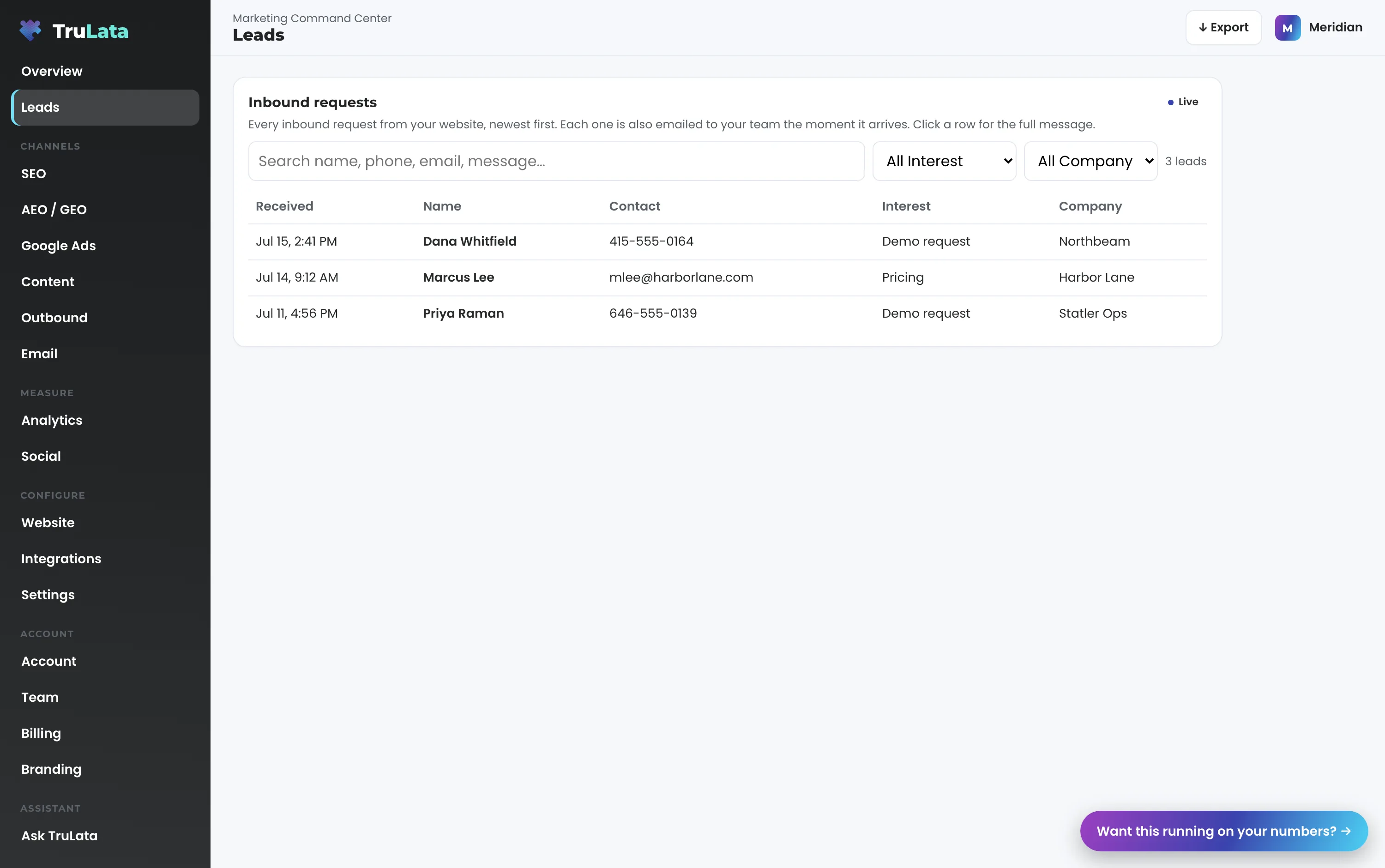
Making the phone ring, and proving it did. Every request from your website in one list, newest first, with the page it came from. Mark which ones became jobs right from the screen.
The work that fills the gaps. New posts on your website, on a schedule. Outreach to new prospects. The follow-up emails nobody at your shop has time to write. Social and reviews in the same place.
Everything else. Revenue and jobs, website traffic, your website, your ad creative and who on your team has access, all next to the work that produced them.
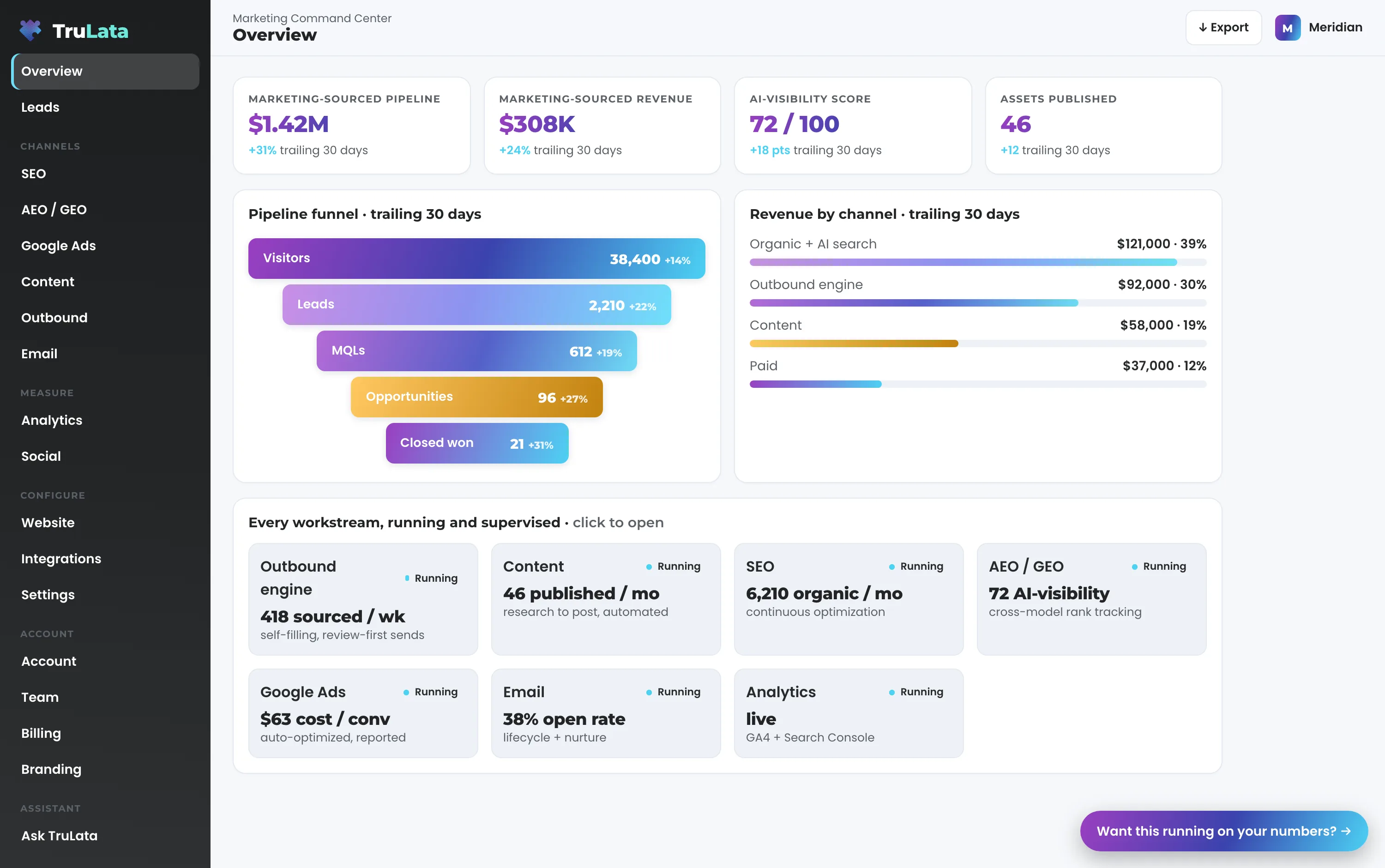
The number is the real number.
Leads are counted from your own website forms. Each one is recorded the moment it comes in and emailed to your team, so an ad blocker or a broken tracking tag cannot make a real lead disappear. Phone leads count when your CRM records them, and we connect your CRM during setup. When a lead turns into a job, mark it on the screen.
Every number says how old it is. Leads, jobs and revenue are live. Google Ads and Analytics run a few hours behind because Google does. Search Console runs two to three days behind for everyone, us included.
Built for the owner who is also the marketing department.
You sell a service, and marketing is one more thing on your plate. The next customer still has to come from somewhere.
Fencing, roofing, plumbing, HVAC, remodeling, solar, restoration, pest control, garage doors, landscaping, and the practices and firms that run the same way: dental, medical, chiropractic, veterinary, law, accounting, insurance. Right now someone near you is searching for what you do. If they find a competitor first, that is a job you never knew about.
It grows with you. Multi-location and national brands use the same screen for every market. If you have a marketing manager, it becomes the one place the team reports to. Open the demo and you will know in ten minutes whether it fits.
Connect the accounts. We build the rest.
First, you give us access. Add our Google account as a manager on Analytics, Search Console, Ads and your Business Profile, and our team connects your CRM, payments, booking platform, email platform and website forms. Then we pull your numbers, set your baselines and keywords, and start the daily ad check. Content, ad reporting, email and goals follow.
It is month to month, like the other software you pay for. Your accounts, your data and your customers stay yours.
Questions, answered.
Is this a dashboard or is it the marketing?
Both, and that is the point. The work runs inside the same system that reports it. Search, ads, content, outbound and email execute here, and the board you open is that work reporting on itself rather than a summary of something happening elsewhere.
We already have an agency. Why would we switch?
You know what you pay them each month and what they showed you for it. Here a subscription replaces the retainer, the work runs inside the screen you open, and any day you look you see what ran, what it cost and what it produced, with the age of each number stated.
How is this different from marketing software I run myself?
Software that waits for you is still your job. This comes with the team that built it, so ads get tuned, content ships and leads get counted whether or not anyone at your company signed in that week, and every send and every ad change is logged.
How is it different from buying leads from Angi or Thumbtack?
A marketplace lead is a shared lead. You are paying for the same homeowner your competitors are calling, and you own nothing at the end of it. This builds your own search presence, your own content and your own list, so the leads are yours.
What does it cost?
Pick from three tiers, each with a published monthly price, month to month and nothing metered. The pricing page lists what every tier includes. Command is scoped with you per engagement.
How current are the numbers?
Leads, jobs and revenue are live, and the page pulls fresh when you open it. Google Ads and analytics lag a few hours because the platforms do. Search Console runs two to three days behind for everyone. Each page states its own freshness rather than implying everything is instant.
What stays mine?
Your accounts, your data and your customer relationships. Every Google connection is a manager invitation you can revoke from your own console, we hold no passwords, and we read no card data. You subscribe to the running system month to month, the way you pay for the software you already use.
See it running
before you decide.
The demo is the real product on a fictional company, with no form in front of it. Pricing is three published tiers.
Open the live demo See pricing
New here? See what the Command Center is. Prefer to write? Send us the one thing you want to know.
Start here: AI marketing platform · AI marketing software · all-in-one marketing platform · marketing automation software · marketing software for small business.
- Refreshed when you open itLive data on page load, never a monthly PDF
- Counted from your own formsLeads recorded server-side, compared daily with Ads and GA4
- Seen in AI answersHow often ChatGPT, Gemini, Claude and Grok name you, measured
- Every send loggedProspect emails leave from a review-first queue, and every send is logged.