

Your numbers are ready before you open the page, and waiting when you do.
Your dashboard is a static page on your own hostname, served from the edge behind a login gate. Last night's numbers render at once, the live ones follow from a managed cloud service, and a stamp in the header says when they were pulled.

Will it load fast and stay up?
Yes. The page is built before you ask for it. Your dashboard is served by one Cloudflare Worker at your own trulata.com address, from the edge location nearest the person opening it: the shared engine ships as static files and your account's own files sit in Cloudflare's storage, already built. A sign-in gate confirms who you are before a byte is served, and our seat list then confirms you hold a seat on this account.
The page then asks a small function on the same edge for your live numbers. That function holds the secret needed to reach our service, so the secret stays out of your browser. It sits behind the gate, so it answers only a request that already passed it.
You notice two things. The page opens in the time a static file takes to arrive, and it stays up when a server somewhere is down, because the file is already built and served from the edge.
One page load, edge first
- Your browser, at your own hostname
- Access gate: who you are
- Seat list: your seat on this account
- Your live payload, from the managed service
- Last night's snapshot, already in the page
What do I see, and how soon?
Last night's numbers, in the first instant. The snapshot baked at 12:01am Central ships with the page and renders before any network call returns. In the same moment the page asks the edge function for your live payload, and a warm service answers from cache in about half a second. Only after that payload lands does the page load its configuration and the engine, so every number it computes comes from the fresh data.
If the snapshot is older than five minutes, opening the page queues one pull of your connected sources behind the request. The pull lands as one automatic reload that puts you back on the view you were reading, at the same scroll position. The page checks every three seconds for up to four minutes, reloads at most once per snapshot, and waits while you have a panel open or are typing. If the live fetch takes longer than four seconds, or fails, the snapshot stands and nobody waits.
Take 9am on a Monday. Ten people on your team open the dashboard inside a minute. The first load starts one pull. The other nine read the current snapshot and pick up the fresh numbers when that one pull lands. Each of them sees a stamp in the header that reads data, then the time of the pull. Hover it and it says either that the data was pulled live when the page opened, or that the live refresh was unreachable and this is the last saved snapshot. The age of the data is always on the screen.
Press Refresh and a real pull of every connected source starts. A full pull takes two seconds to a little over three minutes, set by how many sources you have connected, so the button returns at once and the page checks every three seconds until the pulled-at stamp moves, then reloads. After five minutes it reloads either way. Every path through the button ends in a reloaded page whose stamp says how old the data is.
The clock on one page load
- Last night's snapshot rendersBefore any network call returns
- Live payload from cacheA warm service answers
- One pull startsOne reload when the pull lands
- The snapshot standsNobody waits
- A real pull2 seconds to a little over 3 minutes, then a reload
The age of the data is always on the screen.
Does it keep working when your machines are off?
Yes. The payload your page renders comes from a managed cloud service, not from a computer in an office. Our own machines pull from your connected accounts and push each snapshot up; they are not in the request path when you open the page. Your Google grant is stored encrypted in our cloud database and used only by our service. The service reads by default, and it changes something in your accounts only when you say yes in Ask TruLata or switch on an autopilot in Settings; every change is logged. A real pull, the kind Refresh asks for, runs on our machines against your own sources, and the service keeps serving the last snapshot while it runs.
Which service answers is a setting on your project, not a code change. Moving a client between services is one variable and a redeploy of about a minute, in either direction. The edge function waits two seconds on the managed service before it falls back to our own machine, and if the shared secret is missing altogether the page renders the baked snapshot. A misconfigured project degrades to last night's numbers, and the page still renders in full.
Every step in that chain falls back to something older, and every layer has something to stand on.
- The managed cloud serviceServes your payload; our machines push each snapshot up
- Our own machineThe edge function waits two seconds, then falls back
- The baked snapshotLast night's numbers, and the page still renders in full

Every layer has something to stand on.
Do I get every improvement, or do I fall behind?
You get every one. The engine, the styles and the boot loader are shared files, and the canonical copy is the one most instances agree on, so the shared copy is always the source. Improve the engine once and every client runs the improvement on its next deploy. Before that rule existed, three instances had forked the engine and stopped receiving upgrades. Today every instance runs the same file, and the preflight below reports any drift before a deploy.
A preflight runs before every deploy, and the nightly bake runs the same gate. It checks that your instance's engine, styles and boot loader match the canonical copy, that every script parses, that every asset carries a version stamp, that the fallback snapshot is present, and that no other client's name appears anywhere in your files. Each check exists because the failure it prevents happened once.
An engine change is proven against every client before any of them sees it. A render matrix loads each instance the way a browser does, renders every view its own menu exposes, and fails on a view that throws, renders empty or prints undefined at the client, on a menu item with no view behind it, and on a tile that points at something that is not a view. The matrix also runs inside the deploy gate, so a change that renders badly for one client is held back from that client until it renders clean.
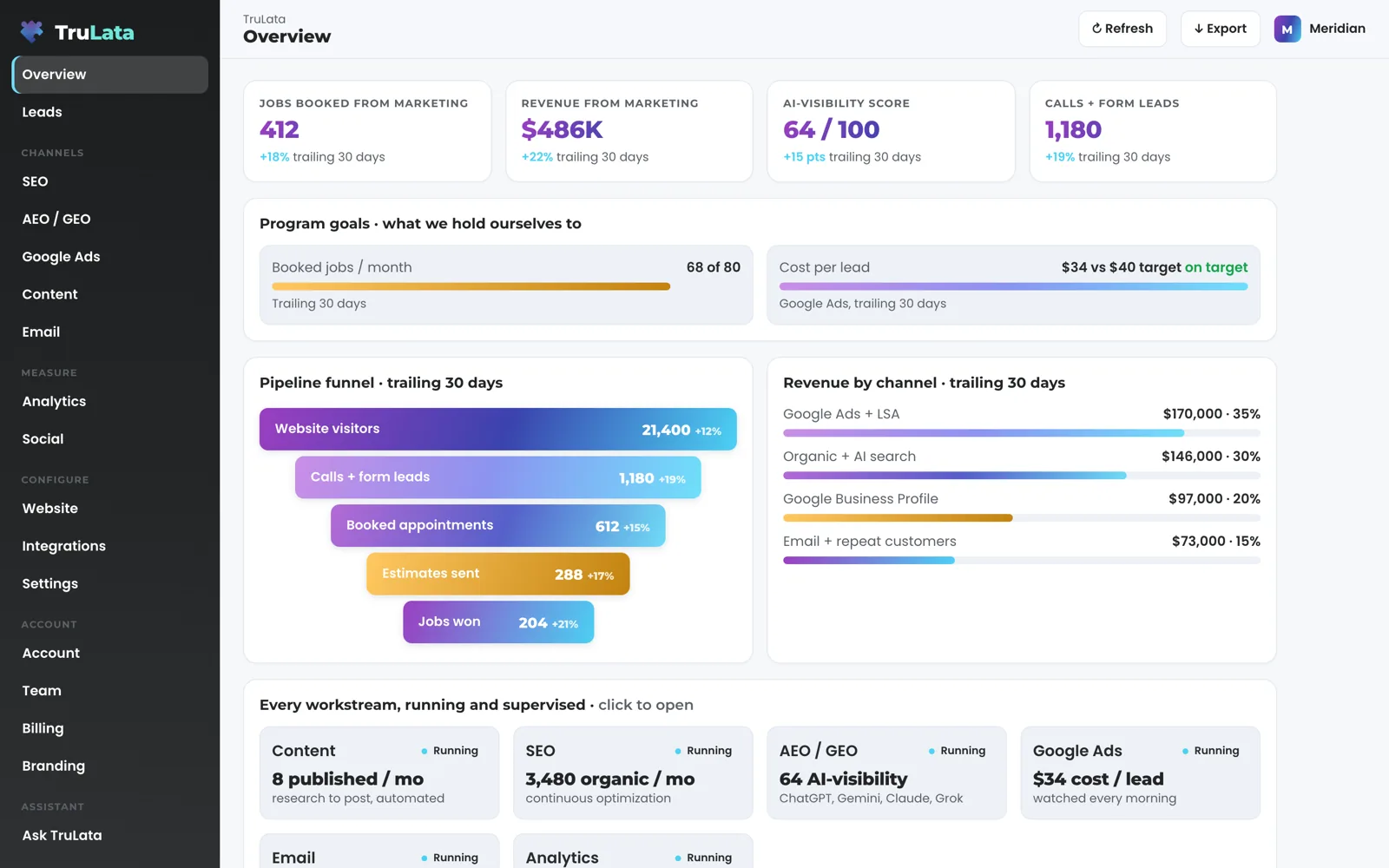
Check it on the demo. demo.trulata.com runs the same engine file every client runs, on a fictional company with illustrative numbers and your name and email in front of it. Find the data stamp in the header. Click a headline card on the Overview and read its value now, its change and its window. Open the Team view and read seats used of plan seats. Your own data arrives when the first pull runs on your accounts.
Will I ever open a blank page?
You open last night's page at the least. Every night at 12:01am Central one job rebuilds a static snapshot for every client from one registry and ships it with the page. That snapshot renders in the first instant of every load, and it is what you keep reading while the live service is out of reach.
The job does five things in order for each client: run the pull, syntax-check every script, bump the version stamp on every asset so browsers and the edge fetch the new files, deploy through the one guarded path, and purge the edge cache for the page and every pinned asset. A failed pull or a script that fails its check stops the job before the deploy, and the previous night's page stays up. Inside an otherwise good pull, a source that fails keeps its previous value for that section, so every section ships with a value. A pull that has not finished in 15 minutes is cut off, so one client's bad night stays that client's alone.
The door follows the same rule. If our seat service is unreachable, a person already signed in to this account stays in, and that decision is logged so the gap is visible rather than silent. Two refusals hold in every case: a login minted for a different dashboard, and a login with no email identity. Revoking a seat takes effect within 30 seconds.
A failed pull or check stops the job before the deploy and the previous night's page stays up. A pull still running at 15 minutes is cut off.
What does it read, and how is that access granted?
It reads, through access you grant. Google connects from Integrations: sign in with Google, or give TruLata access by adding our address to Analytics and Search Console and accepting our link request on Ads. On a managed account our team sends manager invitations instead. You can revoke each one in your own console. We never ask for an account password. A key or app password you paste for another tool is checked live, stored encrypted and revocable by you. Our team connects your CRM, Stripe, your booking platform, your email platform and your website forms from the inside during setup, with the access you grant, so the connection is our work and the grant stays yours.
Which of your accounts the dashboard may read is decided by the accounts chosen in Integrations, by you or by our team on a managed account; the browser sends a request, and that map decides what answers it. A view shows what to connect until its data arrives, and Jobs shows only where your CRM or booking platform is linked, and it shows a coming-soon card until that data is trustworthy. Dates you pick in the analytics view are checked before they reach Google, because they are browser input arriving through the edge function.
Every change the screen can make is logged, and this is the list today: seats (invite and remove), plan and billing, which Google accounts it reads and the keys for the tools you connect, your settings including any autopilot you switch on, a lead outcome on your own lead record, approving or publishing an article, approving an ad or asking for changes where your plan includes creative, and a request to our team. Ask TruLata can take the same actions, and pause, enable or change the budget of a Google Ads campaign, each after your yes. A request from the screen goes to your team as a logged ticket; the engine's writes to your ad accounts and your site go through their APIs and land in each account's own change history, and a budget or bid change in your ad account is made within the limits set for your engagement and lands in your account's own change history.
Your inbox and calendar stay outside the read today, and your customers' card data is never read. A phone lead counts where your CRM records it, and where you run a call-tracking platform with an API it is connected during setup. Freshness is bounded by each source: your CRM, Stripe, your booking platform, website leads and email statistics are live; Google Ads and GA4 intraday figures lag by hours; Search Console runs two to three days behind. The stamp in the header says when the last pull ran.
Outside the read
- Your inbox and calendar, today
- Your customers' card data, never
- Your passwords, none held
Read, through access you grant
- Manager invitations on Analytics, Search Console, Ads and Business Profile
- CRM, Stripe, booking, email and forms, linked by our team
- A per-client map, confirmed by a person, decides what answers
The stack, in one table.
| What | Where it comes from | How fresh |
|---|---|---|
| Dashboard | One Cloudflare Worker, your trulata.com address | Edge-served, already built |
| Gate | A sign-in link from login.trulata.com, then our seat list | Every request; a revoked seat is out within 30 seconds |
| Live data | Managed cloud service holding your snapshot | From cache in about half a second; re-pulled past 5 minutes |
| Pulls | Our machines, from your connected accounts | On open past 5 minutes, on Refresh, and nightly |
| Engine | Shared files, preflight before every deploy | The same file on every client |
| Fallback | Nightly static snapshot, shipped with the page | 12:01am Central; yesterday's page at the least |
The page is built before you ask for it, and the live numbers arrive on top of it.
Questions, answered.
Is my dashboard on a shared server?
It runs on shared infrastructure, walled off per account. One app on Cloudflare's edge serves every dashboard, your hostname decides which account answers, and a sign-in for one account is refused on another. The live numbers come from a managed cloud service.
What if TruLata's own machines are off?
Your page still opens and shows the latest snapshot. Our machines pull and push; they are not in the request path. A Refresh while they are off ends in a reloaded page whose stamp says when the data was last pulled.
Are all clients on the same version?
Yes. The engine, styles and boot loader are shared files. A preflight checks every instance against the canonical copy before each deploy, and an engine change is rendered against every client before any of them sees it.
Can the browser reach your backend directly?
Through the edge function. It sits behind the sign-in gate, holds the secret and forwards the request; your browser calls a path on your own hostname, and the secret stays at the edge.
What happens if a nightly pull fails?
Yesterday's page stays up. The job stops before the deploy on a failed pull or a script that fails its syntax check, and a section whose source failed keeps its previous value.
Can any of this write to my accounts?
The screen reads by default. Its writes are the ones listed under Reach, each logged, and your Google Ads change only on your yes in Ask TruLata or under an autopilot you switched on. The engine's writes to your ad accounts and your site go through each platform's API, within the limits set for your engagement, and land in the account's own change history.
See how it would run
for your business.
15 minutes with TruLata. We show you what your marketing brings in, what each lead costs, and what we would change first.
Book a demo or start a 7-day free trial
No card. It ends on its own after 7 days unless you add one. See pricing.
New here? See what TruLata is. Prefer to write? Send us the one thing you want to know.
Start here: AI marketing platform · AI marketing software · all-in-one marketing platform · marketing automation software · marketing software for small business.
- Refreshed when you open itLive data on page load, never a monthly PDF
- Counted from your own formsLeads recorded server-side, compared daily with Ads and GA4
- Seen in AI answersHow often ChatGPT, Gemini, Claude, Grok, Manus, Google AI Overviews, Perplexity, Meta AI and DeepSeek name you, measured
- Every send loggedProspect emails leave from a review-first queue, and every send is logged.