

Know who can open your dashboard, and what they can change.
Your dashboard opens only for an address that holds a seat on your account. Remove the seat and it stops working within 30 seconds. Every change the screen can make is logged, and this page lists them.

Who can open my dashboard?
Only an address that passes two checks. Your sign-in confirms who the person is before a byte of the page is served. Our seat list then confirms that this address holds a seat on your account. Pass the first without the second and you get a refusal page, not your numbers.
Identity is verified on every request, not remembered. Each request carries a signed session that is pinned to your dashboard, so a sign-in minted for one dashboard is refused at another. Your dashboard tells search engines not to index it, and its preview hostnames do not serve it, so the gated host is the one door.
Sign in with a link, not a password. Enter your address at login.trulata.com. A single-use link arrives at the address on your seat, works once and expires in 15 minutes. Hold seats on more than one account and the link lands on a chooser. There is no password to set, share or reset, and none for us to store.
Every part of the page is checked, not only the front door. One load of your dashboard makes eleven requests, and the file that carries your numbers is one of them. Each is checked against the seat list, so a removed address is refused at the data file too, not only at the front door.
- Sign-in confirms who you areA single-use link that works once and expires in 15 minutes
- The seat list confirms you belongPass the first without the second and you get a refusal page
- Every request is checkedEleven per page load, the data file included
- A session is pinned to one dashboardA sign-in minted for one dashboard is refused at another
How fast can I remove someone?
Within 30 seconds. Say a bookkeeper leaves on a Friday. Open Team, press Remove beside their address, and confirm in the row. Within 30 seconds every request from that address gets a refusal page. It names the address, says the address holds no seat on this dashboard, and tells them to ask the account owner.
The 30 seconds is a cache, and we state it so nobody assumes instant. The decision is held for 30 seconds instead of asked on each of those eleven requests. A removed seat can keep working for up to 30 seconds on a request that was already decided. Not a day. Not a ticket at a vendor. Thirty seconds.
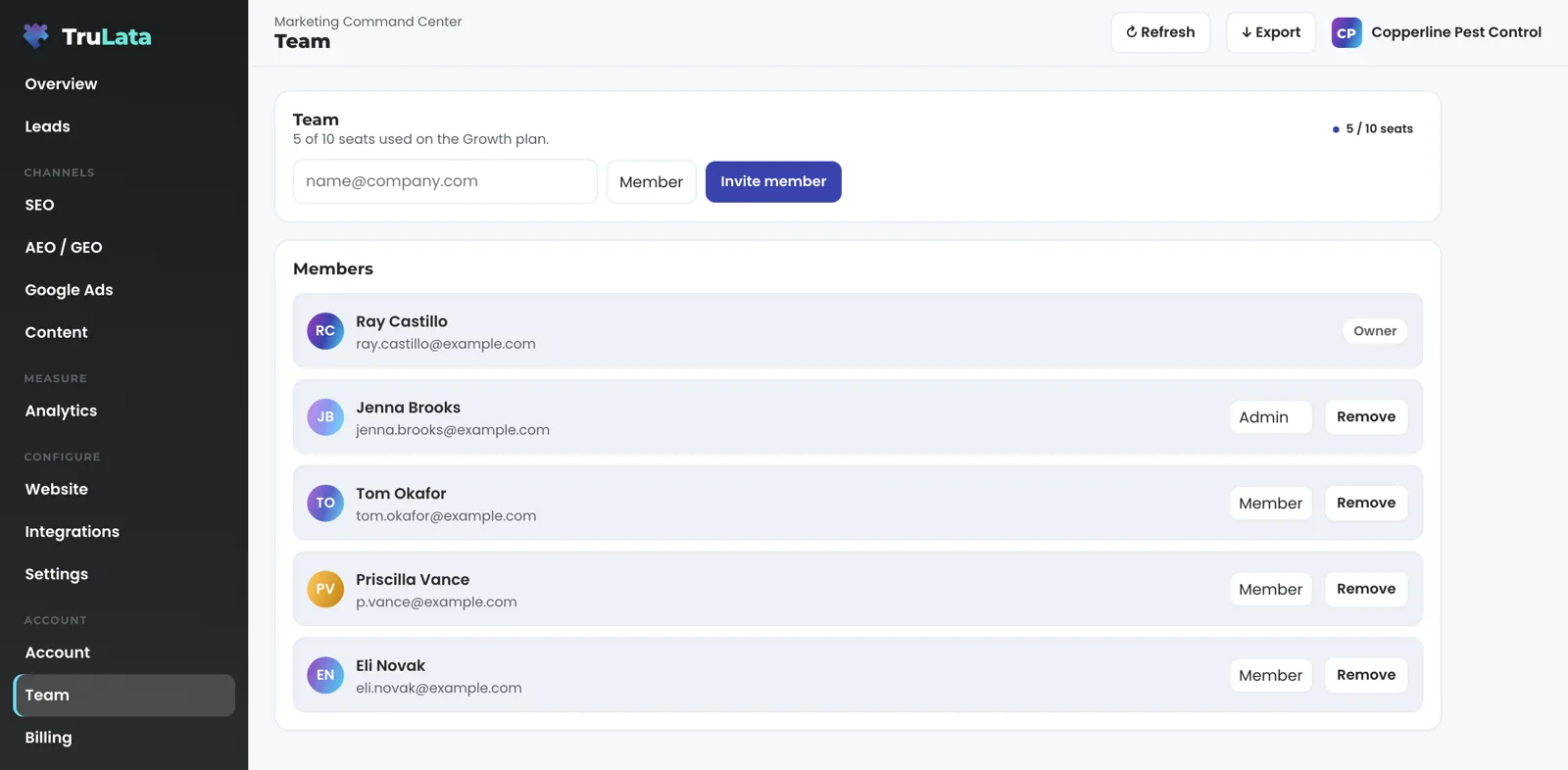
Adding someone is the same view. Type their email, pick Member or Admin, press Invite member. They sign in at login.trulata.com the same way you did. Members open the dashboards. Admins also manage channels, integrations and the team; billing stays with the owner. Only an owner or an admin can invite or remove.
The view keeps count for you. It shows seats used against seats on your plan, and each member carries a status, Active or Invited. When the plan is full the invite box says Seat limit reached instead of failing quietly. Seats by plan: three on Starter, three on Launch, ten on Growth and unlimited on Command.
What can someone with a seat change?
Every change the screen can make is logged, and this is the list today: seats (invite and remove), plan and billing, which Google accounts it reads and the keys for the tools you connect, your settings including any autopilot you switch on, a lead outcome on your own lead record, approving or publishing an article, approving an ad or asking for changes where your plan includes creative, and a request to our team. Ask TruLata can take the same actions, and pause, enable or change the budget of a Google Ads campaign, each after your yes. Everything else on the screen reads.
A lead outcome is a control on the Leads view. Press Not a lead beside a row, choose why (existing customer, spam or sales pitch, wrong number, out of area, other), add an optional note, and press Save. It writes to that lead's record and stands until your own team clears it with Undo. Where follow-up tracking is on, the same control records contacted, quoted, won or lost, and a lead with no record after two days wears a badge that says no contact marked yet.
A request opens a box that says Goes straight to your TruLata team. Send it and the toast reads Sent to your TruLata team, Ticket #N. Quote that number back to us any time. The Support view lists every ticket with when it opened, where it came from, its subject and its status, and our replies appear under it. Email support@trulata.com instead and it lands in the same list with its own number.
Requests go to your team as logged tickets; the engine's own writes to your ad accounts and your site go through their APIs and land in each account's change history. Budget and bid changes in your ad account are made within the limits set for your engagement, and the 7:05am watch reads that history every morning.
Team and Branding change the workspace itself, not your accounts. Team holds who has a seat. Branding holds a logo, PNG, SVG or JPG up to 2 MB, and a brand colour; the logo appears top right on every page. Neither touches anything outside the dashboard.
Check it in the demo. Open demo.trulata.com and go to Support. Press New request and the box opens. Website has the same form inline under Request a website change. The demo simulates the send; your instance hands you a ticket number. Open Team for seats used against plan seats and the roles Member and Admin.
Every write path, the complete list
- Ask a questionThe assistant, where it is offered
- Set a lead outcomeThe lead record, with undo on the row
- Request a website changeYour team, logged, with a ticket number
- Request content, keywords or targetingYour team, logged, with a ticket number
- Ads, CRM, site, Business ProfileChanged through each platform's API, in its own change history

Every change the screen can make is logged, and this page lists them.
Where does my data live, and what do I keep?
Your numbers are served from a managed cloud service, not from a machine in an office. Your browser talks only to your own hostname; the request is forwarded from behind the gate with a key derived for your account alone, so one account's credentials cannot read another's. If the service is unreachable, the page shows last night's snapshot with its age in the header, so there is always a dashboard to read.
Your records are ordinary Google files. Lead rows live in a Google Sheet your own website writes server-side, one row per submission, so it fills even when a browser tag on the site is dead. Content is filed as one Google Doc per piece in a per-client Drive folder.
Google connects from Integrations: sign in with Google, or give TruLata access by adding our address to Analytics and Search Console and accepting our link request on Ads. On a managed account our team sends manager invitations instead. You can revoke each one in your own console. We never ask for an account password. A key or app password you paste for another tool is checked live, stored encrypted and revocable by you. Our team connects your CRM, Stripe, your booking platform, ActiveCampaign and your forms from the inside with access you grant during setup, and a connector we have not built yet is built during setup.
Your inbox and calendar stay outside the screen today and connect during setup where your engagement calls for them. Your customers' card data stays with Stripe and is never read, and the Stripe connection is read only: nothing here creates a charge or a refund. A phone call counts as a lead where your CRM records it. CallRail connects from Integrations with a key you paste, and another call-tracking platform with an API is connected during setup where you use one.
Freshness has a ceiling, and the page says so. Your CRM, Stripe, your booking platform, website leads and email stats are live. Google Ads and Analytics intraday numbers lag by hours. Search Console runs two to three days behind.
If you leave, you revoke the manager invitations in your own consoles and your seat list is emptied. Your content is already Google Docs in your Drive folder, and your lead sheet can be shared with you.
What we never hold
- Your passwords
- Your customers' card data
- Your inbox and calendar, until your engagement calls for them
Where your records live
- Lead rows: a Google Sheet your site writes
- Content: one Google Doc per piece in your Drive folder
- Google access: manager invitations you revoke
- Your numbers: a managed cloud service, behind the gate
What is written down, and who can read it?
Every change made through a dashboard is written down. The record holds the address that made it, what was asked for, the answer it got and the time. Set a lead outcome, send a request, change a seat, and each one lands in the same log. Refusals land there too, so an attempt that was turned away is as visible as one that worked.
Sign-ins are logged the same way, step by step. Asking for a link, using it, and any attempt to use it twice are separate lines, with the address and the dashboard. So the question of who opened your dashboard last month has an answer, and it comes with dates.
Reading the log is ours, and your view of it is your own dashboard. The log covers every account on one service, so it stays with our team rather than sitting behind a client screen. Ask and we will tell you what it holds for your account.
Rate limits sit in front of the same doors. Each account has its own ceiling per minute, counted for the signed-in person where there is one and by address where there is not, with a tighter ceiling on the few actions that cost real money to run. If a limiter cannot answer, the call is let through and the event is logged, so a counter outage keeps you working.
Your data moves under bank-level encryption (TLS), and browsers are told to keep it that way for two years, so a link to your dashboard cannot be downgraded to an open connection. Your numbers sit in a managed database with point-in-time recovery, so a bad hour can be rolled back rather than restored from last night.
Each account has its own rate limit per minute, and your numbers sit in a database with point-in-time recovery.
Who watches my accounts when nobody is at a desk?
A scheduled read, every morning, whether anyone is at a desk. At 7:05am ET the ads change watch reads your Google Ads change history. It also reads the account's user list directly, because a change event does not record who was granted access. So a new address given access to your account reaches the team the next morning, with the role it holds, the date of the grant and who made it.
Most changes are ours, and the watch says so. Our own writes and Google's routine churn are set aside, so what reaches the team is the short list of material changes made by somebody else. Three classes are judged before any filtering and are always raised: an AI-driven setting switched on, a change to who has access, and a change to how conversions are counted. A setting switched on under any login reaches the team's screen the next morning, whether a person switched it or Google's own recommendation applied it.
At 7:20am ET a lead watch compares a lead sheet against what Google reports, on an instance whose forms feed the sheet. Five checks: the site's tag loader still answers, leads are not landing while Analytics records none, paid leads are not landing while Ads counts none, a spending campaign has not gone to zero, and traffic has not continued while leads stopped. So a dead tag, a blind ad account or a form that stopped submitting is flagged the next day rather than at the end of the quarter.
The rest of the schedule is boring on purpose. A nightly bake at 12:01am Central writes the fallback snapshot for every client, and a failed pull leaves the previous page up rather than shipping an empty one.
What stays within limits: budget and bid changes in ad accounts stay within the limits set for your engagement and land in the account's change history. Prospect emails leave from a review-first queue; a person releases them, or the queue releases on the schedule set for the engagement, and every send is logged. Replies are classified and shown, and not-interested or bounced addresses are suppressed from further sends.
On a schedule, whether anyone is at a desk
- Ads change watchChange history plus the account's user list
- Lead watchYour lead sheet against Analytics and Ads
- Seat pin checkAnd again before every deploy
- Nightly bakeA failed pull leaves the previous page up
A blip on our side must not lock you out of your own numbers.
What happens when a check cannot be made?
You stay in. If our seat service takes longer than two seconds to answer, a person who has already signed in is allowed through, and the decision is written to the log. The sign-in has confirmed who they are; our layer only narrows that set. A blip on our side must not lock you out of your own numbers, and a removed seat working a few minutes longer during an outage is the smaller failure.
Two refusals never relax. A login minted for a different dashboard is refused, because a wrong audience is not an outage, it is a token that was never for this door. A login with no email identity is refused, because a dashboard is a human surface and a machine identity holds no seat. Every fail-open is logged, so the gap is visible rather than silent.
Every release is rehearsed before it reaches you. The new version goes to a staging instance of the product first, and a real browser opens every tab of every account on it. Production is touched only when that walk is clean; a single failure leaves the running version in place. Before every deploy, a preflight checks the door itself. The redirect from preview hostnames points at your canonical host, and it is a 302, so a browser checks again next time instead of caching a 301 forever. The engine matches the canonical build. The data file is present and assets are pinned. No other client's name appears anywhere in your instance. No build junk ships. A failed check stops the deploy and the previous page stays up.
If the numbers behind the page are late, the page says so. The header stamp shows how old the data is. Refresh starts a real pull, two seconds to a little over three minutes depending on your sources, and the page reloads when the stamp moves. Every path through it ends in a reloaded page.
Fails open, and logged
- Seat service slower than two seconds
- A person already signed in stays in
- The decision is written to the log
Never relaxes
- A login minted for a different dashboard
- A login with no email identity
- Both refused, every time
Access, in one table.
| What | Where it comes from | How fresh |
|---|---|---|
| Authentication | Sign-in on your dashboard hostname, single-use link | Every request |
| Authorisation | Seat list on our cloud service | Every request, decision held 30 seconds |
| Sign-in | Single-use link from login.trulata.com | Works once, expires in 15 minutes |
| Removal | Team view, or ask your team | Effective within 30 seconds |
| Google account access | A Google sign-in or access you grant | Revocable by you in each console |
| Requests | Every request from the screen becomes a numbered ticket | Live |
| Ads change watch | Change history and the account user list | Daily, 7:05am ET |
| Lead watch | A lead sheet against Analytics and Ads, five checks, where forms feed the sheet | Daily, 7:20am ET |
| Change log | Address, request, answer and time for every change made through a dashboard | Every write |
| Sign-in log | Each step: link asked for, link used, link reused | Every sign-in |
| Rate limits | Per account, counted per signed-in person or address | Per minute |
| In transit | Bank-level encryption (TLS), with browsers told to stay on HTTPS for two years | Every request |
| Recovery | Managed database with point-in-time recovery | Continuous |
| Releases | Staging instance first, every tab of every account walked in a real browser | Every release |
| Controls | Built to the SOC 2 Trust Services Criteria, each control written as policy and enforced in the product | Reviewed quarterly |
Every change the screen can make is named on this page, and each one is logged.
Questions, answered.
How do I sign in?
With a single-use link sent to the address on your seat from login.trulata.com. It works once and expires in 15 minutes. Hold more than one seat and you choose which account to open.
How fast does removing someone take effect?
Within 30 seconds. The decision is held briefly so one page load asks the seat list once instead of eleven times, and that hold is the whole delay.
Who can invite or remove people?
An owner or an admin, from the Team view. Members open the dashboards and see a line saying who can manage seats. Admins manage channels, integrations and the team; billing stays with the owner.
Does the product change my ad account or CRM?
Through each platform's API, with a record. A request from the screen goes to your team as a logged ticket; the engine's writes to your ad accounts and your site go through their APIs, within the limits set for your engagement, and land in each account's own change history, which the ads change watch reads every morning at 7:05am ET. Your CRM is read for pipeline stages and sources, and a change there is a logged request.
Do you store my passwords?
No account passwords. Google connects through a sign-in or access you grant, both revocable in your own console. A key or app password you paste for another tool is checked live, stored encrypted and revocable by you.
What if your service goes down?
You stay in. Someone already signed in is allowed through and the decision is logged, and the page shows the last snapshot with its age. The two refusals that never relax are a wrong audience and a login with no email identity.
Can another client see my dashboard?
Your hostname decides which account a request belongs to, and every request is answered with a key derived for your account alone, so a request from one account cannot read another's. A check that tries exactly that runs against production after any change to sign-in, and a preflight before every deploy fails if another client's name appears anywhere in your instance.
How does TruLata approach SOC 2?
Our controls are built to the SOC 2 Trust Services Criteria. Access, encryption, logging, data retention, recovery and change control are each written down as policy and enforced in the product, and the database accepts connections only from our own servers. A formal SOC 2 report comes from an independent audit, which we will commission when our clients need one.
Can I check any of this before I buy?
Yes, in the demo at demo.trulata.com, with your name and email to open it. Open Support and press New request, and open Team for seats and roles. Every number there is illustrative, and the engine is the same code every client runs.
What do I keep if I leave?
Your own accounts, with our manager access revoked by you, your content as Google Docs in your Drive folder, and your lead sheet shared with you.
See how it would run
for your business.
15 minutes with TruLata. We show you what your marketing brings in, what each lead costs, and what we would change first.
Book a demo or start a 7-day free trial
No card. It ends on its own after 7 days unless you add one. See pricing.
New here? See what TruLata is. Prefer to write? Send us the one thing you want to know.
Start here: AI marketing platform · AI marketing software · all-in-one marketing platform · marketing automation software · marketing software for small business.
- Refreshed when you open itLive data on page load, never a monthly PDF
- Counted from your own formsLeads recorded server-side, compared daily with Ads and GA4
- Seen in AI answersHow often ChatGPT, Gemini, Claude, Grok, Manus, Google AI Overviews, Perplexity, Meta AI and DeepSeek name you, measured
- Every send loggedProspect emails leave from a review-first queue, and every send is logged.