

Know every lead your website produced, even on the day your tracking breaks.
Your form handler writes each submission to a lead sheet on the server and emails your team before the visitor sees the thank-you page. Open the Leads view and read that sheet newest first. Once the watch is connected to your sheet, it compares the sheet every morning at 7:20am Eastern with what Google Ads and GA4 counted.

Which leads did my website actually produce?
Each one your forms received, in the order they arrived. Submit a form on your site and the handler emails your team, appends a row to a lead sheet on the server, then sends the visitor on to the thank-you page where Google's conversion tag fires. The row exists before the tag does. Google Ads conversions and GA4 events are measurement layered on top. The email and the sheet are the record of whether a form was submitted, and the sheet keeps filling on a day when every tag on the site is dead.
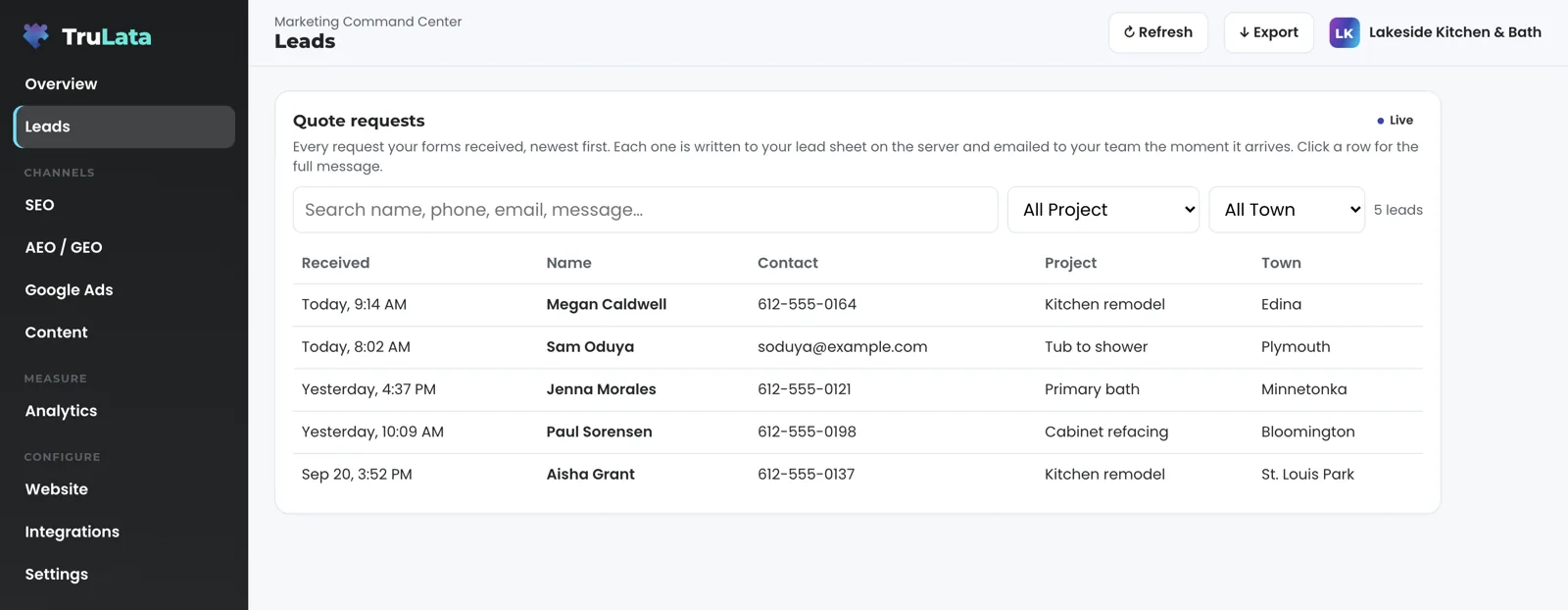
Open the Leads view and the sheet is on the screen, newest first, under a Live badge. Each row shows when it arrived, the name, a phone or email, the project and the town. Your instance renames the project and town columns to match what your forms ask, an interest and a company, for example. Click a row and it opens with the phone, email, project, address, town, the page the form was on and the full message. Type in the search box and the table narrows as you type, across name, phone, email, message and page. The dropdowns beside it list only the projects and towns actually present, so a business with one service sees a picker that fits it. Press Export and the table leaves as a CSV.
Reply from your inbox and it goes straight to the person: the lead email carries their address as the reply-to. If the first mail route fails, the handler sends through the server's own mail where the host has one; where the host has none, the visitor sees an error rather than a false thank-you. A hidden honeypot field turns bots away before anything is written. On forms where the spam check labels rather than rejects, the lead still arrives when a visitor's browser blocks the check: the email notes the check did not pass, and your team decides. Our own test submissions are filtered out before you see the list. Before the first lead arrives, the view says so. If the sheet is out of reach for a moment, the view tells you the leads are still arriving by email.
Will I know when Google stops counting my leads?
Our team will, the next morning, once the watch is connected to your sheet. A tag that stops firing after a site change takes the ad report to zero while your forms keep filling, and a report that reads zero is the one an owner acts on. The watch checks the leads your sheet holds against the conversions Google counted, every morning, and a gap between them reaches our team the next day. Your budget decision then rests on what your forms produced rather than on what a broken tag reported. Your sheet is written on the server as each form lands, so it keeps counting on a day when the tags do not.
Once the watch is connected to your sheet, a job runs every morning at 7:20 Eastern and compares the last seven days in the sheet with what Google Ads and GA4 counted. Five checks, each named. Loader: Google's tag still serves, and the live pages still carry it and the conversion label. Blind: leads in the sheet, zero GA4 form events. Ads blind: leads from a paid click in the sheet, zero Ads conversions. Stalled: a campaign that had spent at least $50 has sat at zero for four days running. Silent: no leads at all in seven days while Search Console shows more than 20 organic clicks.
A finding reaches our team the morning the run makes it, with the three counts side by side: what the sheet holds, what GA4 says, what Ads says. A stalled campaign is reported with its last spending day, what it spent in the seven days before it went dark, and who paused it and when, read from your account's change history. When the pause predates the 30 days of history Google keeps, the report says so plainly, and a campaign that is not paused reads as budget-starved or disapproved. An unchanged condition repeats at most once a week, so a known pause neither shouts daily nor goes quiet. The watch reads and reports. Our team decides what to do with the finding, and any budget or bid change that follows stays within the limits set for your engagement and lands in your account's own change history.
- LoaderGoogle's tag still serves, and the live pages carry it and the conversion label
- BlindLeads in the sheet, zero GA4 form events
- Ads blindLeads from a paid click, zero Ads conversions
- StalledA campaign that had spent at least $50, at zero four days running
- SilentNo leads in seven days while Search Console shows more than 20 organic clicks

Your sheet keeps counting on a day when the tags do not.
Can I record what happened to each lead?
Yes, from the row itself. With outcomes switched on for your instance, every lead carries a status chosen from a dropdown on the row: New, Contacted, Quoted, Won or Lost. A row that turns out not to be a lead takes a reason instead: existing customer, spam or sales pitch, wrong number, out of area, or other, with an optional note on who it was and what they wanted. The mark is written to the lead's own record and it is yours: it stands until your team changes it, and undo sits beside the mark.
The screen keeps score and leaves the judgement to your team. A lead that has sat two days with no status wears a badge that reads no contact marked yet, with its age in days. The counter above the table shows how many are not yet marked contacted and how many are marked not a lead, and a row marked not a lead dims rather than disappears. Both numbers come from your own record. A lead nobody has touched stays counted as a lead and stays marked New.
Each mark reaches our team as it is saved, with who set it, the name, the date and the reason. A not-a-lead flag is a work item on our side, and where the lead came through Google's Local Services it is also a refund candidate for our team to dispute with Google. Won and lost, set from the screen, sit on the row from your own record rather than our estimate.
A lead nobody has touched
- Stays counted as a lead
- Stays marked New
- After two days, a badge: no contact marked yet
A lead your team marked
- New, Contacted, Quoted, Won or Lost
- Or not a lead, with its reason
- Written to the lead's own record
Which channel sent this lead?
The one the row says, captured at the moment of submission. The handler writes the page the form was on to the same row as the name and the message. Where your site carries our first-touch capture, it also writes the landing page, the referrer and any click id from the URL, noted once per browser session when the visitor lands and sent along with the form. The source then reads in plain words on the row: paid, with the network and the campaign named; AI search, with the engine named; or organic. A click id on the row marks a paid click; that is how the 7:20 watch knows a lead came from Google Ads without asking Google. All of it is captured server-side, whether or not a Google tag fired.
Follow one lead through a day. A paid click lands a quote request at 9:14. At 9:14 the row is in the sheet with the click id, and the email is in your team's inbox with the visitor as the reply-to. The Leads view shows it the next time anyone opens the dashboard. GA4 shows the event hours later, on Google's schedule. At 7:20 the next morning the watch counts it as one paid lead in the sheet and checks that Ads counted a conversion too.
A phone call counts when your CRM records it, or Google's Local Services where you run it. A call-tracking platform you already run connects during setup like any other source with an API. A field the submission did not carry stays empty on the row, so every value you read was captured rather than inferred. On a dashboard with a Leads feed, the Analytics view puts lead actions first: the default tile, the chart and the first table are the GA4 lead events, and traffic is the supporting cast. The two counts sit on the same dashboard on purpose. GA4 lags hours intraday; the Leads view is live. When they disagree, the sheet is the record of whether a form was submitted.
One paid click, followed
- Quote requestThe row lands in the sheet with the click id
- EmailIn your team's inbox, the visitor as the reply-to
- Leads viewThe row is on the screen
- GA4The event, on Google's schedule
- Next morningOne paid lead, checked against Ads
When they disagree, the sheet is the record of whether a form was submitted.
Does it work with my CRM?
Yes, any CRM with an API: GoHighLevel, HubSpot, Salesforce, Pipedrive, Insightly and others. On GoHighLevel we read your own sub-account for pipeline stages and sources; a CRM we have not connected before is connected during setup. Where your website form also feeds your CRM or booking platform, the same submission lands there too, and its stages show on the Jobs view once that connection is live. The lead keeps its source on the Leads view either way.
The Jobs view appears once your CRM or booking platform is connected, and it shows a coming-soon card until it has numbers it can stand behind. An outcome you set is written to the lead record here, and a change you request from the screen goes to your team as a logged ticket.
One submission, three places
- Your website form
- Leads view, with its source
- Your CRM or booking platform
- Jobs view, once connected
How do I connect it, and what should I check in the demo?
Grant access and keep every password. Our team connects your forms, your CRM and your booking platform from the inside, with access you grant during setup, and every Google connection is a grant you can revoke from your own console. That is your part. The first pull and baselines land next. The Leads view is included on all tiers.
Open demo.trulata.com and click Leads. It is the same engine code every client runs, on a fictional company, and every number is illustrative. Check four things. Type a name into the search box and watch the table narrow as you type. Pick an entry from a dropdown and confirm it lists only what is present. Click a row and confirm it opens with the contact details, the page the form was on and the full message. Press Export and confirm the table leaves as a CSV.
Then ask about what your own instance adds. The outcome column is switched on per instance, so ask to see it on yours. Ask which of your numbers are live and which lag: website leads, your CRM, Stripe, your booking platform and email statistics are live; Google Ads and GA4 lag hours; Search Console runs two to three days behind. Ask what the 7:20 watch raises, and ask to read one alert.

What the Leads view reads.
| What | Where it comes from | How fresh |
|---|---|---|
| Lead rows | Your website's form handler, appended to a lead sheet on the server | Live, the moment a form is submitted |
| Page, landing page, referrer, click id | Written to the same row at submission | Live |
| Outcome and not-a-lead flags | Set from the row, written to the lead record | Live, and the team is notified as each is saved |
| Ads conversions and GA4 events | Google APIs, for comparison only | Hours behind, set by Google |
| Divergence watch | Lead sheet vs Ads vs GA4, trailing seven days | Daily at 7:20am Eastern, once the watch is connected to your sheet |
| Pipeline stages | Your CRM or booking platform | Live |
Every lead on this view came from your own forms, your CRM or your Local Services account, so the count is yours to trust. Phone calls arrive through your CRM, and your inbox and calendar connect where your engagement calls for it.
Questions, answered.
What counts as a lead?
A form submission on your website, written to the lead sheet on the server as it arrives, plus any lead your CRM records. The count is built from those two records. A row your team marks not a lead is dimmed and counted separately.
Why would my leads and Google Ads disagree?
Because a tag broke, was merged or stopped loading after a site change, and Ads then reports zero while real leads keep landing. Your sheet keeps filling either way, because the form handler writes each row on the server before any tag runs. The 7:20am watch exists so it is found the next morning.
Can I mark a lead as won?
Yes. With outcomes switched on for your instance, each row carries a dropdown with New, Contacted, Quoted, Won, Lost and Not a lead. The mark is written to the lead record, reaches our team as it is saved, and stands until your team changes it.
Do you track phone calls?
Through your CRM. A phone call is counted when your CRM records it, or Google's Local Services where you run it. A call-tracking platform you already run connects during setup like any other source with an API.
Does the lead list work if my site's tracking is broken?
Yes. The row is written by the form handler on the server, not by a browser tag, so it keeps counting on the day every tag on the site is dead. Once the watch is connected to your sheet, it reports the broken tag the next morning, with leads in the sheet against zero GA4 events as the evidence.
Which CRM do you connect?
Any CRM with an API. GoHighLevel, HubSpot, Salesforce, Pipedrive and Insightly are among the ones we connect, and a CRM that is new to us is connected during setup. On GoHighLevel we read your own sub-account for pipeline stages and sources. Jobs come from your CRM or booking platform where the business runs on it, and the Jobs view appears once that is connected.
How fresh is the Leads view?
Live. It reads the sheet when you open it, and each lead was also emailed to your team as it arrived. Ads and GA4 on the same dashboard lag hours; the watch compares them with the sheet once a day at 7:20am Eastern.
See how it would run
for your business.
15 minutes with TruLata. We show you what your marketing brings in, what each lead costs, and what we would change first.
Book a demo or start a 7-day free trial
No card. It ends on its own after 7 days unless you add one. See pricing.
New here? See what TruLata is. Prefer to write? Send us the one thing you want to know.
Start here: AI marketing platform · AI marketing software · all-in-one marketing platform · marketing automation software · marketing software for small business.
- Refreshed when you open itLive data on page load, never a monthly PDF
- Counted from your own formsLeads recorded server-side, compared daily with Ads and GA4
- Seen in AI answersHow often ChatGPT, Gemini, Claude, Grok, Manus, Google AI Overviews, Perplexity, Meta AI and DeepSeek name you, measured
- Every send loggedProspect emails leave from a review-first queue, and every send is logged.