

Open one page and know what your marketing did, without asking anyone for a report.
Our team connects your accounts in the first week. From then on the page pulls from them when you open it, the work runs on a schedule whether anyone is at a desk, and every request you send from the screen comes back with a ticket number.

How do my accounts get connected without handing over a password?
Our team does the connecting. You send four manager invitations from your own Google consoles: Analytics, Search Console, Ads and Business Profile. Each one is the grant you would give a bookkeeper at your bank, and you revoke it in the same console on the day you choose. We never ask for your account password.
Your CRM, Stripe, your booking platform, your email campaign platform and your website forms are linked by our team from the inside, with access you grant during setup, so the connection is our work and the grant stays yours. A per-client map, confirmed by a person at setup, decides which Analytics property, which Ads account and which Search Console site your page may read.
Some things are scoped with you. Your inbox and calendar stay outside the read today, and your customers' card data is never read. Stripe is read only; a charge or a refund is made in your own Stripe account. A phone lead counts where your CRM records it, and where you run a call-tracking platform with an API it is connected during setup. A request from the screen goes to your team as a logged ticket; the engine's writes to your ad accounts and your site go through their APIs, within the limits set for your engagement, and land in each account's own change history.
Connected once, by our team
- Analytics
- Search Console
- Google Ads
- Business Profile
- Your CRM
- Stripe, read only
- Your website forms
- Four manager invitations you can revoke
- The rest linked by our team with access you grant
- No password held by us
How fresh are the numbers when I open it?
Last night's numbers first, then today's. The page renders a snapshot baked at 12:01am Central before any request returns, so the first screen is always full. It then asks our service for the live payload, which a warm service answers from cache in about 100 milliseconds. If that snapshot is older than five minutes, a pull of your sources starts behind the request. Ten people opening at 9am cause one pull, not ten.
The fresh numbers swap in when they land. The page then checks every 3 seconds for the new snapshot, swaps it in and puts you back on the view you were reading at the same scroll position. It waits while a panel is open or you are typing.
Read the stamp before you read a number. Beside the page title a stamp gives the time of the last pull. Hover it and it says one of two things: pulled live when you opened the page, or live refresh unreachable, showing the last saved snapshot. The age of the data is always on the screen.
Press Refresh and every connected source is pulled again. A pull takes 2 seconds to a little over 3 minutes depending on how many sources you have, so the page polls until the stamp moves, then reloads. A slow pull, an unreachable service and a five minute timeout all end the same way: a reloaded page whose stamp says how old what you are reading is. The button has no error state.
Press Refresh and every source is pulled again: 2 seconds to a little over 3 minutes, then a reload.
What do I learn from the screen without waiting for a report?
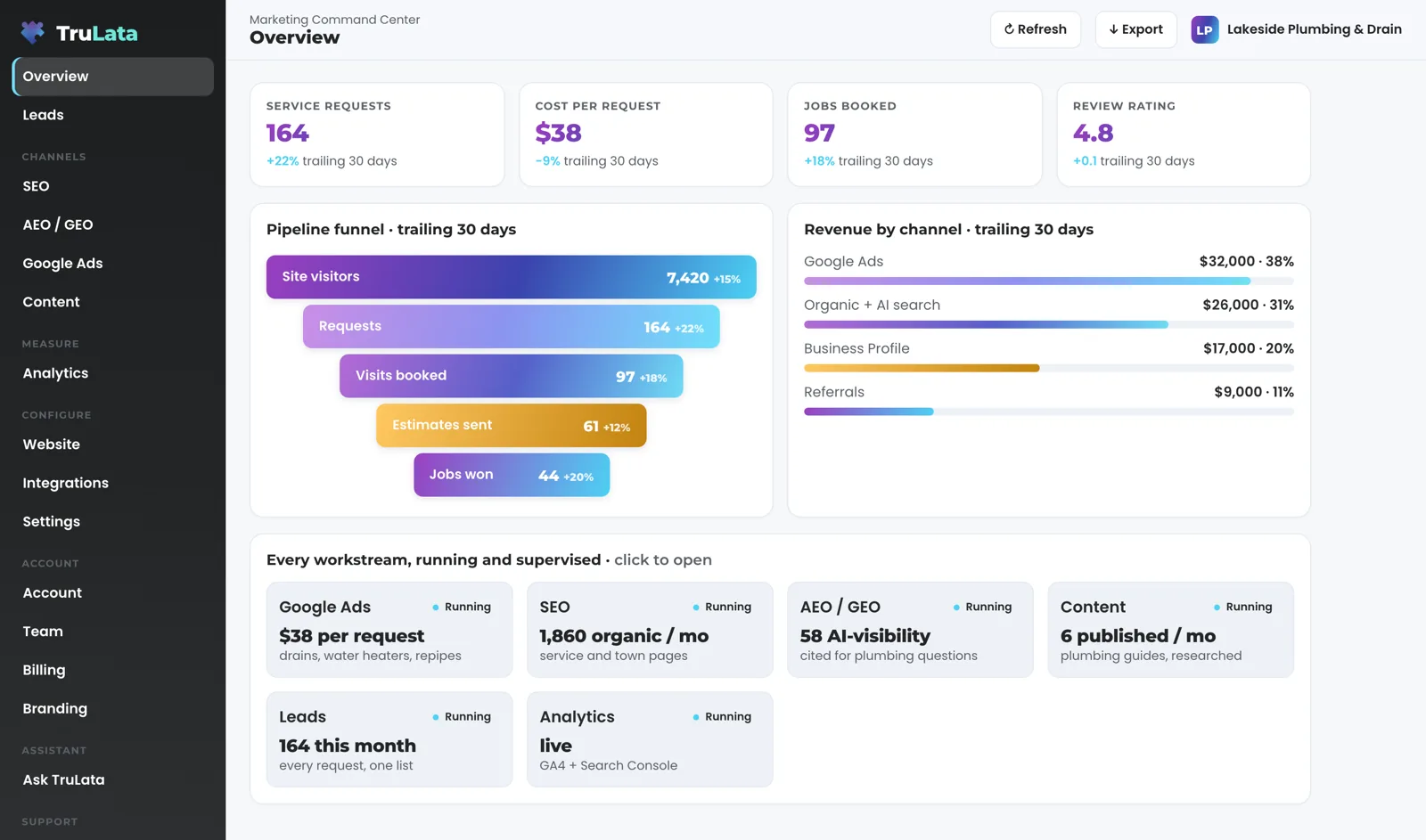
The Overview is the report, and the page assembles it. Headline metrics sit at the top; click one and it opens to its current value, its change and its window. Program goals sit under them, each with a progress bar and an on-target mark. Below that: the pipeline funnel stage by stage, revenue by channel with each channel's share, and every workstream in a grid with its status and its latest figure. Click a workstream and its view opens.
Each view names its source and its window. The search view shows queries, impressions, clicks and average position from Search Console, and a position there is Search Console's average for that query, not a daily ranking check. The ads view shows spend, conversions and cost per conversion for every campaign, as fresh as Google publishes them. The Leads view reads the sheet your own forms append to, newest first, so a lead is counted from your own form, ahead of any platform's estimate.
Follow one lead through it. A visitor submits your contact form. Your site's form handler appends the row to your lead sheet server-side and emails your team, so the lead is counted whether or not a browser tag fired. Open Leads and it is the first row. Set its outcome from the screen and that writes to the lead record. On an instance whose forms feed a lead sheet, a lead watch built for that instance compares the sheet with Ads and GA4 at 7:20am Eastern.
A view whose source is not linked stays off the navigation. Jobs shows a coming-soon card until its data is trustworthy. Every number on the screen is pulled from a source rather than typed by a person, and the page says everything a monthly PDF would, more recently.
What runs on its own, and what stays with a person?
Scheduled work runs whether anyone is at a desk. Prospects are sourced weekly to your target profile on Command; enrichment finds a deliverable address or routes the prospect to a contact form. Content moves through research, draft and publish on your cadence on Launch, Growth and Command. Each topic passes a demand gate before a word is written: real search volume above a floor and below a head-term ceiling, and a live top ten not already owned by major publishers. A topic is written on demonstrated demand, and one that fails the gate is rejected. Each piece cites current sources, is filed as a Google Doc in your Drive and carries a generated featured image. The ads change watch reads every Ads account mapped to a client at 7:05am Eastern. On an instance whose forms feed a lead sheet, a lead watch built for that instance compares the sheet with Ads and GA4 at 7:20am Eastern.
Judged work stays with a person. Prospect emails leave from a review-first queue; a person releases them, or the queue releases on the schedule set for the engagement, and every send is logged with the draft, the mailbox and the time. Replies are classified and shown, and not-interested or bounced addresses are suppressed from further sends. Named accounts are always reviewed by a person. Budget and bid changes in ad accounts are made within the limits set for your engagement and land in your account's own change history. Approval on content is a setting you choose.
Your requests take the same path. Ask for a website change, a content topic, a keyword target, a category or a targeting change from inside the screen. The request is logged, opened as a ticket with a number and sent to your team, and the confirmation on your screen carries that number. An email to support@trulata.com opens a ticket the same way. The Support view lists every ticket with when it was opened, where it came from, its subject and its status, and our replies sit under it. The engine's writes to your ad accounts and your site go through their APIs and land in each account's own change history, and the ticket carries the reply when your change is done.
Runs on a schedule
- Prospects sourced weekly, on Command
- Content researched and drafted on your cadence
- Ads change watch, 7:05am ET
- Lead watch, 7:20am ET
Stays with a person
- Prospect emails leave a review-first queue
- Budgets and bids within your engagement's limits
- Content approval, a setting you choose
- Your requests, logged with a ticket number

Scheduled work runs whether anyone is at a desk.
What happens on a normal Tuesday once it is running?
Take a Tuesday. At 7:05am Eastern the ads watch reads four things from your Google Ads account: the change history, with what was edited, by whom and through which tool; the list of account users; the conversion actions; and the campaign settings. It filters out our own writes and Google's routine churn first. A third party changing a budget, a bid strategy, a network setting or the status of a spending campaign reaches the team as the run finds it. New ad copy, a geo change or a schedule change goes into the 8am digest. The user list is read directly because Google logs no change event when someone is granted access, so an address added to your account overnight is named in the same morning's run.
On an instance whose forms feed a lead sheet, a lead watch built for that instance compares the sheet with Ads and GA4 at 7:20am Eastern. It runs five named checks: loader, blind, ads blind, stalled and silent. The leads that landed on the sheet are checked against the conversions Google counted, so a dead tag, a blind ad account or a stalled form is flagged the next day rather than at the end of the quarter.
At 9am you open the page. The 12:01am snapshot renders first, the live payload arrives from cache, and because nobody has opened it since yesterday a pull starts behind the request. When it lands the numbers swap in and the stamp moves. Your CRM pipeline, Stripe payments, booking platform jobs, website leads and email statistics are current. Ads and GA4 show the newest hours Google has published. Search Console shows the newest day Google has released, two to three days back. No number on the page was typed by a person.
At 12:01am Central the fallback snapshot for Wednesday bakes: your pulls run, every script passes a syntax check, the page deploys and the edge cache is purged. A failed pull or a failed check stops the deploy and leaves Tuesday's page up.
One Tuesday, on a schedule
- Ads change watchChange history, users, conversion actions and settings, read
- Lead watchFive checks: your lead sheet against Ads and GA4
- DigestNew ad copy, geo or schedule changes
- You open the pageSnapshot first, then a pull, then the stamp moves
- Wednesday's snapshot bakesA failed pull leaves Tuesday's page up
No number on the page was typed by a person.
How soon do I see my own numbers, and what should I check in the demo?
Access comes first: the four manager invitations, the CRM link, the website and its forms, and your login working. Then comes the first pull, which fills the Overview with your numbers, plus the answer-engine baseline across ChatGPT, Gemini, Claude, Grok, Manus, Google AI Overviews, Perplexity, Meta AI and DeepSeek, the keyword set for the search view, and the ads watch starting on your account. A blank answer from an engine is a measurement error and leaves the denominator, so your score reflects answers rather than outages. After that come the content cadence, the first ads reports and the email flows. Views arrive as their sources connect, and every number on them is yours.
Your login is a single-use link from login.trulata.com, sent to the email on your seat, with a chooser if you hold more than one seat. A single-use sign-in link confirms who you are; our seat list decides what you may open. The Team view shows seats used of plan seats, and you invite by email as Member or Admin. Remove a seat and the revocation takes effect within 30 seconds. Every instance passes a preflight before every deploy, and one of its checks is that no other client's name appears anywhere in your files.
Before you sign, open demo.trulata.com. It opens in any browser, with your name and email in front of it. It runs the same engine code every client runs, on a fictional company, with every number illustrative. Check four things. Click a headline metric and confirm it opens with its value, its change and its window. Open a workstream from the Overview grid and confirm the view names its source. Open Support and see how a request is listed: ticket number, when it was opened, where it came from, subject and status. Note that the Refresh button lives on your instance, where live sources sit behind it; the demo runs on fixed numbers and leaves it out. Then ask us which of your sources will be live and which will lag. The answer is per source, and we put it in writing.
- AccessFour manager invitations, the CRM link, your forms and your login working
- First pullYour Overview fills, the answer-engine baseline runs and the ads watch starts
- RunningContent cadence, the first ads reports and the email flows
- Before you signOpen demo.trulata.com: same engine, a fictional company
What runs, and how often.
| What | Where it comes from | How fresh |
|---|---|---|
| Page load | Our service, then your connected sources | Instant from cache; a snapshot older than 5 minutes is pulled behind the request |
| Refresh button | A forced pull of every connected source | 2 seconds to a little over 3 minutes, then the page reloads |
| Fallback snapshot | Nightly bake, every client, one registry | 12:01am Central; a failed pull leaves the previous page up |
| Outbound sourcing | Your target profile | Weekly; drafts to a review-first queue; every send logged |
| Content | Demand gate on search volume and the live top ten | On your cadence; approval optional |
| Ads change watch | Google Ads change history and user list, every Ads account mapped to a client | Daily, 7:05am Eastern |
| Lead watch | Your lead sheet against Ads and GA4 | Daily, 7:20am Eastern, built per instance where forms feed a sheet |
| Answer-engine score | ChatGPT, Gemini, Claude, Grok, Manus, Google AI Overviews, Perplexity, Meta AI and DeepSeek, each via an API | Baseline early in setup; re-run as the program moves |
| Your requests | The screen, or an email to support@trulata.com | Logged and ticketed as you send them |
Every page carries the time its numbers were last pulled, and the ceiling is per source: your CRM, Stripe, your booking platform, website leads and email statistics are live, Google Ads and GA4 lag by hours, and Search Console runs two to three days behind.
Questions, answered.
Do I have to connect anything myself?
Four manager invitations, and our team does the rest. You send them from your own Google consoles, for Analytics, Search Console, Ads and Business Profile, and our team links your CRM, Stripe, your booking platform, your email campaign platform and your website forms from the inside with the access you grant.
What happens if one of my sources is down?
You see the last good numbers for that source, and the header stamp says when the page was last pulled. The Refresh button ends in a reloaded page whose stamp says how old the data is, and the nightly bake keeps the previous page up when a pull fails, so every section always carries a value.
Does anything send email or spend money on its own?
Prospect emails leave from a review-first queue; a person releases them, or the queue releases on the schedule set for the engagement, and every send is logged. Budget and bid changes in ad accounts are made within the limits set for your engagement and land in your account's own change history. Stripe is read only; a charge or a refund is made in your own Stripe account.
Can I ask for changes from inside the screen?
Yes. Website changes, content topics, keyword targets, categories and general requests go to your TruLata team from the screen. Each one is logged and opened as a ticket with a number you can quote back, and an email to support@trulata.com opens a ticket the same way.
Where do I see what happened to a request?
In the Support view. Every ticket is listed with when it was opened, where it came from, its subject and its status, and our replies sit under it. The ticket carries the reply when the change is done.
Why does Search Console lag when everything else is live?
Because Google releases Search Console data two to three days after the fact. The page shows the newest day Google has published, and the stamp says so. Ads and GA4 lag by hours for the same reason; your CRM, Stripe, website leads and email statistics are live.
See how it would run
for your business.
15 minutes with TruLata. We show you what your marketing brings in, what each lead costs, and what we would change first.
Book a demo or start a 7-day free trial
No card. It ends on its own after 7 days unless you add one. See pricing.
New here? See what TruLata is. Prefer to write? Send us the one thing you want to know.
Start here: AI marketing platform · AI marketing software · all-in-one marketing platform · marketing automation software · marketing software for small business.
- Refreshed when you open itLive data on page load, never a monthly PDF
- Counted from your own formsLeads recorded server-side, compared daily with Ads and GA4
- Seen in AI answersHow often ChatGPT, Gemini, Claude, Grok, Manus, Google AI Overviews, Perplexity, Meta AI and DeepSeek name you, measured
- Every send loggedProspect emails leave from a review-first queue, and every send is logged.