

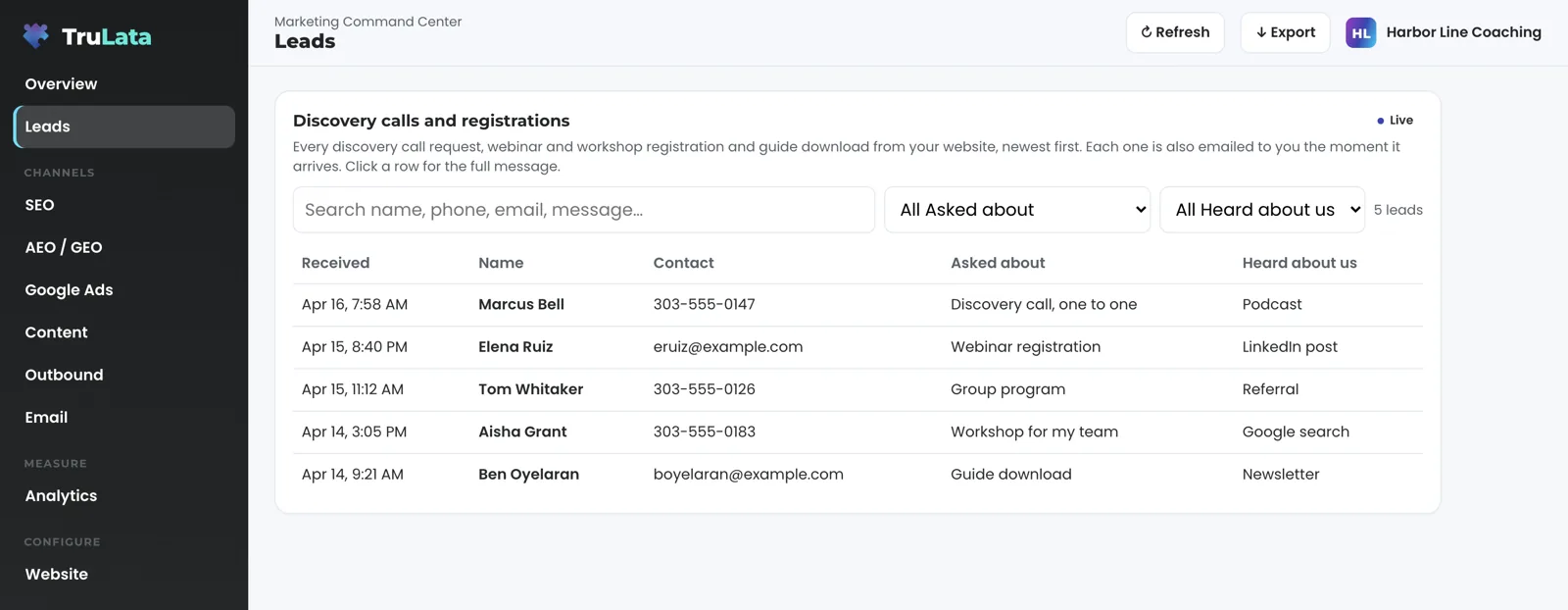
See who asked for a call, and where they found you.
Built for a business coach or a coaching firm that works with owners and leadership teams, whoever runs the marketing. TruLata reads your Google accounts, your email platform and the requests and registrations from your own site's forms, and runs the watching, the drafting and the outbound on a schedule while you are on client calls.

Is this built for a business coach?
Yes. TruLata is built for a business coach, an executive or leadership coach, or a coaching firm that works with owners and their teams, one to one, in a group program or in workshops, in person or on video. A firm with several coaches fits the same way. The marketing is often the coach's own, fitted in after the last client call of the day and before the next workshop, or it falls to an operations lead; a firm with a marketer on staff gets the same screen. Search, content, email, outbound and the counting run on a schedule whether or not anyone had time this week, every request is counted from your own site, and one screen shows what happened and what it cost.
Hiring a coach is a considered decision, and an owner gets to know you before asking. They may hear you on a podcast, read a post or an article, register for a webinar or a workshop, and read your emails for a while. They check the about page for who you work with and how a program runs, and ask the owner who referred them what it was like. When the timing is right, they ask for a discovery call. By then the path runs through several of your channels, and the request is the moment it shows.
So the screen follows the path in people. It counts discovery call requests, webinar and workshop registrations and newsletter sign-ups from your own site's forms, the source recorded with each one, and the clients each request became, next to what the marketing cost.
An owner gets to know you before asking
- A podcast
- A post or an article
- A webinar or a workshop
- Your emails
- A referral from an owner
- A discovery call request, with the source recorded
- Counted on the Leads view, newest first

Hiring a coach is a considered decision.
What does the screen show a coach?
It leads with the requests. When an owner asks for a discovery call, registers for a webinar or a workshop, or downloads a guide through a form on your site, the form handler appends the row to a lead sheet server-side and emails you, whether or not a tracking tag fired. The Leads view reads that sheet newest first, and each row carries what your form recorded: the name, the company, the contact details, what they asked about, one to one coaching, a group program, a workshop for their team or the webinar date, how they heard about you where the form asks, and the message. Set what each request became from the screen, contacted, quoted, won or lost, or not a lead with the reason, and it stays on the row. The leads page covers the ledger and the daily watch behind it.
Then the channels that did the work. Your email platform's campaign statistics are read live: the sends, opens, clicks and unsubscribes on the weekly newsletter, and the sequence that follows a webinar registration, on the email view. GA4 gives sessions, sources, which pages were read, the about page, the program pages, the webinar page, and the key events you count as a request, hours behind intraday; a visit from a podcast's show notes or a post with a tagged link shows as its own source. Search Console gives the queries you appeared for, impressions, clicks and average position, two to three days behind; for a coach those queries are the kind of coaching and the kind of owner, business coach for a trade or a stage of company, leadership coaching, your own name, and the positions are Search Console's own averages, not a rank tracker. Google Ads gives spend, conversions and cost per conversion by campaign where you run it.
Where you run your pipeline on a CRM with an API, it connects during setup and the pipeline appears live, stage by stage, with a coming-soon card rather than a number until the data is trustworthy. Where Meta is connected, the page and social metrics appear on Meta's own schedule, and LinkedIn or YouTube connect the same way, as sources with an API. Your scheduling link and your video platform stay in your own systems today; a source with an API can be connected during setup. Your inbox and calendar stay outside the screen today and connect during setup where your engagement calls for them, so a call booked straight into your calendar counts where your CRM records it.
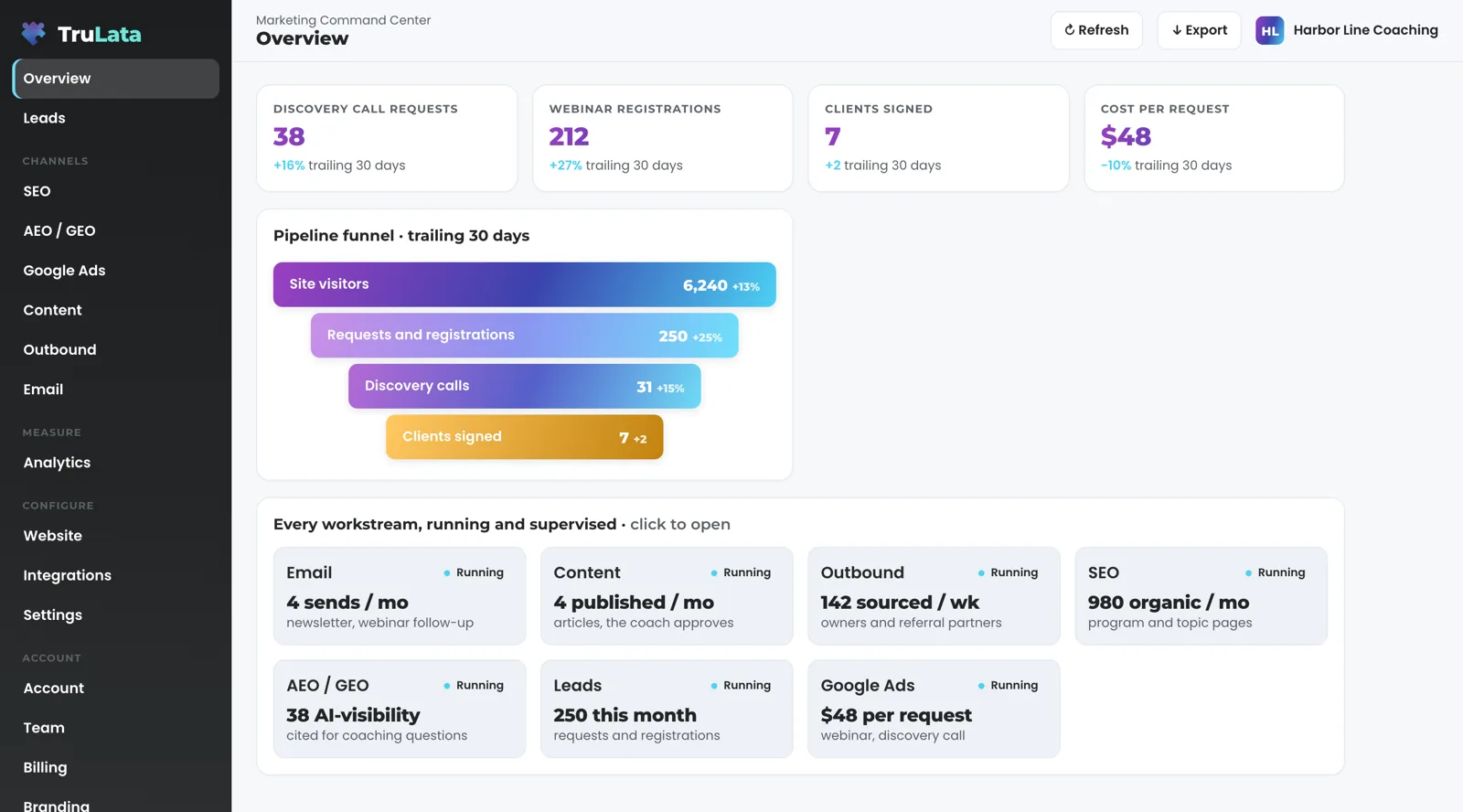
What runs while you are on client calls, and what waits for a person?
On Launch, Growth and Command, the content engine researches and drafts on your cadence the articles an owner reads before asking for a call: what a first coaching session covers, how a group program differs from one to one coaching, how to run a planning day with a leadership team, what to ask a coach before signing on. Each topic passes a demand gate on real search volume and what already occupies the result page, the research cites current sources, the dedupe reads the titles already published on your site, and each piece is filed as a Google Doc in your Drive with a featured image. Auto-publish is a per-client setting and approval is optional, which matters when every article has to sound like you before it goes up.
On Command, the outbound engine sources prospects weekly to the target profile set with you: the owners, founders and presidents of the kind and size of company you coach, and the people who advise them and refer, such as accountants, bankers and business attorneys. It finds a deliverable address or routes the prospect to a contact-form path, and drafts into a review-first queue; a person releases them, or the queue releases on the schedule set for the engagement, and every send is logged with the draft, the mailbox and the time. Replies are classified and shown, and not-interested or bounced addresses are suppressed from further sends. The owners you name as target accounts are researched one by one and always reviewed by a person.
Where you run search ads, your Google Ads account is watched every morning. At 7:05 Eastern the ads change watch reads the account's change history and its user list, sets our own writes and routine churn aside, and raises a material change made by anyone else the same morning. Where we manage your campaigns on all tiers, a budget or bid change is made within the limits set for your engagement and lands in the account's own change history, so the webinar registration campaign keeps the budget you set for it. On Growth and Command, Meta ads run beside it.
Every day at 7:20 Eastern, on an instance whose forms feed the sheet, the lead watch runs five checks across the sheet, GA4 and Ads, so a dead tag or a registration form that stopped submitting is flagged the next day rather than on the morning of the webinar. Every night at 12:01 Central a fallback snapshot is baked, and a failed pull leaves the previous page up. What stays with a person is the judgement: the limits on spend, and anything that answers a client. A content piece with auto-publish off waits as a draft until you approve it. From the screen you can set a lead outcome, request a website change, and request a content, keyword, category or targeting change; each request goes to the team as a logged ticket, and the engine's writes to your ad accounts and your site go through their APIs and land in each account's own change history.
While you are on client calls
- Content draftsArticles owners read before asking for a call, on Launch, Growth and Command
- Prospect sourcingOwners and the advisers who refer them, on Command
- Ads change watchWhere you run search ads, material changes raised the same morning
- Lead watchFive checks across your form sheet, GA4 and Ads
- Fallback snapshotBaked nightly, so a failed pull leaves the previous page up
The newsletter, the articles and the outbound keep their schedule in a week full of sessions.
Can I see it before I talk to anyone?
Yes, with your name and email in front of it. The demo is the same engine code every client runs, pointed at a fictional company called Meridian so it can be public. Every number is invented, and the screen says so. Open the Leads view, the Email view and the Outbound view and you are looking at the screen a coach gets, with your sources in place of Meridian's.
Then put your own practice in the seat. You coach owners and their teams, owners find you through your content, a referral or a search, and whoever runs the marketing does it between client calls. That is the coach this page, the setup and the tiers are written for, and what changes is the evening work: the newsletter, the articles and the outbound keep their schedule in a week full of sessions, every request and registration is counted from your own forms, and one screen shows what happened and what it cost. Part of it runs on your own numbers during setup: the first pull, the answer-engine baseline and the ads watch run on your accounts in the first two weeks, before most of the engines are switched on. If you want the work done as a service rather than run as a system, the services side is the other door.
One thing about the search view is worth knowing before you open it. Ranking is not earning, so the view puts the requests your own forms took beside the queries and positions that earned them. A position there is Search Console's average for that query, not a rank tracker's guess. That is what the screen holds the work to: which searches and which emails became a discovery call, not where a keyword sat.
Which tier fits a business coach?
Starter includes the TruLata dashboard, full analytics, leads, search visibility, the AI visibility program, managed Google Ads search, the assistant and briefings and support tickets. The content engine, for the articles owners read before they ask, is on Launch, Growth and Command. Meta ads are on Growth and Command. The outbound engine, for reaching owners and the advisers who refer them, is on Command. Command adds the outbound engine, ad creatives and your full marketing team, always on.
Seats are three on Starter, three on Launch, ten on Growth and unlimited on Command, so each coach in the firm and the person who runs operations can sign in with a seat of their own, and a seat you remove is revoked within 30 seconds. Starter is $400 a month, Launch $650, Growth $1,200, and Command is scoped per engagement. Every tier is month to month with nothing metered, and committing annually takes twenty to twenty-five percent off the monthly. The pricing page carries the same figures as every other page.
- Starterthe TruLata dashboard, full analytics, leads, search visibility, the AI visibility program, managed Google Ads search, the assistant and briefings and support tickets
- Content engineOn Launch, Growth and Command, for the articles owners read before they ask
- Meta adsOn Growth and Command
- Outbound engineOn Command, for owners and the advisers who refer them
- CommandAdds the outbound engine, ad creatives and your full marketing team, always on
Want it run for you?
You have two doors. Managed TruLata is our team running the program on your accounts, the content calendar, the target profile and the campaigns among it, and every change we make lands in your account's own change history, which the same 7:05 Eastern watch reads and sorts as ours. A piece with auto-publish off still waits for you, in your voice. Local services marketing is TruLata's agency work for the same buyer, search and paid search with a daily account watch among it.

What a coach's screen reads, and how fresh it is.
| What | Where it comes from | How fresh |
|---|---|---|
| Discovery call requests, webinar and workshop registrations | Your site's forms, appended to a lead sheet server-side and emailed to you; the Leads view reads it newest first | Live, the moment the form is submitted |
| Newsletter and sequence statistics | Your email platform: sends, opens, clicks, unsubscribes | Live |
| Prospects sourced, queued and replied | The outbound engine, on Command; every send logged with the draft, the mailbox and the time | Sourced weekly; sends and replies logged as they happen |
| Sessions, sources, pages, key events | Google Analytics 4 | Hours behind intraday |
| Queries, impressions, clicks, average position | Search Console; its own average positions, not a rank tracker | 2 to 3 days behind |
| Spend, conversions, cost per conversion | Google Ads, by campaign, where you run it | Intraday lags hours; change history read daily at 7:05am ET |
| Client pipeline | Your CRM, where you run your pipeline on one with an API | Live; a coming-soon card until the data is trustworthy |
| The page itself | Snapshot on open, live pull behind it when older than 5 minutes, nightly bake at 12:01am CT | Header stamp says when the data was pulled |
The morning after a webinar, the registrations and the discovery call requests from your forms are live on the screen and the follow-up sequence's statistics are read live from your email platform. Google Ads numbers run hours behind and Search Console two to three days behind. The header stamp says when each pull ran, the Refresh button forces a new one and never shows an error, and a failed pull leaves the previous page up rather than a blank one.
Questions, answered.
Can I see which webinar or email a discovery call came from?
The page a request came from is one click into the row, and the sheet behind it records the source and, where the form captures them, the traffic source, the landing page, the referrer and any UTM for each submission, so a link in your newsletter or your show notes that carries a tag reads as its own source. Where the form asks how they heard about you, the answer is on the row too. You set what the request became on the same row.
Does it count webinar registrations?
Where the registration form is on your own site, each registration is a row on the lead sheet, read newest first beside the discovery call requests. A registration taken only inside your webinar platform stays there today; a platform with an API can be connected during setup.
Will an article go out under my name before I read it?
Only if you switch auto-publish on. Auto-publish is a per-client setting and approval is optional; leave approval on and each article waits as a Google Doc in your Drive until you approve it.
Who decides which owners get an email?
You do, through the target profile set with you during setup: the titles, the industries, the company sizes and the region you want to reach. Prospect emails leave from a review-first queue; a person releases them, or the queue releases on the schedule set for the engagement, and every send is logged. Replies are classified and shown, and not-interested or bounced addresses are suppressed from further sends.
What do I have to connect?
Manager invitations on your Google Analytics property, your Search Console site and your Google Ads account where you run one, each revocable in your own console. Our team connects your email platform, your CRM and your website forms from the inside with the access you grant during setup, and we never hold your passwords. The screen counts people and marketing spend: requests, registrations, discovery calls and what each request became.
What does it cost for a business coach?
Starter is $400 a month, Launch $650, Growth $1,200, and Command is scoped per engagement. Seats are three on Starter, three on Launch, ten on Growth and unlimited on Command. Every tier is month to month with nothing metered, and a managed strategy retainer sits on top of any tier, scoped with you rather than priced on this site; <a href="/product/managed">the managed page</a> says what our team takes on.
See it running
before you decide.
The demo is the real product on a fictional company, with your name and email in front of it. Pricing is three published tiers.
Open the live demo See pricing
New here? See what TruLata is. Prefer to write? Send us the one thing you want to know.
Start here: AI marketing platform · AI marketing software · all-in-one marketing platform · marketing automation software · marketing software for small business.
- Refreshed when you open itLive data on page load, never a monthly PDF
- Counted from your own formsLeads recorded server-side, compared daily with Ads and GA4
- Seen in AI answersHow often ChatGPT, Gemini, Claude and Grok name you, measured
- Every send loggedProspect emails leave from a review-first queue, and every send is logged.