

Keep publishing pages your buyers search for, without writing a word.
Every piece starts as a phrase people type, between roughly 100 and 20,000 searches a month, is written from up to twelve current sources, gets a vetted photograph and is filed as a Google Doc in a Drive folder for your business before it reaches your site. Approve each draft first, or let it run on the cadence set with you.

Will pages keep going out when my team has no time?
Yes. The engine runs on a schedule whether anyone is at a desk. On the first of each month at 7am Eastern it queues the month's pieces for your account, the count set with you, and works through them in order: queued, researching, writing, draft, then approved, posting and posted, or rejected. Every piece moves through each stage in order. Research finishes before writing starts, and a draft stays a draft until your standing approval or a person releases it. A piece that fails a step stops where it failed and is retried from there, so only a finished piece reaches your site.
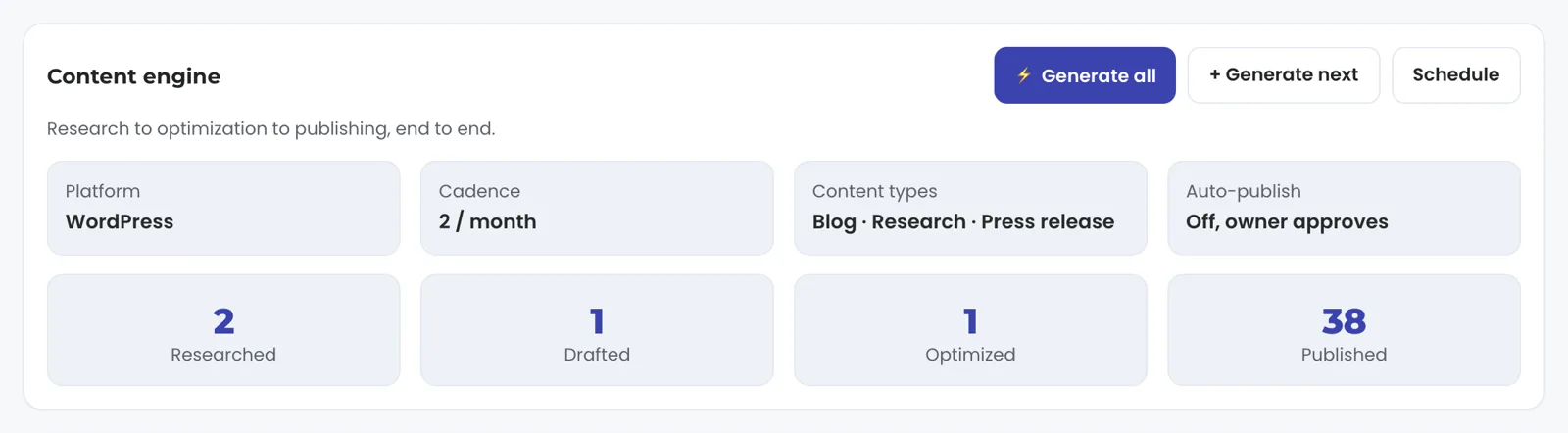
Open the Content view and the pipeline reads as four counts: researched, drafted, optimized and published this period. Each piece opens to its type, its status and where it went, with a link to the live post and a control to request a rewrite. Below the pipeline sit your categories and tags, each with an add control, and the Drive folders where the finished Google Docs are filed.
Take a plumber whose account is set to two blog posts a month, the default. On the first at 7am Eastern two rows appear as queued. For the first, topic research proposes a phrase a homeowner types, say the cost of a tankless water heater, and the brief is checked against the band before a word is written. Up to four web searches hand the writer up to twelve current sources. The writer opens with a direct answer to the title. The draft is filed as a Google Doc in the folder for the month with a vetted photograph beside it, and our team gets a notice that the draft is ready, with the Doc link. With auto-publish on, the piece goes to your site and a second notice says it is live, with the address.
Three kinds of piece run through the same stages: blog posts, research papers and press releases. A blog targets about 1,000 words, a research paper about 4,000 and a press release about 600. Accounts on the hands-off runner publish twice a month, on days set with you.
A month on the content engine
- QueuedThe month's pieces, the count set with you
- ResearchingUp to four web searches, up to twelve sources
- WritingA direct answer to the title comes first
- Filed in your DriveA Google Doc, a vetted photograph beside it
- PostedBy your standing approval or by a person
Only a finished piece reaches your site.
Will anyone actually search for what it writes?
Yes. Every topic brief is written to a band: the primary phrase must be one people type, between roughly 100 and 20,000 searches a month. Under 100, nobody is asking. Over 20,000, the phrase is a head term a small firm will not take.
The band comes from the two ways a topic wastes a month. A phrase nobody types produces a well written page that sits unread, and a head term owned by national brands produces a page that ranks behind them. Ranking is not earning either, so the demand gate reads the live top ten for a phrase as well as its search volume, and rejects a topic the major publishers already own. The band exists so your pieces aim at a search someone makes and a page a firm your size can win.
The engine chooses a fresh phrase every time. Before choosing, it reads the titles it has already published for you and the topics queued this month, so each piece aims at a search of its own. Negative keywords, set with you during setup, keep it off subjects that are not your business.
Will it read like everyone else's AI content?
It reads like a researched answer, and the research step is the reason. Before the draft, the engine runs up to four web searches on the topic and hands the writer up to twelve current sources, each with its address on the first line. The writer cites only those addresses, copied character for character, three to five of them inline, so every link in the piece is one a source actually carried.
The writing follows rules built for search and for answer engines alike. The piece opens with a direct answer to its title in 40 to 60 words, before any scene-setting. Headings are the questions a buyer asks out loud, not topic labels. The piece names your business and the area it serves in a plain sentence an engine can quote. Specifics beat adjectives: a size, a range, a timeframe, a standard, each one taken from the sources, so where the sources carry no figure the piece stays general. It closes with a FAQ of three to five buyer questions, each answered in 40 to 60 words that stand alone, and it carries a meta description of 140 to 160 characters written for the search result. Where we hand it a list of pages on your own site, it places three to five links to them, chosen only from that list. It punctuates plainly, with commas and full stops rather than dashes.
Then, before the engine publishes a piece itself, it opens every external link. A dead link is unwrapped so the sentence still reads. A source that blocks automated visitors or rate limits them counts as alive, and a host our check fails to reach is kept. A piece with more than half its citations dead is held, not published: a post built on dead sources is not a post.
Our own site runs on this engine, held to the same rules as your pieces: every citation is an address a source actually carried, every external link is opened before the piece publishes, and every topic clears the demand gate first. A rule that holds for our own pages holds for yours.
- ResearchUp to four web searches hand the writer up to twelve current sources
- CiteThree to five inline links, each an address a source actually carried
- Answer first40 to 60 words that answer the title, then question headings
- CloseA FAQ of three to five buyer questions and a 140 to 160 character description
- Open every linkA piece with more than half its citations dead is held

Every link in the piece is one a source actually carried.
Can I approve every piece before it goes live?
Yes. Auto-publish is a setting per account. With it off, the draft waits: it lands as a Google Doc in the Drive folder for your business, filed under the month, and it posts when you say so. A rejection carries your notes back into the pipeline. An account that approves every piece stays on the approval path, apart from the hands-off runner. With it on, a piece that passes its checks goes to your site on the cadence and our team is notified when it is live.
Publishing goes to WordPress, Webflow or Shopify through their APIs, or to a static site we host by re-render and redeploy; a platform with an API we have not connected yet is connected during setup. Our team connects your site during setup with a publishing credential you grant, so the connection is done for you. Where a platform offers no publishing API, a person publishes the approved Doc by hand and records the live address in the pipeline, so the record stays complete.
The archive is yours to open in Google Drive. Every piece is a Google Doc in a folder for your business, one subfolder per month, named by type and title, with the featured image saved beside it, and it opens in Drive like any other document.
Will the images fit my business?
A real photograph first. For a service business a photo of the subject in good condition sells better than an illustration, so the engine searches stock photography for the subject of the post, not the action: four searches of two to four plain words, six candidates each, landscape before square. A model vets each set against the piece: the subject must be visible and fit this post, in the right setting, a photograph rather than a render, with no text, watermark or logo. If no candidate fits, the whole set is rejected and the next query runs. When stock has no fit for the topic, an image is generated instead, kept clean of text and faces.
The chosen image is sized to 1200 by 800, set as the featured image on the post and saved beside the Google Doc in the Drive folder. A photographer whose work already covers your recent posts is skipped, so the covers show a range of people rather than the same two. On a site we host, every post goes live with its image: a missing image holds the piece and alerts the team, and the page ships once the image is in place.
Have your own photography? Where your Website view lists photo folders, drop it there. Our team reviews it and adds the best of it to your site.

Can I steer what it writes, and where does it stop?
Yes, from the screen, and each change is a logged request the next pieces follow. Add a category and new content files under it. Add a tag and it applies across content and answer-engine targeting. Add a target keyword and the engine starts aiming at it. Edit the brand voice and every future piece follows it. Change the cadence from the Schedule control. Ask for a rewrite from any piece; the screen tells you the rewrite usually goes live within one business day.
Each of these goes to the team as a logged request and shows up in the next pieces. The Settings view shows the current voice, keywords and cadence. What runs on the schedule: queueing, research, writing, filing, the image, the link check and, with auto-publish on, the publish itself. What stays with a person: releasing a draft on an account that approves, publishing by hand on a platform without an API, and answering a rewrite request.
Publishing is one half and measuring is the other. Whether a page earns shows in the search view from Search Console, 2 to 3 days behind, and in the analytics view from GA4, hours behind intraday. Positions there are Search Console average positions. Google's AI Overviews are measured through the search view, and the nine answer engines are scored at baseline and re-run as the program moves. Press releases are a la carte: distributed on request and listed with the date distributed, the syndicated reprints tracked and the wire reach.
Check it in the demo. Open the Content view on demo.trulata.com. The company is fictional and every number is illustrative, but it is the same engine code every client runs. Look at four things: the pipeline counts, one piece opened to its detail, the categories and tags with their add controls, and the settings cards for platform, cadence, content types and auto-publish. Those four are what your own screen shows later in setup, when the content cadence starts.

What the content engine reads and writes.
| What | Where it comes from | How fresh |
|---|---|---|
| Topics | A phrase inside the roughly 100 to 20,000 winnable band | Before each piece is written |
| Research | Up to twelve current web sources, each with its address, cited inline | At writing time; every link opened again before the engine publishes |
| Dedupe | Titles it has already published for you and topics queued this month | At topic selection |
| Publish | WordPress, Webflow or Shopify through their APIs, or a static site we host by re-render and redeploy | On your cadence; approval optional |
| Archive | A Google Doc in a Drive folder for your business, one subfolder per month | As each piece is written |
| Images | A vetted real photograph first, generated only as the fallback, 1200 by 800 | At draft; set on the post at publish |
Every piece is built on claims its sources carry, a title new to your site, and links that answered when the engine opened them.
Questions, answered.
Will it publish without my approval?
Only if auto-publish is on for your account. With it off, every draft waits as a Google Doc in the Drive folder for your business until you say yes, and a rejection carries your notes back into the pipeline.
Where do the topics come from?
From the winnable band. A primary phrase must draw between roughly 100 and 20,000 real searches a month, and is new against the titles the engine has already published for you.
Is the content researched or generated?
Researched first, then written. Up to twelve current sources with their addresses go to the writer, it may cite only those, and every link is opened again before the engine publishes. A piece with more than half its citations dead is held.
Which platforms can it publish to?
WordPress, Webflow and Shopify through their APIs, and static sites we host by re-render and redeploy. A platform with an API we have not connected yet is connected during setup, and a platform without a publishing API gets the approved Doc published by hand, with the live address recorded.
Do I get the content outside your tool?
Yes. Every piece is a Google Doc in the Drive folder for your business, filed by month, with its image saved beside it, and it opens in Drive like any other document.
How many pieces a month, and when does it start?
Two blog posts a month by default, with the cadence set with you and research papers and press releases counted separately. The content cadence starts later in setup, after access during setup and the first pull, baselines and keyword set early in setup.
Which tier includes it?
On Launch, Growth and Command. The full list of what each tier includes is on the pricing page.
See how it would run
for your business.
15 minutes with TruLata. We show you what your marketing brings in, what each lead costs, and what we would change first.
Book a demo or start a 7-day free trial
No card. It ends on its own after 7 days unless you add one. See pricing.
New here? See what TruLata is. Prefer to write? Send us the one thing you want to know.
Start here: AI marketing platform · AI marketing software · all-in-one marketing platform · marketing automation software · marketing software for small business.
- Refreshed when you open itLive data on page load, never a monthly PDF
- Counted from your own formsLeads recorded server-side, compared daily with Ads and GA4
- Seen in AI answersHow often ChatGPT, Gemini, Claude, Grok, Manus, Google AI Overviews, Perplexity, Meta AI and DeepSeek name you, measured
- Every send loggedProspect emails leave from a review-first queue, and every send is logged.