

Replace five logins with one all-in-one marketing platform, built for service businesses.
TruLata runs search, ads, content and outbound on a schedule, reads your reviews, social, revenue and CRM beside them, and reports all of it on one screen that refreshes when you open it. Here is what runs inside it, what it only reads, what still needs a person, and what it costs.

What does an all-in-one marketing platform replace?
Five logins, for a start. Ask one question, which channel paid for last month's jobs, and today it takes five consoles: Google Analytics for traffic, Google Ads for spend, Search Console for queries, your Business Profile for reviews and your CRM for what became a quote. Each has its own date picker and its own idea of a conversion. An all-in-one marketing platform answers that question on one screen, and TruLata is one built for a service business with a territory, and a multi-location or national business fits the same way.
Your instance is one page at your own address on trulata.com, behind your own login. It shows last night's snapshot first, then pulls your sources behind the request when that snapshot is older than five minutes. A stamp beside the page title says when the numbers were last pulled. Press Refresh and every connected source is pulled again, two seconds to a little over three minutes, and the page reloads when the stamp moves. Every path through Refresh ends in a reloaded page.
Every number on the one screen says how fresh it is. Your CRM, Stripe, your booking platform, website leads and email statistics are live. Google Ads and GA4 lag by hours. Search Console runs two to three days behind. Google sets those ceilings, and the search view says so beside its numbers.
Five consoles today
- Google Analytics for traffic
- Google Ads for spend
- Search Console for queries
- Business Profile for reviews
- Your CRM for what became a quote
One screen
- One page at your own address, behind your login
- Last night's snapshot first, then a live pull
- Every number says how fresh it is
Each has its own date picker and its own idea of a conversion.
Which channels run inside TruLata?
Search. The search view reads Search Console for queries, impressions, clicks and average position against your keyword set. A position there is Search Console's average for that query, not a daily check. Answer-engine visibility is scored across ChatGPT, Gemini, Claude, Grok, Manus, Google AI Overviews, Perplexity, Meta AI and DeepSeek, each through an API, at baseline and again as the program moves. A blank answer from an engine is a measurement error and leaves the denominator, so your score counts real answers only. Google AI Overviews are measured through the search view.
Ads. Google Ads search is managed on all tiers. Campaigns run for you, and a change watch reads the account's change history and its list of users at 7:05am Eastern every day, and sorts our own writes from material changes made by anyone else. The list of users is read directly because Google logs no change event when access is granted, so a new address on your account is named the next morning too. Meta ads run alongside search on Growth and Command.
Content. On Launch, Growth and Command, each topic passes a demand gate on real search volume and how occupied the live results already are. Each piece cites current sources, carries a generated featured image and is filed as a Google Doc in your Drive. Publishing on its own or waiting for your approval is a setting on your instance.
Outbound. On Command, prospects are sourced weekly to your target profile, and enrichment finds a deliverable address or routes the prospect to a contact-form path. Prospect emails leave from a review-first queue; a person releases them, or the queue releases on the schedule set for the engagement, and every send is logged. Replies are classified and shown, and not-interested or bounced addresses are suppressed from further sends.
Email. Your email flows are built with you later in setup. The email view reads your email platform's campaign statistics live: ActiveCampaign, Mailchimp, Klaviyo, HubSpot or any other platform with an API. A new flow, or a change to one, is a logged request our team builds in your platform.
Runs on a schedule
- OutboundProspects sourced to your target profile, review-first queue
- ContentDemand gate first, filed as a Google Doc
- Google Ads searchManaged, with a daily change watch
- SearchYour keyword set, Search Console and nine answer engines
- EmailFlows built with you, statistics read live
What does it read without running it?
Reviews and your listing. TruLata reads your Google Business Profile for rating, reviews and listing performance once you add our Google account as a manager on the listing. A listing edit is a ticketed request from the screen, made by our team with that manager access, so every change to the listing has a name and a ticket number behind it.
Social. Where Meta is connected, the Social view reads page and social metrics on Meta's schedule and shows them by platform. The view reports. Where social publishing is set up for your instance, posts go out through the platform's API, and nothing publishes under your name without the approval setting you chose.
Revenue, pipeline and jobs. Stripe is read for payments, subscriptions and recent charges, live, over a read-only connection. Your CRM is read for pipeline stages and sources, whichever you run: GoHighLevel, HubSpot, Salesforce, Pipedrive, Insightly or any other CRM with an API. Where your business runs on your CRM or booking platform, the Jobs view reads jobs live and shows a coming-soon card until its data is trustworthy. Analytics reads GA4 for sessions, sources, pages and key events. Leads are counted from your own forms: the handler appends each submission to a lead sheet server-side and emails your team, and the Leads view reads that sheet newest first.
Some sources are connected on request. Your inbox and calendar stay outside the screen today and connect during setup where your engagement calls for them. Your customers' card data stays with Stripe and is never read. A phone lead counts where your CRM records it, and a call-tracking platform with an API is connected during setup where you use one. A view whose source is not connected yet stays off the navigation until it is, rather than showing a sample.
Read live, shown by source
- Business ProfileRating, reviews and listing performance
- SocialPage metrics by platform, on Meta's schedule
- StripePayments and subscriptions, live, read only
- Your CRMPipeline stages and sources
- GA4Sessions, sources, pages and key events
- Your website formsThe lead sheet, newest first
How do the views report onto one board?
The Overview is the board. Headline metrics sit across the top, each naming its window; click one and it opens to its value, its change and its window. Program goals sit under them, each with a progress bar and an on-target mark. Below that, the pipeline funnel stage by stage, revenue by channel with each channel's share where the source of a sale is recorded, and every workstream in a grid with its status and its latest figure. Click a workstream and its view opens.
Each view names its source and its window, so every number is anchored to both. The search view says Search Console. The ads view says Google Ads. The Leads view says which forms it counts. Views appear only when their source is connected: Jobs only with your CRM or booking platform, Creative only where we run paid social.
Read the cards against each other, because that is the point of one board. Ad spend beside form leads is the pair to watch. Spend that climbs while form leads hold flat is visible in one look, because both cards sit under the same window. The ads watch reads that account's change history every morning and names what changed, so your team can say what moved the spend. Five consoles show five numbers. One board shows the pair.
The board has a floor, too. A fallback snapshot bakes at 12:01am Central; a failed pull or a failed syntax check leaves the previous page up, so there is always a complete page to open.
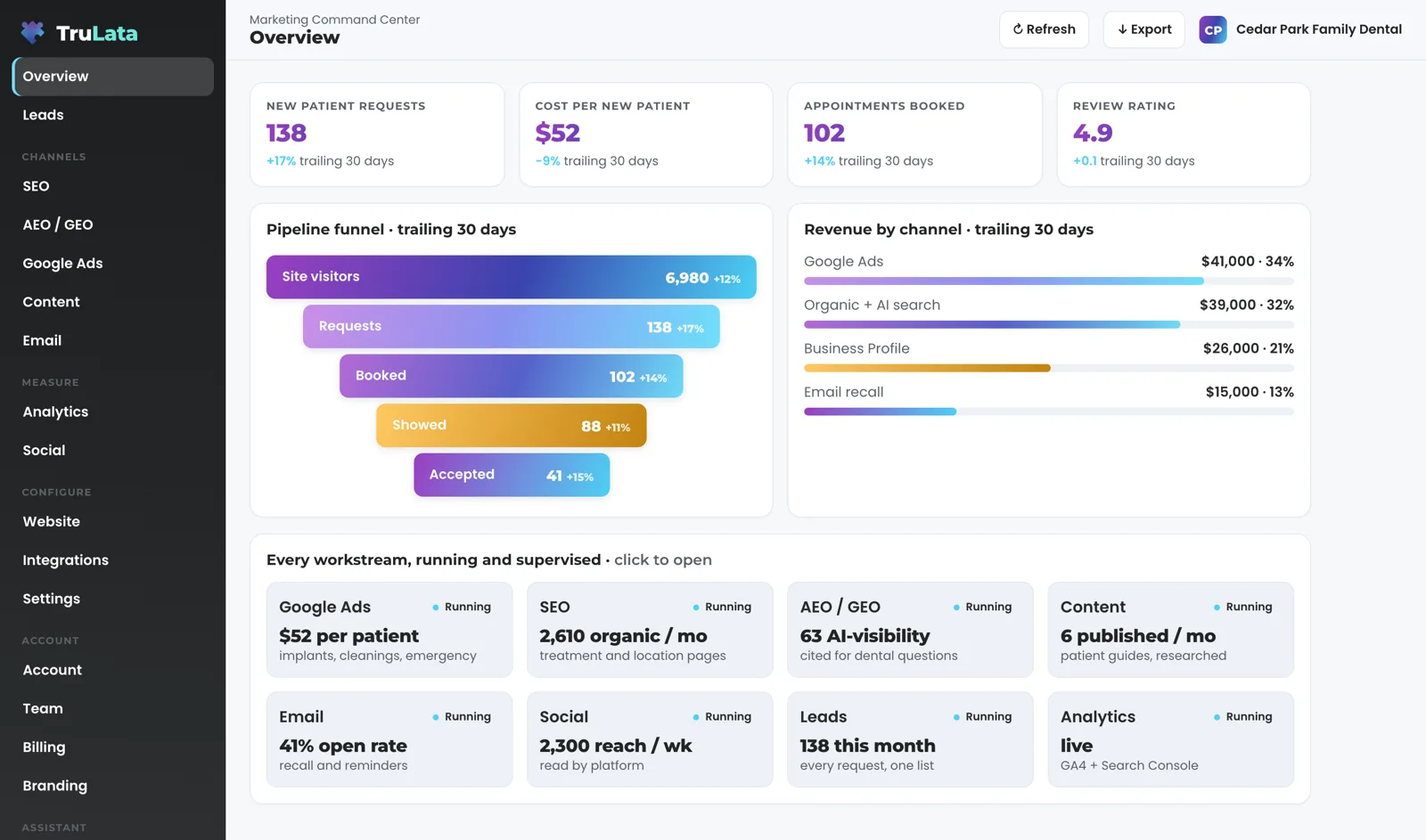

Ad spend beside form leads is the pair to watch.
What still needs a person?
The judged work. Budget and bid changes in ad accounts are made within the limits set for your engagement and land in your account's own change history. Named priority accounts in outbound are always reviewed by a person. Prospect emails leave from a review-first queue; a person releases them, or the queue releases on the schedule set for the engagement, and every send is logged. Whether content publishes on its own or waits for approval is a setting you choose.
Your requests, too. Ask for a website change, a content topic, a keyword target, a category or a targeting change from inside the screen, or email support@trulata.com. The request is logged and opened as a ticket with a number, and a person makes the change. What the screen writes is short: a lead outcome, which writes to the lead record, and requests to your team, which are logged.
Setup, too. Our team connects your accounts in the first week with access you grant: manager invitations from your own Google consoles for Analytics, Search Console, Ads and Business Profile, and your CRM, Stripe, your booking platform, ActiveCampaign and your website forms linked from the inside. We never ask for your account password, and you revoke any Google connection in your own console. Our team does the connecting from the inside, and a connector we have not built yet is built during setup.

How does it compare with a stack of point tools?
On mechanism, not on adjectives. A stack is a search tool, an ads console, a content tool, an email tool, a review tool and a social scheduler, each with its own login, its own export and its own idea of a lead. You do the joining, at night, in a spreadsheet. Here is the comparison on the four questions that decide it.
Who does the work. In a stack, you do, between tools. Here, engines run the scheduled work: prospects sourced weekly, content on your cadence, an ads watch every morning at 7:05 Eastern. A person does the judged work, and the record shows who did what.
What you can see. A stack shows one channel per tab, each on its own window. Here, one screen shows every connected channel for a named window, stamped with when it was pulled, and each card opens to its value, its change and its window.
What happens to the data. A stack keeps each channel's record inside that tool's account. Here, every Google connection is a grant you revoke in your own console, each lead is a row your own forms appended to your lead sheet, and every piece of content is filed as a Google Doc in your Drive as it is made.
What it costs on our published tiers. Starter is $400 a month, Launch $650, Growth $1,200, and Command is scoped per engagement. Starter carries the TruLata dashboard, full analytics, leads, search visibility, the AI visibility program, managed Google Ads search, the assistant and briefings and support tickets; Launch adds the content engine; Growth adds Meta ads; Command adds the outbound engine, social media management, your full marketing team, always on and a website our team builds for you. Seats are three on Starter, three on Launch, ten on Growth and unlimited on Command. Every tier is one flat number, month to month. Commit for a year and pay 20 percent less each month. We publish no figure for any point tool.
Before you compare on price, open demo.trulata.com. Your name and email, then the same engine code every client runs, a fictional company with illustrative numbers. Click a headline metric and confirm it opens with its value, its change and its window.
A stack of point tools
- You do the work, between tools
- One channel per tab, each on its own window
- Each channel's record inside that tool's account
- One bill per tool
TruLata
- Engines on a schedule, a person on the rest
- Every connected channel in one window, stamped
- Your consoles, your lead sheet, your Drive
- One flat tier
Every channel: run or read, and how fresh.
| Channel | Runs it or reads it | How fresh |
|---|---|---|
| Search | Runs: keyword set, Search Console queries and average position, answer-engine score across ChatGPT, Gemini, Claude, Grok, Manus, Google AI Overviews, Perplexity, Meta AI and DeepSeek | Search Console 2 to 3 days behind; answer engines at baseline and as the program moves |
| Google Ads | Runs: search campaigns managed on all tiers; change history and user list read every morning | Hours behind; watch at 7:05am Eastern |
| Content | Runs: demand gate, research, draft, Google Doc in your Drive, on Launch, Growth and Command | On your cadence; approval optional |
| Outbound | Runs: prospects sourced weekly to your target profile, review-first queue, on Command | Weekly; every send logged |
| Reads: campaign statistics from your email platform; flows built with you in setup | Live | |
| Reviews and listing | Reads: rating, reviews and listing performance from your Business Profile | With each pull; a person makes any listing edit |
| Social | Reads: page and social metrics by platform where Meta is connected; publishes where set up for your instance, under the approval setting you chose | On Meta's schedule |
Every number carries its own age, and every change to your accounts carries a record. Your CRM, Stripe, your booking platform, website leads and email statistics are live; Google Ads and GA4 lag by hours; Search Console runs two to three days behind. A request from the screen goes to your team as a logged ticket; the engine's writes to your ad accounts and your site go through their APIs and land in each account's own change history. Every change there has a name behind it, ours or the engine's, and the request that asked for it carries a ticket number.
Questions, answered.
Is TruLata an all-in-one marketing platform or a dashboard?
Both, and the split is stated per channel. Search, Google Ads, content and outbound run inside it on a schedule, on the tiers that carry them. Reviews, social, revenue, your CRM pipeline and GA4 are read and shown beside them. All of it reports onto one Overview that refreshes when you open it.
Does it replace my CRM or my email platform?
It works beside them. Your CRM is read for pipeline stages and sources, whichever you run: GoHighLevel, HubSpot, Salesforce, Pipedrive, Insightly or any other CRM with an API. Your email platform, ActiveCampaign, Mailchimp, Klaviyo, HubSpot or any other platform with an API, is read for campaign statistics, and your flows send from that platform, built with you in setup. A new flow is a logged request our team builds there.
Does anything post, send or spend on its own?
Each of the three is a setting, and each leaves a record. Where social publishing is set up for your instance, nothing publishes under your name without the approval setting you chose. Stripe is read only; nothing here creates a charge or a refund. Budget and bid changes in ad accounts are made within the limits set for your engagement and land in your account's own change history. Prospect emails leave from a review-first queue; a person releases them, or the queue releases on the schedule set for the engagement, and every send is logged.
Which sources connect, and which wait for setup?
Anything with an API: your CRM, your email platform, your ads accounts, your analytics, Stripe, your booking platform, your website and its forms, your Business Profile and your social accounts, and a connector we have not built yet is built during setup. Your inbox and calendar stay outside the screen today and connect during setup where your engagement calls for them. Your customers' card data stays with Stripe and is never read. A phone lead counts where your CRM records it, and a call-tracking platform with an API is connected during setup where you use one. A view whose source is not connected yet stays off until it is, rather than showing a sample.
What does it cost?
Starter is $400 a month, Launch $650, Growth $1,200, and Command is scoped per engagement. Starter carries the TruLata dashboard, full analytics, leads, search visibility, the AI visibility program, managed Google Ads search, the assistant and briefings and support tickets. Launch adds the content engine. Growth adds Meta ads. Command adds the outbound engine, social media management, your full marketing team, always on and a website our team builds for you and is scoped per engagement. Seats are three on Starter, three on Launch, ten on Growth and unlimited on Command. One flat number, month to month.
See how it would run
for your business.
15 minutes with TruLata. We show you what your marketing brings in, what each lead costs, and what we would change first.
Book a demo or start a 7-day free trial
No card. It ends on its own after 7 days unless you add one. See pricing.
New here? See what TruLata is. Prefer to write? Send us the one thing you want to know.
Start here: AI marketing platform · AI marketing software · all-in-one marketing platform · marketing automation software · marketing software for small business.
- Refreshed when you open itLive data on page load, never a monthly PDF
- Counted from your own formsLeads recorded server-side, compared daily with Ads and GA4
- Seen in AI answersHow often ChatGPT, Gemini, Claude, Grok, Manus, Google AI Overviews, Perplexity, Meta AI and DeepSeek name you, measured
- Every send loggedProspect emails leave from a review-first queue, and every send is logged.