

Every will, trust and workshop sign-up, and what it became.
Built for an estate planning practice, whoever runs the marketing. TruLata reads your Google accounts, your Business Profile, your email platform and the consultation requests and workshop registrations from your own site's forms, runs the watching and the drafting on a schedule while you are in signing meetings, and leaves approvals and compliance review of what goes out with the firm.

Is this built for an estate planning practice?
Yes. It is built for an estate planning practice, a solo attorney or a firm of several, that drafts wills, trusts, powers of attorney and health care directives and handles probate and trust administration, and a firm with a second office fits the same way. The marketing often falls to the founding attorney, done after the drafts are reviewed and the signing meetings are over, or to a paralegal or an office manager, and a firm with a marketer on staff gets the same screen. Search, ads, content and the counting run on a schedule whether or not anyone had time this week, every request and registration is counted from your own site, and one screen shows what happened and what it cost.
People come to an estate plan by three roads. Some have been meaning to do it and something finally moves them, a new child, a new house, a retirement date, a friend's family sorting out an estate without a plan, and they search, read your site and ask for a consultation. Some come to a workshop first: an evening at a library or a community room, or a session online, where they hear how a will and a trust differ before they decide to book. And some arrive with a name from someone they already trust, a financial advisor, a CPA or another attorney, and search it to check it. A family handling a loved one's estate after a death asks about probate, and deserves a calm, quick reply.
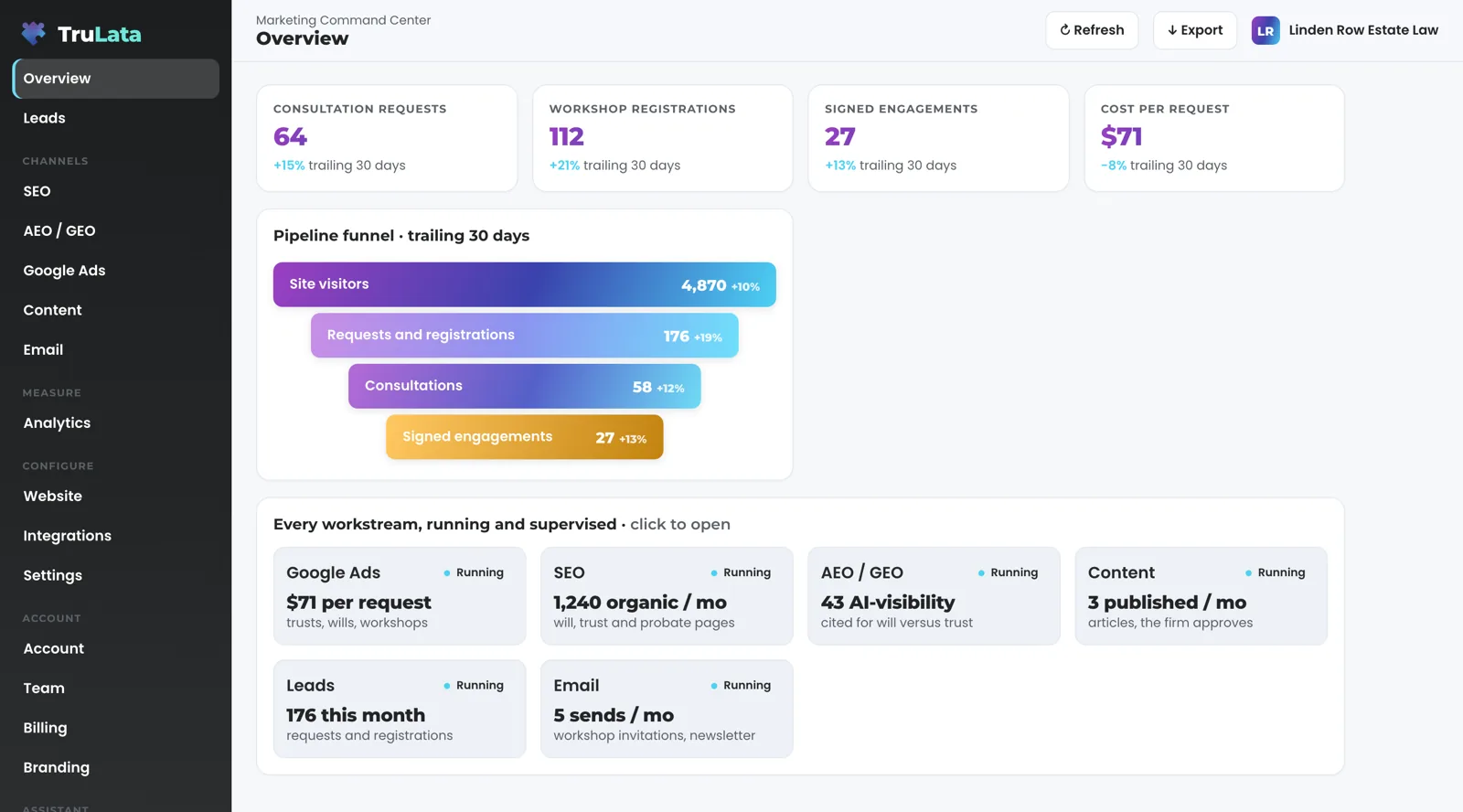
Each road ends in the same place: a request or a registration on your own site's form, written to your lead sheet the moment it lands. So the screen counts consultation requests, workshop registrations, consultations and signed engagements next to what the marketing cost, and approvals and compliance review of what the firm publishes stay with the firm.
Three roads to an estate plan
The search
- A new child, a new house, a retirement date
- They search, read your site and ask for a consultation
The workshop
- An evening in a community room, or a session online
- They hear how a will and a trust differ before they book
The referral
- A name from a financial advisor, a CPA or another attorney
- They search it to check it

Some come to a workshop first.
What does the screen show an estate planning firm?
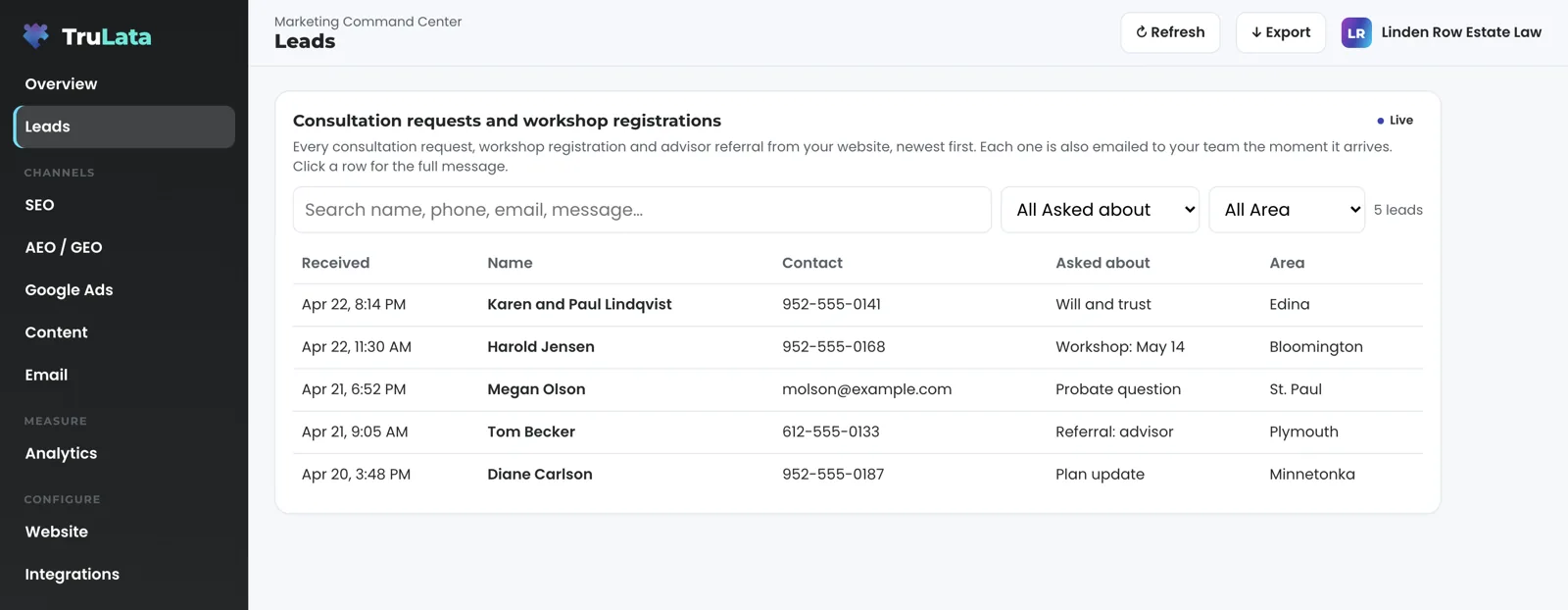
It leads with the requests and the registrations. When someone asks for a consultation, registers for a workshop, or an advisor sends a client through your referral form, the form handler appends the row to a lead sheet server-side and emails your team, whether or not a tracking tag fired. The Leads view reads that sheet newest first, and each row carries what your form recorded: the name, the contact details, what they asked about, a will, a trust, a plan update, a probate question or the workshop date, the referring advisor where the form asks for one, and the message. Keep the form to scheduling details: the screen needs the request, not the family's finances. Set what each one became from the screen, contacted, quoted, won or lost, or not a lead with the reason, and it stays on the row; for a firm, won means a signed engagement. The leads page covers the ledger and the daily watch behind it.
Your email platform's campaign statistics are read live, so the workshop invitation, the reminder and the past-client newsletter sit on the same screen as the registrations they produced. Google Ads gives spend, conversions and cost per conversion by campaign, so the workshop campaign and the trust consultation campaign are judged apart. Search Console gives the queries you appeared for, impressions, clicks and average position, two to three days behind; for an estate planning practice those queries are the document and the place, estate planning attorney near me, will versus trust, probate questions and your attorneys' names, and the positions are Search Console's own averages, not a rank tracker. GA4 gives sessions, sources, which pages were read, the workshop page, the trust page, the probate page, and the key events you count as a request, hours behind intraday. Google Business Profile gives your reviews, your rating and your listing performance through a manager invitation you can revoke; what the firm does with reviews stays with the firm.
Where intake runs on a CRM with an API, it connects during setup and the pipeline appears live, stage by stage, with a coming-soon card rather than a number until the data is trustworthy. Your document drafting and practice management systems stay in your own systems today; a source with an API can be connected during setup. Card data is never read. Your inbox and calendar stay outside the screen today and connect during setup where your engagement calls for them, and a phone call counts as a lead where your CRM records it, with a call-tracking platform you already run connected during setup like any other source with an API.
What runs while I am in signing meetings, and what waits for the firm?
Your Google Ads account is watched every morning. At 7:05 Eastern the ads change watch reads the account's change history and its user list, sets our own writes and routine churn aside, and raises a material change made by anyone else the same morning, including the recommendations Google applies on its own. Where we manage your search campaigns on all tiers, a budget or bid change is made within the limits set for your engagement and lands in the account's own change history. In the weeks before a workshop, that is what keeps the registration budget pointed where you put it, and a new address given access to the account reaches your team the next morning.
On Launch, Growth and Command, the content engine researches and drafts on your cadence the articles a family reads before booking: how a will and a living trust differ, what happens to an estate without a plan, what probate involves for the family handling it, what a power of attorney and a health care directive do, and when to update a plan. Each topic passes a demand gate on real search volume and what already occupies the result page, the research cites current sources, the dedupe reads the titles already published on your site, and each piece is filed as a Google Doc in your Drive with a featured image. Auto-publish is a per-client setting and approval is optional. Approvals and compliance review stay with the firm: with auto-publish off, each piece waits as a draft until the firm approves it.
On Command, the outbound engine sources prospects weekly to the target profile set with you, which for an estate planning practice can be the professionals whose clients need a plan: financial advisors, CPAs, insurance agents, and attorneys in family and business law. It finds a deliverable address or routes the prospect to a contact-form path and drafts into a review-first queue; a person releases them, or the queue releases on the schedule set for the engagement, and every send is logged with the draft, the mailbox and the time. Replies are classified, and not-interested and bounced addresses are suppressed.
Every day at 7:20 Eastern, on an instance whose forms feed the sheet, the lead watch runs five checks across the sheet, GA4 and Ads, so a dead tag, a blind ad account or a workshop registration form that stopped submitting is flagged the next morning rather than on the night of the workshop. Every night at 12:01 Central a fallback snapshot is baked, and a failed pull leaves the previous page up. What stays with a person is the judgement: the limits on spend, and anything that answers a family or a referring advisor. From the screen you can set a lead outcome, request a website change, and request a content, keyword, category or targeting change; each request goes to the team as a logged ticket, and the engine's writes to your ad accounts and your site go through their APIs and land in each account's own change history, so the firm has a record of every change to review.
While you are in signing meetings
- Ads change watchReads the change history and the user list, raises material changes the same morning
- Lead watchFive checks across your form sheet, GA4 and Ads, so a workshop form that stopped is flagged the next morning
- Content draftsWill, trust and probate articles, waiting for the firm where auto-publish is off, on Launch, Growth and Command
- Prospect sourcingFinancial advisors, CPAs, insurance agents and other attorneys, on Command
- Fallback snapshotBaked nightly, so a failed pull leaves the previous page up
What stays with a person is the judgement: the limits on spend, and anything that answers a family or a referring advisor.
Can I see it before I talk to anyone?
Yes, with your name and email in front of it. The demo is the same engine code every client runs, pointed at a fictional company called Meridian so it can be public. Every number is invented, and the screen says so. Open the Leads view, the Email view and the search view and you are looking at the screen an estate planning practice gets, with your sources in place of Meridian's.
Then put your own firm in the seat. You draft and review plans by day, you hold signing meetings and workshops, your advisors and CPAs send you the clients they trust you with, and whoever runs the marketing does it after the drafts are done. That is the firm this page, the setup and the tiers are written for, and what changes is the evening work: the scheduled work runs whether anyone had time, every request and registration is counted from your own forms, and one screen shows what happened and what it cost. Part of it runs on your own numbers during setup: the first pull, the answer-engine baseline and the ads watch run on your accounts in the first two weeks, before most of the engines are switched on. The broader view for every practice area is on the law firms page.
One thing about the search view is worth knowing before you open it. Ranking is not earning, so the view puts the requests your own forms took beside the queries and positions that earned them. A position there is Search Console's average for that query, not a rank tracker's guess. A page that climbed for a will versus trust search and a page that brought in a signed engagement are told apart on the same screen.
Which tier fits an estate planning practice?
Starter includes the TruLata dashboard, full analytics, leads, search visibility, the AI visibility program, managed Google Ads search, the assistant and briefings and support tickets. The content engine is on Launch, Growth and Command. Meta ads, for a firm that fills workshops from social as well as search, are on Growth and Command. The outbound engine, for a firm that wants advisor and CPA relationships beside the searches and the workshops, is on Command. Command adds the outbound engine, ad creatives and your full marketing team, always on.
Seats are three on Starter, three on Launch, ten on Growth and unlimited on Command, so each attorney and paralegal can sign in with a seat of their own, and a seat you remove is revoked within 30 seconds. Starter is $400 a month, Launch $650, Growth $1,200, and Command is scoped per engagement. Every tier is month to month with nothing metered, and committing annually takes twenty to twenty-five percent off the monthly. The pricing page carries the same figures as every other page.
By tier
- Content engineLaunch, Growth and Command
- Meta ads, for filling workshops from socialGrowth and Command
- Outbound engine, for advisor and CPA relationshipsCommand
- Seats, for each attorney and paralegalthree on Starter, three on Launch, ten on Growth and unlimited on Command
Want it run for you?
You have two doors. Managed TruLata is our team running the program on your accounts, and every change we make lands in your account's own change history, which the same 7:05 Eastern watch reads and sorts as ours. Approvals and compliance review stay with the firm on that door too: a content piece with auto-publish off waits as a draft until the firm approves it. Local services marketing is TruLata's agency work for the same buyer, search and paid search with a daily account watch among it.

What an estate planning firm's screen reads, and how fresh it is.
| What | Where it comes from | How fresh |
|---|---|---|
| Consultation requests, workshop registrations, referrals | Your site's forms, appended to a lead sheet server-side and emailed to your team; the Leads view reads it newest first | Live, the moment the form is submitted |
| Workshop invitation and newsletter statistics | Your email platform | Live |
| Spend, conversions, cost per conversion | Google Ads, by campaign | Intraday lags hours; change history read daily at 7:05am ET |
| Sessions, sources, pages, key events | Google Analytics 4 | Hours behind intraday |
| Queries, impressions, clicks, average position | Search Console; its own average positions, not a rank tracker | 2 to 3 days behind |
| Reviews, rating, listing performance | Google Business Profile, with our Google account as a manager you can revoke | Refreshed on its own schedule, separate from the Ads and GA4 lag |
| The page itself | Snapshot on open, live pull behind it when older than 5 minutes, nightly bake at 12:01am CT | Header stamp says when the data was pulled |
In the week before a workshop, the registrations from your forms are live on the screen, the invitation statistics from your email platform are live beside them, the Google Ads numbers still run hours behind, and Search Console runs two to three days behind. The header stamp says when each pull ran, the Refresh button forces a new one and never shows an error, and a failed pull leaves the previous page up rather than a blank one.
Questions, answered.
Do workshop registrations count as leads?
Yes. A registration made through a form on your site counts the moment it is submitted: the form handler writes it to the lead sheet server-side and emails your team, and the Leads view shows it newest first beside the consultation requests, with the workshop date your form recorded. You set what each registration became on the same row, so the attendee who booked a consultation and signed a plan reads differently from the one who did not.
Can I see which advisor sent a client?
Where your referral form asks for the referring advisor, the advisor is on the row with the rest of the submission. You set what the referral became on the same row, and the email platform shows the advisor update beside it where you send one.
Does the screen show estate values or fees?
It counts people and marketing spend: consultation requests, workshop registrations, consultations, signed engagements and what each request became, and Google Ads spend and cost per conversion by campaign. Your document drafting and practice management systems stay in your own systems today; a source with an API can be connected during setup.
Who approves what goes out under the firm's name?
The firm does. Approvals and compliance review stay with the firm. Auto-publish is a per-client setting and approval is optional; with auto-publish off, each content piece waits as a draft, filed as a Google Doc in your Drive, until someone at the firm approves it. On Command, prospect emails leave from a review-first queue; a person releases them, or the queue releases on the schedule set for the engagement, and every send is logged with the draft, the mailbox and the time.
Will anyone change our ad budget without us knowing?
A budget or bid change is made within the limits set for your engagement, and every change in the account lands in Google's own change history, which the watch reads at 7:05 Eastern every morning and sorts by who made it. Recommendations Google applies on its own are raised the same morning. Who has access to the account is read directly every day, because change events do not log it.
What does it cost for an estate planning practice?
Starter is $400 a month, Launch $650, Growth $1,200, and Command is scoped per engagement. Seats are three on Starter, three on Launch, ten on Growth and unlimited on Command. Every tier is month to month with nothing metered, and a managed strategy retainer sits on top of any tier, scoped with you rather than priced on this site; <a href="/product/managed">the managed page</a> says what our team takes on.
See it running
before you decide.
The demo is the real product on a fictional company, with your name and email in front of it. Pricing is three published tiers.
Open the live demo See pricing
New here? See what TruLata is. Prefer to write? Send us the one thing you want to know.
Start here: AI marketing platform · AI marketing software · all-in-one marketing platform · marketing automation software · marketing software for small business.
- Refreshed when you open itLive data on page load, never a monthly PDF
- Counted from your own formsLeads recorded server-side, compared daily with Ads and GA4
- Seen in AI answersHow often ChatGPT, Gemini, Claude and Grok name you, measured
- Every send loggedProspect emails leave from a review-first queue, and every send is logged.