

See every screen you would be paying for before you pay for any of it.
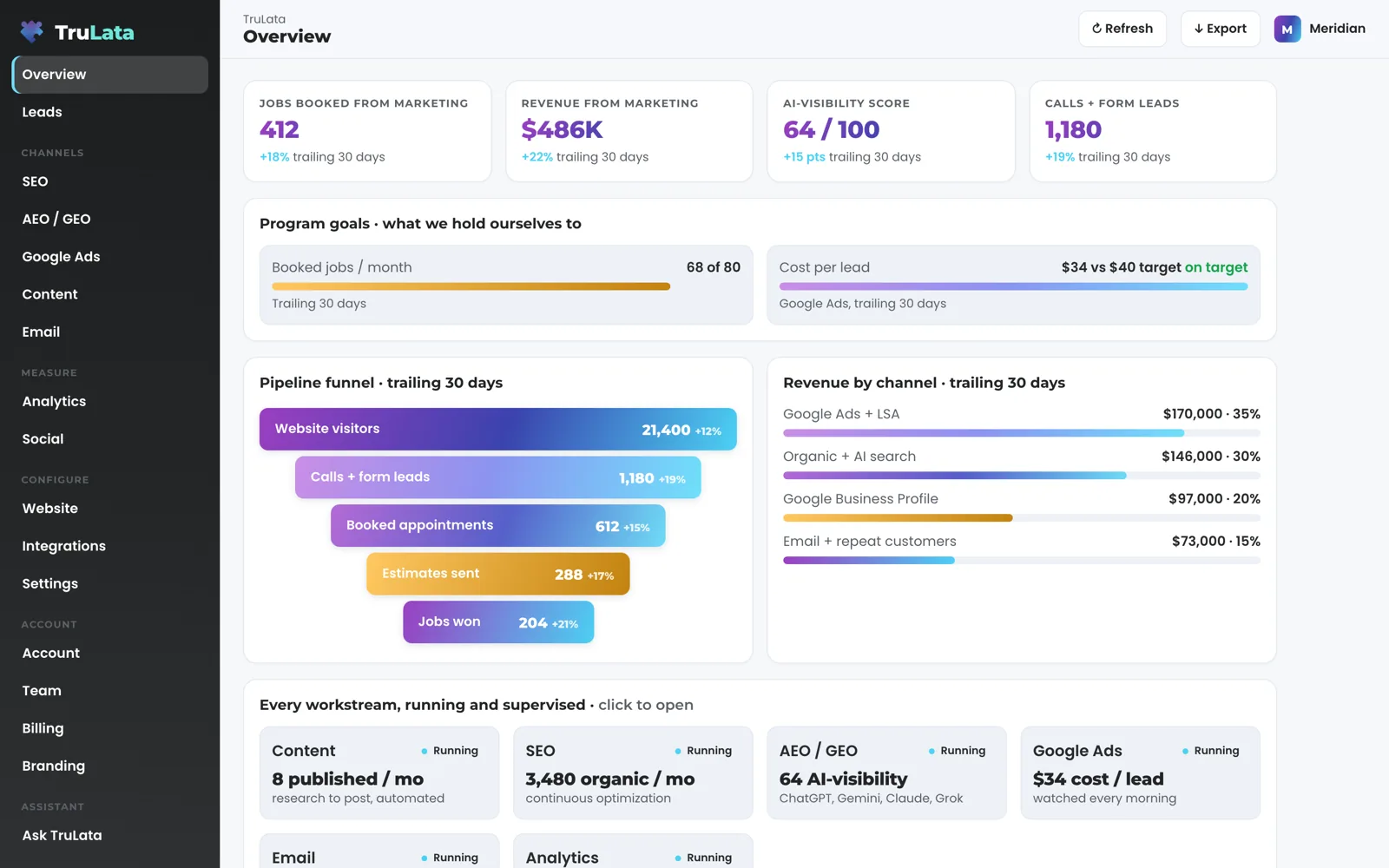
demo.trulata.com is TruLata itself, running on a fictional company called Meridian, with your name and email in front of it, and no account. Click a number, read where it comes from, and the screen tells you which figures are invented.

Where do I open it, and what do I need?
A browser, and ten minutes. Open demo.trulata.com and you land on the Overview of a running instance; your name and email open the first screen. It is the same engine every client dashboard runs, pointed at a fictional company so it can be public. The left-hand menu is the client's menu: Overview, Revenue and Leads at the top, then the channels (search, answer engines, Google Ads, content, outbound, email), then Analytics and Social, then Website, Integrations and Settings, then Account, Team, Billing and Branding, and Support last.
Give it ten minutes and click everything. Headline cards open a panel with the number, its change, its window, a trend line and a note on where it comes from; funnel stages, keyword rows, campaign rows and channel bars each open their own detail panel. Press Export on any view and a CSV of that view downloads. The fastest way to judge the product is to try to find a headline number that leads nowhere. If you want the guided version first, the Dashboard page explains each Overview card before you open it.
What in the demo is the real product?
The product itself. The views, the drill-down panels, the request flow, the menu and the layout are exactly what a client sees. The engine is one shared file and the demo runs it too, so every screen in the demo is a screen the product has, and a change that ships to clients ships to the demo.
The request flow is real in shape. Open Website and use Request a website change: name the page, describe the change, add your name and send it. On the demo the toast says the request would reach your team in a live account. On your instance the same form reaches our team, is logged, and comes back with a ticket number you can quote to us; the Support view lists every ticket, whether it came from the dashboard or from an email to support@trulata.com. What you type on the screen goes to your team as a logged request; the engine's own writes to your ad accounts and your site go through their APIs and land in each account's change history, and the ticket carries the reply when your change is done.
The labelling is real too. Click a stat card on any channel view of the demo and the panel says the drill-down is illustrative in this sample workspace. On your instance the same panel says the number was pulled from your connected accounts. The product labels its own numbers, and the demo is where you watch it do that.
Invented for the demo
- Meridian's team, numbers and campaigns
- Its content titles, invoices and plan
- The sample source list on Integrations
The real product
- The views and the drill-down panels
- The request flow, the menu and the layout
- One shared engine file, the one every client runs
The product labels its own numbers, and the demo is where you watch it do that.
Which numbers are invented?
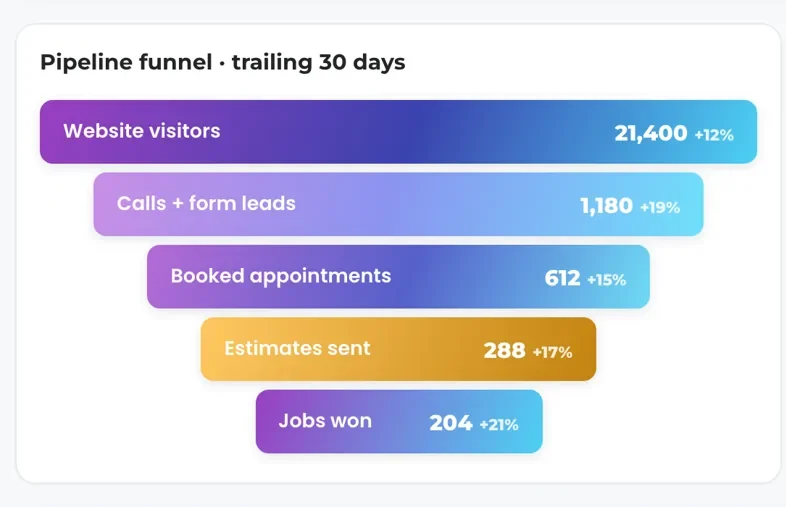
All of Meridian's. Its team, its numbers, its campaigns, its content titles, its invoices and its plan are illustrative, there to show the shape of a screen and not to make a claim. Meridian is written as a plumbing, heating and air company, so its leads read AC repair and Water heater, its conversions read Phone calls and Quote requests, and its funnel runs from 21,400 website visitors to 204 jobs won. Your instance shows your own form submissions and your own GA4 key events under the names your forms and your analytics give them.
The demo's Integrations view is a sample: it lists the connectors by family with Connected or Connect pills and lets you switch the active AI model so you can see what the screen does. The product connects to every one of them, and to anything else with an API. Your instance lists what is connected, and views arrive as their sources connect: Jobs appears with your CRM or booking platform, and shows a coming-soon card until its data is trustworthy. The list of what each connection reads is on the Integrations page.
The answer-engine view in the demo shows six sample bars. On your instance the engines are ChatGPT, Gemini, Claude, Grok, Manus, Google AI Overviews, Perplexity, Meta AI and DeepSeek today, each asked through an API, with engines added as they are built, and a blank answer leaves the denominator instead of counting as a miss. The score is set at baseline and re-run as the program moves. Google AI Overviews are one of them, read off a live Google search.
What should I test while I am in it?
Start with one number and follow it down. On the Overview, click the first headline card. The panel shows the value now, its change, the window and a trend line, with a note under it on where the number comes from. That panel is the unit of the whole product: a number, its window, its source. If you would trust a report built only from panels like that, you will trust the dashboard.
Open Leads. The ledger runs newest first with the time, the name, a phone or email and what the person asked for; click a row for the page they were on and the full message, or search the ledger by name, phone, email or message. On your instance each row is written server-side the moment a form is submitted and emailed to your team at the same time, which is why the count keeps working on the day a tracking tag breaks. Where your forms feed the lead sheet, a watch checks the ledger against what Ads and GA4 counted at 7:20am ET every day, so a dead tag, a blind ad account or a stalled form is flagged the next day rather than at the end of the quarter.
Open Google Ads. Each campaign row carries spend, conversions and cost per conversion, and clicking it opens the campaign detail. Open AEO / GEO for the presence score, the per-engine bars and the list of buyer questions with a rank wherever the business was cited. Open Team to see seats used against plan seats and an invite box with the roles Member and Admin. Open Branding for the logo upload, PNG, SVG or JPG up to 2 MB, and the brand colour.
Then try to break it. Look for a headline card that stays shut, a panel without a window on it, or a screen that needs a manual. If you find one, tell us which.
- OverviewClick the first headline card: value, change, window, trend and source
- LeadsNewest first; search by name, phone, email or message
- Google AdsClick a campaign row for spend, conversions and cost per conversion
- AEO / GEOThe presence score, the engine bars and the buyer questions
- Team and BrandingSeats and roles; a logo up to 2 MB and one brand colour

Then try to break it.
What does my own instance add to the demo?
Freshness. The demo runs on fixed numbers, so it leaves out the Refresh button and the data stamp. Your instance loads last night's snapshot first, fetches the current payload from a cache the moment it opens, and runs a pull in the background when the snapshot is older than five minutes. Refresh starts a real pull against your accounts, two seconds to a little over three minutes depending on your sources, and the page reloads when the stamp moves, with the stamp saying how old the data is.
The ceiling is the upstream, not the screen. Your CRM, Stripe, your booking platform, website leads and email statistics are live. Google Ads and GA4 intraday numbers lag by hours. Search Console runs two to three days behind however often it is asked. A nightly bake at 12:01am Central writes the fallback snapshot for every client, and a failed pull leaves the previous page up rather than shipping an empty one.
The schedule. Part of the product runs on a schedule whether anyone is at a desk: prospects are sourced weekly to your target profile, the ads change watch reads your change history at 7:05am ET every day, and the content engine moves each piece from queued through research and draft to posted. Part of it stays within limits: budget and bid changes in ad accounts stay within the limits set for your engagement, and prospect emails leave from a review-first queue; a person releases them, or the queue releases on the schedule set for the engagement, and every send is logged. The ads watch earns its slot. It reads your change history and your account's user list every morning, sets our own writes and Google's routine churn aside, and raises a material change made by anyone else to the team the same day, so a setting switched on under any login, or a new address given access, is known the next morning.
The sign-in, and what stays yours. The demo is public; your instance sits behind our sign-in gate, and you sign in with a single-use magic link from login.trulata.com, with a chooser if you hold more than one seat. Removing a seat takes effect within 30 seconds. Every Google connection is a grant you can revoke in your own console, and we never ask for your account passwords. Your inbox and calendar stay outside the read today, your customers' card data is never read, and a phone call counts as a lead where your CRM records it.
What your own instance adds
- Snapshot, then liveA background pull when the snapshot is older than five minutes
- A real pull2 seconds to a little over 3 minutes
- Ads change watchYour change history and user list
- Prospect sourcingTo your target profile
- Fallback snapshotA failed pull leaves the previous page up
Can I see it on my own numbers?
Yes, in the first two weeks of setup. Access comes first: you add our Google account as a manager on your Analytics property, your Search Console site, your Ads account and your Business Profile, and our team connects your CRM, Stripe, your booking platform and your forms from the inside with access you grant, so your side of setup is the grant. Then comes the first pull: your numbers fill the Overview, the answer-engine baseline is scored, the keyword set is agreed and the daily ads watch starts. That is real data on the real screen before the content cadence, ads reports and email flows start later in setup.
Looking comes with no follow-up. The demo has no gate and asks for no details. The button in the corner opens a short form: first name, work email, company, company size and marketing spend per month, plus optional fields for what to run first, when you want it running and anything you want to see on your numbers. Send it and a confirmation goes to the address you gave, a short series of follow-up emails comes from us, the request reaches our team, and we come back with what the screen looks like on your data. If you would rather read first, the pricing page lists the published tiers and the contact page reaches a person.

The demo, in one table.
| What | Where it comes from | How fresh |
|---|---|---|
| URL | demo.trulata.com | Public, no account |
| Company | Meridian, fictional | Every number illustrative, and labelled |
| Engine | The same file every client dashboard runs | Current |
| Views | Every view; yours arrive as their sources connect | Working |
| Refresh and stamp | Hidden on the demo; a real pull on your instance, 2 seconds to a little over 3 minutes | Live when you open it |
| Follow-up | Only when you send the form in the corner | You decide |
The demo is where this product shows invented numbers, and it labels them; your instance shows what your connected accounts contain.
Questions, answered.
Do I need to sign up to see the demo?
demo.trulata.com opens in any browser with your name and email, and no account.
Is the demo the real product?
Yes. It runs the same engine file every client dashboard runs, pointed at a fictional company.
Are the numbers real?
Meridian's are invented to show the shape of each screen, and the drill-down panels say so.
Why is there no Refresh button in the demo?
The demo's numbers are fixed, so it runs without a pull. On your instance the button starts a real pull against your accounts, two seconds to a little over three minutes, and the page reloads when the stamp moves.
Can I see it on my own accounts?
Yes, in the first two weeks of setup. The first pull fills the Overview, the answer-engine baseline is scored and the ads watch starts, all on your accounts.
Will someone contact me because I opened it?
Only if you ask. The form in the corner of the demo is the ask; opening the page is not.
See how it would run
for your business.
15 minutes with TruLata. We show you what your marketing brings in, what each lead costs, and what we would change first.
Book a demo or start a 7-day free trial
No card. It ends on its own after 7 days unless you add one. See pricing.
New here? See what TruLata is. Prefer to write? Send us the one thing you want to know.
Start here: AI marketing platform · AI marketing software · all-in-one marketing platform · marketing automation software · marketing software for small business.
- Refreshed when you open itLive data on page load, never a monthly PDF
- Counted from your own formsLeads recorded server-side, compared daily with Ads and GA4
- Seen in AI answersHow often ChatGPT, Gemini, Claude, Grok, Manus, Google AI Overviews, Perplexity, Meta AI and DeepSeek name you, measured
- Every send loggedProspect emails leave from a review-first queue, and every send is logged.