

Know which search sent the tour request, and which tour became a signed lease.
Built for an apartment community or a small group of communities, whoever runs the marketing: the leasing office, the community manager or a regional marketing lead. TruLata counts every tour request and contact form from your community's own site with its source beside it. It reads your Business Profile reviews and your Google accounts, runs the watching on a schedule whether anyone is at the leasing desk, and shows you what each request became.

How does a renter pick the community they tour?
A renter picks from a short list, and fast. A new job across town, a first year of graduate school, or a lease that ends in sixty days starts the search. The renter types apartments near the office, near campus or in the neighborhood they want, and opens a few communities side by side. They compare the photos, the floor plans and the rent range. They read the star rating and the most recent resident reviews, including how management answered the unhappy ones. Then they request a tour from the community whose site and listing answered their questions in the first minute.
That request is where your leasing office starts working. Someone calls or texts back and books the tour, and a prospect who walks the model and likes the unit applies. An approved application becomes a signed lease and a filled unit ahead of a move-out, or one more unit off the lease-up count. The office wants the answer the ad platforms do not give it: which source sent the tour that became the lease. The Google Ads campaign on the community name, the neighborhood campaign, the Business Profile listing and the organic search visit each claim some of the credit.
TruLata is built for the community that wants that answer on one screen. The marketing may sit with the community manager between renewals and resident issues, with a leasing consultant between tours, or with a regional marketing lead covering several properties, and each of them reads the same screen. Search, ads and content run on a schedule whether or not anyone had time this week, every tour request is counted from your own site, and the screen shows what happened and what it cost. A property management company chasing owner leads has its own page. This one is about renters.
- The searchApartments near the office, near campus or in the neighborhood they want
- Side by sidePhotos, floor plans and the rent range across a few communities
- The reviewsThe star rating, recent resident reviews and how management answered
- The tour requestTo the community whose site answered their questions in the first minute
- The leaseA booked tour, an approved application, a filled unit
What does the screen read for an apartment community?
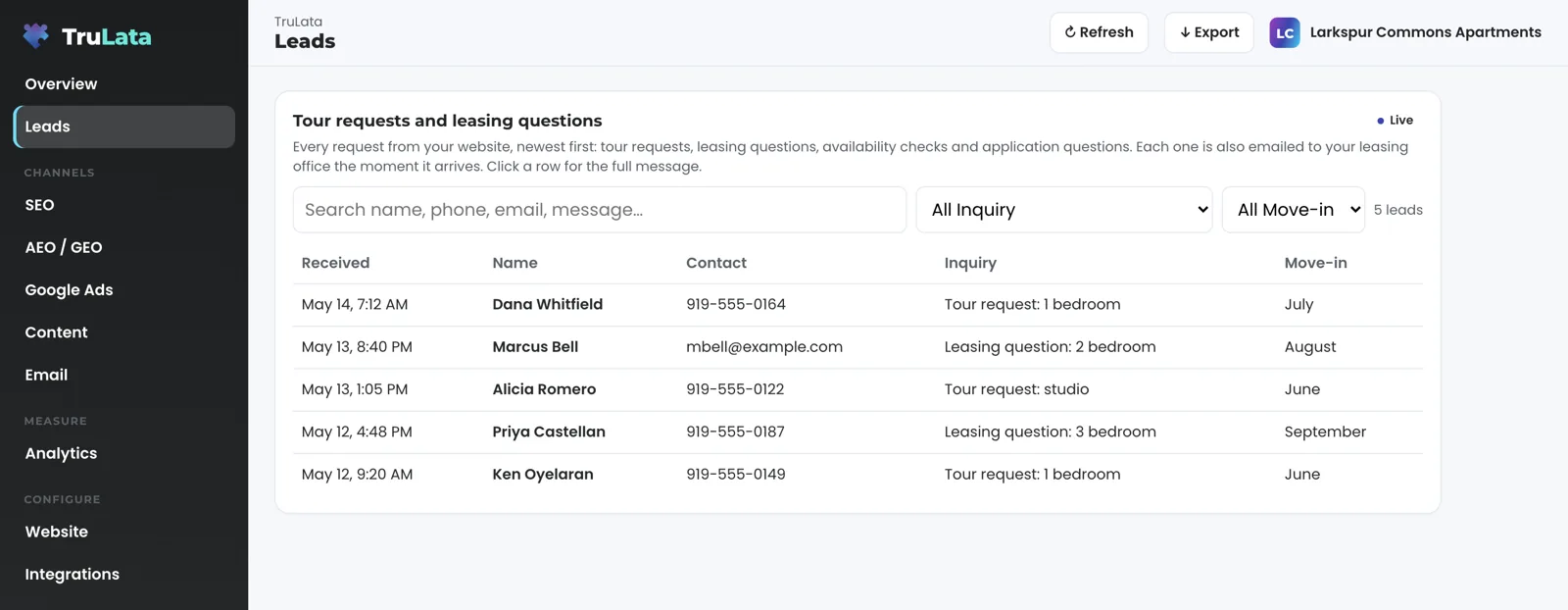
It starts with your own site. When a renter submits the tour request or the contact form, the form handler appends the submission to a lead sheet server-side as it lands and emails your leasing office. The Leads view reads that sheet newest first, with the page each request came from on the record. After the office follows up, you mark what the request became from the screen: contacted, quoted, won, lost, or not a lead with the reason. For a leasing office, won is the signed lease and lost is the renter who went elsewhere. The mark is written to the lead record and stays on the row, so the source and the outcome sit side by side. The leads page shows the view in full.
Your Google accounts fill in the rest. Google Analytics 4 supplies sessions, sources, pages and key events, hours behind intraday, so the tour request can be a key event of its own. Search Console supplies the queries you appeared for, with impressions, clicks, average position and top pages, two to three days behind. For a community those queries are the neighborhood, the nearby employer or campus, the bedroom count and the community name. The positions are Search Console's own averages, not a rank tracker. Google Ads supplies spend, conversions and cost per conversion by campaign. Your Business Profile supplies reviews, rating and listing performance through a manager invitation you can revoke.
The screen connects to anything with an API. The named connectors are listed by family on the demo's Integrations view, and a connector not built yet is built during setup. That covers a listing site or a property management system your community runs on, where it has an API, scoped with you. Where you run on a CRM, the Jobs view reads its pipeline live, and shows a coming-soon card until the data is trustworthy. A phone inquiry counts where your CRM records it, or through CallRail, whose calls count as leads once your API key is on the Integrations view. Your inbox and calendar stay outside the screen today and connect during setup where your engagement calls for them. Card data is never read.
What runs while the office is out giving tours?
The ads account is watched every morning. At 7:05 Eastern the ads change watch reads your Google Ads change history and the account's user list. It sets our own writes and Google's routine churn aside, and raises a material change made by anyone else to the team the same day, including a recommendation Google applied on its own. The user list is read directly, because a change to who can see the account does not log as a change event. Where we manage search on all tiers, a budget or bid change is made within the limits set for your engagement and lands in your account's own change history. Shifting spend from the community name campaign to the neighborhood campaign before a heavy move-out month leaves a record.
Every day at 7:20 Eastern, where your forms feed the lead sheet, the lead watch runs five checks across the sheet, GA4 and Ads. It checks the tour requests that landed against the conversions Google counted. A dead tag, a blind ad account or a tour form that stopped submitting is flagged the next day, not after the busy leasing season is over. Every night at 12:01am Central a fallback snapshot is baked, and a failed pull leaves the previous page up. When you open the screen it loads that snapshot first and pulls live numbers behind it when the snapshot is older than five minutes.
On Launch, Growth and Command, the content engine researches and drafts, on your cadence, the pages a renter reads before touring. Examples are a guide to the neighborhood, what a commute from the community looks like, and what to bring to an application. Each topic passes a demand gate on real search volume, the research cites current sources, and the dedupe reads the titles already published on your site. Each piece is filed as a Google Doc in your Drive with a featured image, and auto-publish is a per-client setting. On Growth and Command, Meta ads are managed alongside search. On Command, prospects are sourced weekly to a target profile set with you, such as employer relocation and HR contacts near the community. Prospect emails leave from a review-first queue. A person releases them, or the queue releases on the schedule set for the engagement, and every send is logged.
The judgement stays with your people. Your reviews are read onto the screen, and answering a resident's review stays with your office, where the next renter will read the reply. From the screen you can set what a tour request became and request a website, content, keyword or targeting change. Each request reaches the team as a logged ticket, and every change made through the screen is written to an audit log with the address, the request and the result.
A dead tag, a blind ad account or a tour form that stopped submitting is flagged the next day.

The judgement stays with your people.
How does the screen read a leasing calendar?
It reads the calendar through your own numbers. Many communities feel the leasing year swell in late spring and summer, when leases turn over and people move for jobs and school, and slow in the winter months. A community near a campus follows the academic year. A lease-up follows its own curve, with every unit to fill at once. Each of those shows up on the screen as tour requests by week, spend by campaign and the outcomes your office marked.
Read the season before you spend into it. Search Console shows when the neighborhood and bedroom count queries start climbing, two to three days behind. Google Ads shows what each campaign cost per conversion last month, and the Leads view shows how many of last month's tour requests your office marked won. Together they tell you whether the next dollar belongs on the community name, on the neighborhood or on content that answers the questions renters ask before they tour.
A small group of communities reads the same way. Each community's campaigns sit on their own rows in Google Ads, and each property's listing carries its own reviews and rating. The multi-location page covers a business with more than one address, and seats let each community manager sign in with their own.
Can I see it before I sign anything?
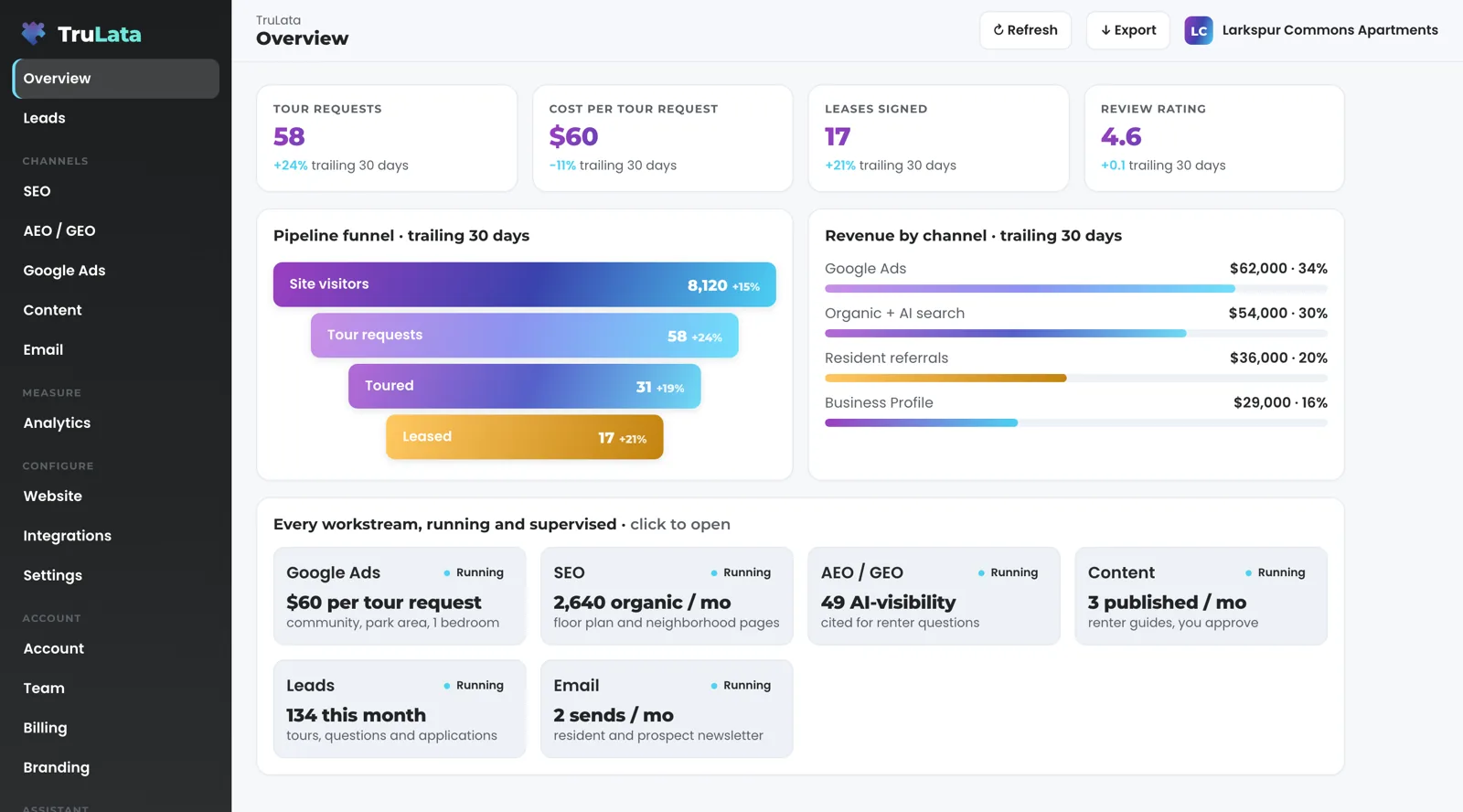
Yes. The demo is the same engine code every client runs, on a fictional company called Meridian, and every number in it is illustrative. It opens with your name and email. Open the Leads view for submissions newest first, then the ads view for spend by campaign, and you are looking at the screen your community gets, with your accounts behind it.
Ranking is not earning. The search view puts the tour requests your own forms took beside the queries and positions, and a position is Search Console's average for the query, not a rank tracker's guess. A page that climbed for a studio search and a page that sent a renter who signed are told apart on the same screen. The attribution use case follows one lead from source to outcome.
A tour request from your own form is yours alone. It came to your community's site, it was written to your sheet, and your office marked what it became. If you would rather have the work done as a service, the services side of TruLata is the other door.
A rank tracker's guess
- A position on its own
- A page that climbed for a studio search
- No link to the tour it sent
The same screen
- Search Console's average for the query
- The tour requests your own forms took beside it
- A page that sent a renter who signed, told apart
A tour request from your own form is yours alone.
Which tier fits an apartment community?
Start on Starter unless you want an engine running from the first week. Starter is 7 days free, no card. Starter includes TruLata dashboard, full analytics, leads, search visibility, the AI visibility program, managed Google Ads search, the assistant and briefings and support tickets. Google Ads search is managed on all tiers. The content engine is on Launch, Growth and Command, Meta ads are on Growth and Command, and the outbound engine is on Command. Command adds the outbound engine, social media management and your full marketing team, always on, scoped per engagement.
Seats are three on Starter, three on Launch, ten on Growth and unlimited on Command, so the community manager and the regional lead each sign in with their own. Starter is $400 a month, Launch $650, Growth $1,200, and Command is scoped per engagement. Every tier is month to month with nothing metered, and committing annually takes twenty percent off the monthly. The pricing page carries the same figures. Want our team to run it? The managed page covers the managed strategy retainer, which sits on top of any tier. Our search work and paid search with a daily account watch run on the same screen.
Which engine sits on which tier
- Starter7 days free, no card
- Google Ads searchall tiers
- Content engineLaunch, Growth and Command
- Meta adsGrowth and Command
- Outbound engineCommand
- Seatsthree on Starter, three on Launch, ten on Growth and unlimited on Command
What an apartment community's screen reads, and how fresh.
| What | Where it comes from | How fresh |
|---|---|---|
| Tour requests and contact forms | Your site's forms, appended to the lead sheet server-side; outcome set from the screen | Live as they land |
| Reviews, rating, listing performance | Google Business Profile, with our account as manager on your listing | Pulled when you open the screen; the header stamp says when |
| Spend, conversions, cost per conversion | Google Ads, by campaign | Hours behind intraday |
| Ads change record and account users | Google Ads change history and user list | Daily, 7:05am Eastern |
| Queries, impressions, clicks, average position | Search Console | 2 to 3 days behind |
| Sessions, sources, pages, key events | Google Analytics 4 | Hours behind intraday |
| Other sources | Anything with an API; a connector not built yet is built during setup | Set by the source |
A lead is a tour request or contact form from your community's own site, written to the sheet server-side as it lands, with the outcome your office sets beside it. A phone inquiry counts where your CRM records it or through a connected CallRail account. Other sources with an API are connected during setup.
Questions, answered.
Does it connect to the listing sites and property management software we use?
The screen connects to anything with an API, and a connector not built yet is built during setup, scoped with you. The sources this page describes are your site's forms, your Google accounts, your Business Profile and your CRM where you run on one.
Can I see which source sent the tour that became a lease?
Yes, for requests from your own site. Each submission lands on the Leads view with the page it came from, and your office marks what it became, so the source and the outcome sit on the same row. Google Ads, GA4 and Search Console show spend and traffic by source beside it.
Do phone calls from renters count?
Where your CRM records them, and CallRail calls count as leads once you paste its API key on the Integrations view. Other call-tracking platforms with an API connect during setup. Call recordings are not played or stored on the screen.
Can it answer our resident reviews?
The Business Profile connection reads reviews, rating and listing performance onto the screen. Replying to a review stays with your office today, and a request from the screen reaches the team as a logged ticket.
We run several communities. Does that work?
Yes. Each community's campaigns sit on their own rows, each listing keeps its own reviews, and seats are three on Starter, three on Launch, ten on Growth and unlimited on Command, so each manager signs in with their own.
What do we have to set up?
Access to your Google Analytics property, Search Console site, Google Ads account and Business Profile listing, each revocable in your own console. We never ask for your account password. Every connection is a grant or a key you create and can revoke, and what we store is encrypted.
See it running
before you decide.
The demo is the real product on a fictional company, with your name and email in front of it. Pricing is three published tiers.
Start 7 days free Open the live demo
No card. It ends on its own after 7 days unless you add one. See pricing.
Just need a website? Build it free.
New here? See what TruLata is. Prefer to write? Send us the one thing you want to know.
Start here: AI marketing platform · AI marketing software · all-in-one marketing platform · marketing automation software · marketing software for small business.
- Refreshed when you open itLive data on page load, never a monthly PDF
- Counted from your own formsLeads recorded server-side, compared daily with Ads and GA4
- Seen in AI answersHow often ChatGPT, Gemini, Claude and Grok name you, measured
- Every send loggedProspect emails leave from a review-first queue, and every send is logged.