

Prove which dollar made the phone ring, from your own record.
Count leads from your own forms, mark which ones became jobs, and set both against what Google Ads spent and what Stripe collected, on one dashboard. Stop taking the ad platform's word for what its dollar produced.

How do I get a lead count I can trust?
Count leads from your own website, not from the ad platform. When someone submits a form on your site, the form handler appends the submission to a lead sheet server-side and emails your team the moment it lands. The Leads view reads that sheet, newest first. It is a record of forms actually sent, so it keeps counting on the day every tracking tag on the site breaks.
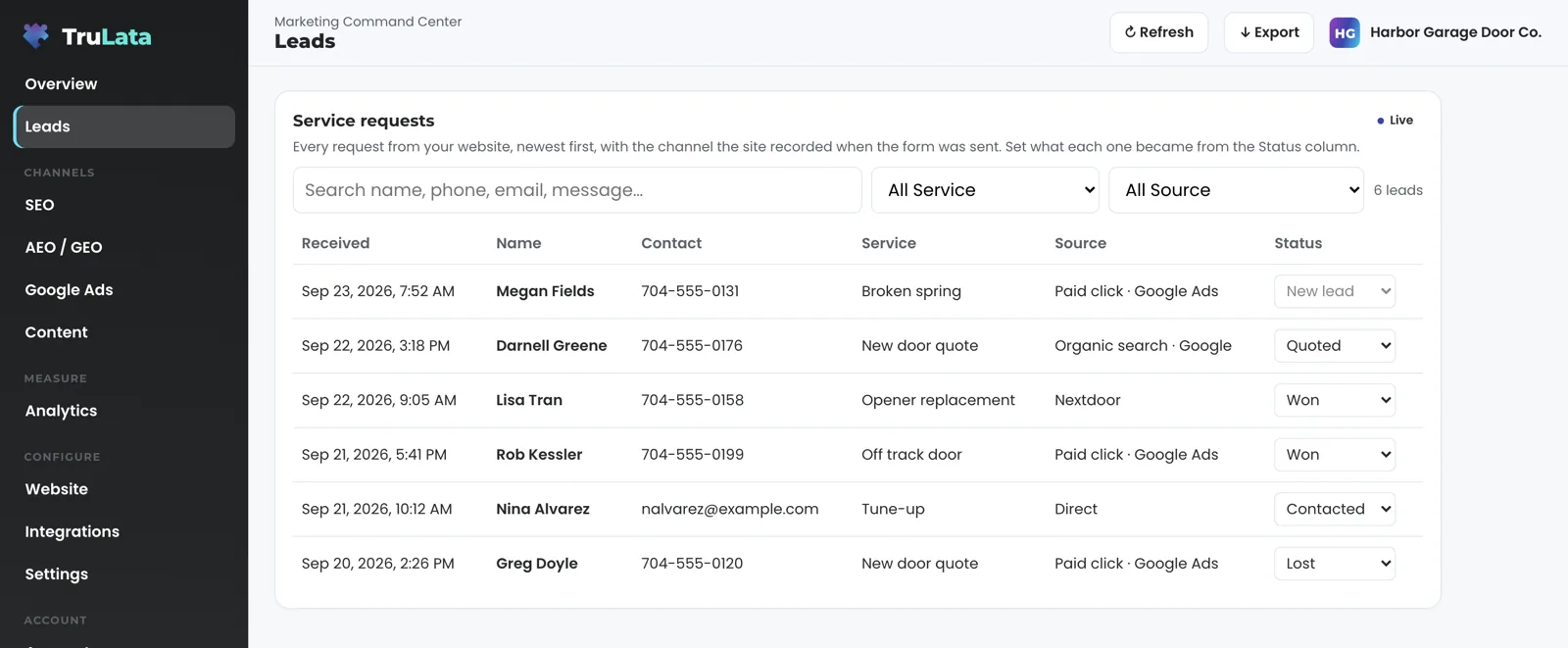
Each row carries the person's name and contact details, what they asked for and the page they submitted from. Where your site's script captured the visit, the handler writes the channel that sent them on the row at submission. Every count on this page starts from that ledger. A lead here is an enquiry your own site received, not a shared enquiry bought from a marketplace, and that difference has its own page.
How do I know which channel sent each lead?
Your site names the channel the moment the form goes in. During the visit, the site's own script notes the page the visitor landed on, the page that sent them and any campaign tags on the link they clicked. The handler reads those at submission and writes the channel on the row. How finely it is named is set per site. One handler we run names a paid click from its click id or paid tag, Google and Bing referrers as organic search, Facebook, Instagram, Yelp and Nextdoor by name, any other host as a referral by hostname, and a visit with no referrer as direct. Another groups the same signals into paid, AI search and organic. Both keep the campaign tags and the referrer on the row. The three-bucket handler keeps the click id in full and the other notes it as present, so you can audit any label back to what the browser sent.
You can see when a visit was not captured. The named handler writes unknown rather than guessing; the three-bucket handler files it as organic; the raw signals stay on the row either way, so you can tell which it was. Read how the source lands on the row and what attribution can say. A lead that arrives by phone rather than by form counts only if your CRM records it, with whatever source your staff entered.
How one handler we run names the channel
- A click id or a paid campaign tagPaid click
- A Google or Bing referrerOrganic search
- Facebook, Instagram, Yelp, NextdoorThe network, by name
- Any other siteReferral, by hostname
- No referrerDirect
- The visit was not capturedUnknown

Your site names the channel the moment the form goes in.
How do I record which leads became jobs?
Your team sets it, from the screen. Where the outcome dropdown is on for your instance, each lead in the Leads view carries a status your staff choose: new, contacted, quoted, won or lost. A submission that is not a lead gets a reason instead: existing customer, spam or sales pitch, wrong number, out of area. The outcome is written to the lead record with the time it was set and stands until your team changes it. Nobody at TruLata sets one for you. A lead with no outcome counts as a lead, and stays one until your team sets its outcome.
That record works for you in two ways. A lead with no status two days after it arrived wears a small badge saying no contact has been marked yet, computed from your own record and nobody's opinion. A lead you mark as not a lead is raised to the team, and one that came through Google's Local Services Ads queues as a refund candidate.
- NewNobody has set an outcome yet
- Contacted, quotedSet by your staff from the screen
- Won or lostWritten to the lead record with the time it was set
- Not a leadWith a reason: existing customer, spam, wrong number, out of area
How do I see what each campaign cost?
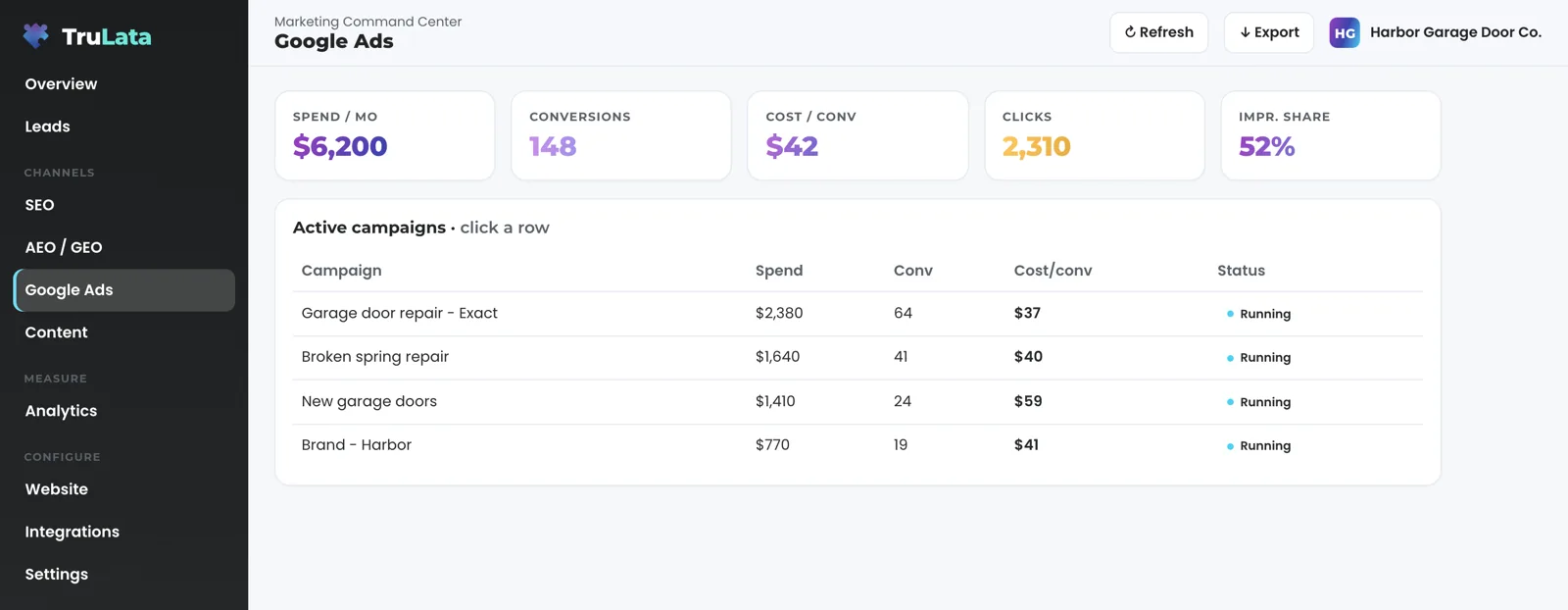
Read spend straight from Google Ads, through its API. The ads view shows spend, conversions and cost per conversion, one row per campaign with its status, and the account totals above. Google publishes that data a few hours behind, and the header stamp says when it was last pulled. Where you run Local Services Ads, that account's spend, the leads Google counted and its cost per lead are read as well.
The conversions column is what Google counted, not your lead count. On an instance whose forms feed the sheet, a daily watch compares the ledger against Ads conversions and GA4 events and raises it when leads are landing while one of them reports zero. The daily change watch behind the ads view reads every change Google logs against the account, and who made it, at 7:05am Eastern each morning, so the spend on this page ties back to who changed what and when.
How do I get to a cost per won job?
Three numbers, one dashboard. Spend by campaign, in the ads view. Leads in the Leads view, source written at submission, outcome set by your team. Payments in the revenue view, live from Stripe and read only: no charge, no refund, no subscription change, no card data held. Divide a channel's spend by the jobs won from it and you have the cost of a won job on that channel. You do that division from numbers you can see today, and a printed cost per won job arrives as it is built. The result is only as good as the outcomes set on the leads, which is why setting one is a dropdown on the row and not a form to fill in later. What the revenue view reads has its own page.
The count comes from your forms and not from the platform for a reason. A tracking tag that stops firing takes the platform's conversion count to zero while your forms keep filling, and a cost per won job computed from that report would call a working channel worthless. Computed from the ledger, it reads what the channel actually produced. On an instance whose forms feed the sheet, the lead watch sets the two counts against each other every morning at 7:20 Eastern, so the gap is a finding the next day rather than a quarter later. The division on this page stays anchored to rows your own site wrote.
The division
- Spend on the channel, from the ads view
- Leads from the channel, source written at submission
- Marked won, by your team
- The cost of a won job on that channel
Divide a channel's spend by the jobs won from it and you have the cost of a won job on that channel.
Where does the proof stop?
At a phone call your systems have not recorded. A phone lead counts when your CRM records it, with the source your staff wrote down, and where you run a call-tracking platform with an API, it is connected during setup so those calls land in the count too. The honest answer to the question in the title starts with the forms, and grows with each system you connect.
The count reads the sources connected to your instance today, and each new connection widens it. After the lead, the outcome your team sets. Each number is as fresh as its source allows: leads, your CRM and Stripe are live; Google Ads and GA4 lag hours intraday; Search Console runs two to three days behind. The header stamp says when the data was last pulled, and every press of Refresh ends in a reloaded page whose stamp says how old the data is. Where you want our team on the numbers as well, the analytics service and managed paid media are the agency counterparts to this page.

Every number on the page, and where it is read from.
| What | Where it comes from | How fresh |
|---|---|---|
| Lead rows | Your website's form handler, appended to a lead sheet server-side | Live, the moment a form is submitted |
| Traffic source, landing page, referrer, campaign tags | Captured on the visit, written on the row at submission | Live |
| Outcome | Set from the screen by your team, written to the lead record with the time it was set | Live |
| Spend, conversions, cost per conversion | Google Ads API, by campaign | Hours behind, set by Google |
| Local Services Ads spend and cost per lead | The Local Services account, where you run one | Hours behind, set by Google |
| Payments, subscriptions, recent charges | Stripe API, read only | Live |
| Pipeline stages | Your CRM, connected during setup | Live |
| Ledger vs Ads vs GA4 | The daily lead watch, where the forms feed the sheet | Daily |
| Phone leads | Your CRM, as your staff record them; a call-tracking platform with an API, connected during setup | As entered |
Every figure behind your cost per won job is one you can trace: leads your own forms received, outcomes your own team set, spend Google reported and payments Stripe recorded. Every job counted as won is one your team marked won, and every revenue figure comes from a payment record.
Questions, answered.
Does this track phone calls?
Through your CRM today: a phone lead counts when your CRM records it, with the source your staff entered. Where you run a call-tracking platform with an API, it is connected during setup.
Who sets the outcome on a lead?
Your team, from the Leads view: contacted, quoted, won, lost, or not a lead with a reason. Each outcome is written to the lead record with the time it was set. Nobody at TruLata sets one for you.
How fresh is each number?
Leads, your CRM and Stripe are live. Google Ads and GA4 run hours behind, set by Google. Search Console runs two to three days behind. The header stamp on the page says when its data was last pulled.
Can the product charge or refund a customer?
It reads Stripe through the API: payments, subscriptions and recent charges, live. The connection is read only, so every charge, refund and subscription change stays yours to make in Stripe, and no card data is held.
What happens when my leads and Google Ads disagree?
A daily watch raises it the next morning. On an instance whose forms feed the sheet, it compares the ledger against Ads conversions and GA4 events and flags leads landing while one of them reports zero. It runs at 7:20am Eastern, so a dead tag, a blind ad account or a stalled form is named the next day rather than at the end of the quarter.
Which tier includes this?
TruLata is on all tiers, and a view appears once its source is connected. Ads operations, where our team runs the account, is on all tiers.
See how it would run
for your business.
15 minutes with TruLata. We show you what your marketing brings in, what each lead costs, and what we would change first.
Book a demo or start a 7-day free trial
No card. It ends on its own after 7 days unless you add one. See pricing.
New here? See what TruLata is. Prefer to write? Send us the one thing you want to know.
Start here: AI marketing platform · AI marketing software · all-in-one marketing platform · marketing automation software · marketing software for small business.
- Refreshed when you open itLive data on page load, never a monthly PDF
- Counted from your own formsLeads recorded server-side, compared daily with Ads and GA4
- Seen in AI answersHow often ChatGPT, Gemini, Claude, Grok, Manus, Google AI Overviews, Perplexity, Meta AI and DeepSeek name you, measured
- Every send loggedProspect emails leave from a review-first queue, and every send is logged.