

Know where each web lead came from, the moment it lands.
Every submission on a site we run is written with its source, in the same row as the name and the phone number, at the moment it is submitted. It survives a tracking tag that stops loading.

What does lead source tracking tell me?
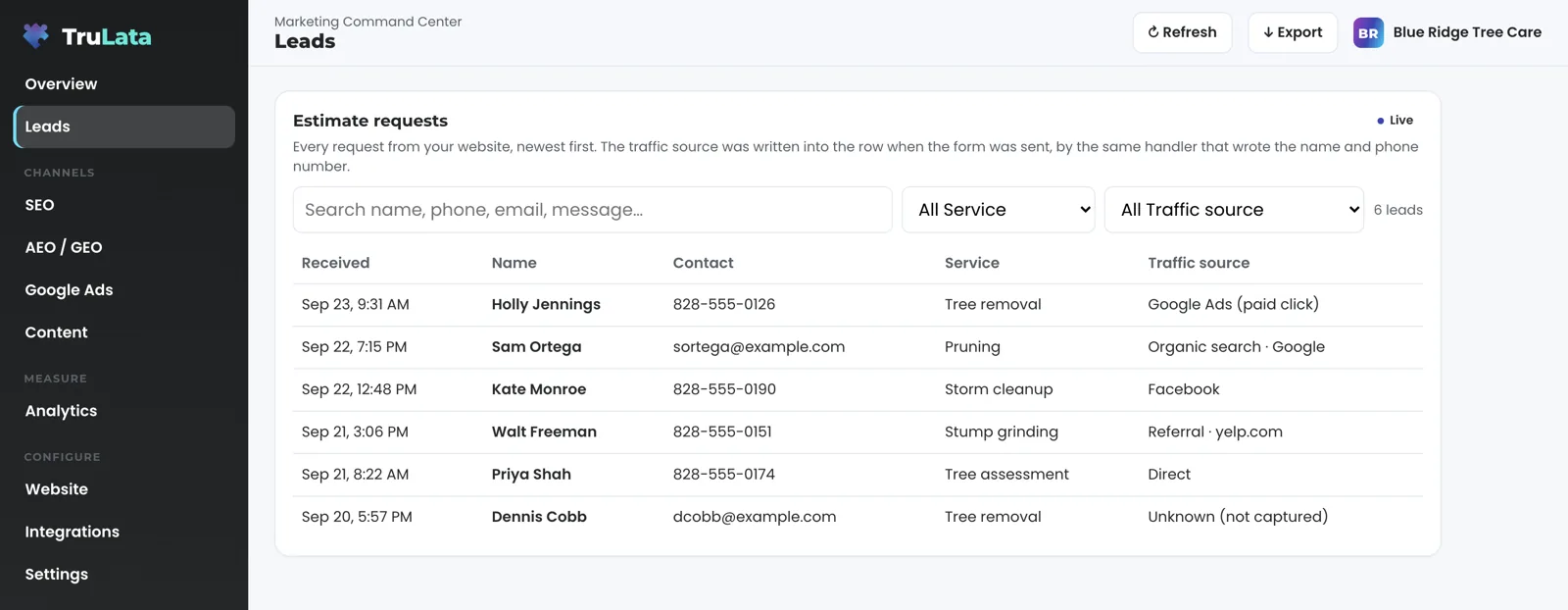
Lead source tracking tells you, for every lead, which channel brought that person to your site before they filled in the form. The record is per lead, not per visit. It sits in the same row as the name, the phone number and what they asked for. Open the list on any day and read, lead by lead: a paid click, a search result, another website, a social network, or someone who typed your address.
It answers a narrower question than attribution. Attribution is a model that shares credit across every touch a customer had. Lead source tracking records one fact at one moment: where this visit began when this form was submitted.
A narrower question
Attribution
- A model
- Shares credit across every touch a customer had
Lead source tracking
- One fact, at one moment
- Where this visit began when this form was sent
- In the same row as the name and phone number
Where does the source come from?
The handler that records the lead records its source. Submit a form on a site we run and the form handler writes one row to a lead sheet server-side and emails your team. The row carries what the person typed and, where the site captures it, where the visit began: the first page they landed on, the address that sent them there, any campaign parameters on that first link, and whether a Google click identifier was present. A few lines of the site's own script note those facts on the first page of the visit and carry them to the form, so they are in hand when the handler writes the row.
The Leads view reads that sheet, newest first. The source column was written at the same moment as the name and the phone number, by the same process.
- The visit beginsThe site's script notes the first page, the referrer, campaign tags and any Google click id
- The facts ride to the formIn hand when the person submits
- The handler writes one rowServer-side, beside the name and phone number, and emails your team
- The Leads view reads itNewest first

The source column was written at the same moment as the name and the phone number.
What will the source column say?
Each lead carries a plain name, not a code. A Google click identifier on the landing link, or campaign parameters naming Google with a paid medium, labels the lead a paid click. A referrer of Google, Bing, DuckDuckGo or Yahoo labels it organic search, with the engine named. Facebook or Instagram names the network. Any other site is a referral, named by its host; Yelp and Nextdoor carry their own names. No referrer, or a page on your own site, is direct: the person typed the address or used a bookmark.
Tag a link yourself, in an email or on a printed piece, and the lead carries the source, medium and campaign exactly as you wrote them. The labels above are those of one site we run; exact names vary by site.
What happens when the source is unknown?
The row says unknown, and the lead still counts. On the site whose labels are shown above, if the start of the visit went uncaptured, the label reads 'Unknown (not captured)'. The lead is still counted, still emailed, still on the list. It is not folded into direct, and it is not handed to the channel spending the most that week. A blank is visible. A guess is not.
The same rule holds for time. The daily check that reads one site's lead sheet keeps a row whose timestamp will not parse, because a lead without a date is still a lead, and dropping it would quiet the count in exactly the way the check exists to prevent. A phone call counts when your CRM records it, and a call-tracking platform you run is connected during setup; a caller who skipped the form has no row and no invented source.
A guess
- Folded into direct
- Handed to the channel spending the most
This row
- Reads Unknown (not captured)
- Still counted, still emailed, still on the list
A blank is visible. A guess is not.
Why not trust the tracking tag?
Tags break, and a broken tag reports zero, not an error. A site keeps taking requests while its measurement is dead, and the platform reporting the zero gives no sign that anything changed. A budget decision made on that zero is a decision made on the measurement rather than on the business.
So the source lives in the row the form handler writes, not in an analytics event. On the day every tag on the site is dead, the row still lands, carrying whatever the site captured at the start of the visit. Google Ads conversions and GA4 key events are read into TruLata and they are useful, but they are the measurement layer on top of the ledger, not the ledger. On one site we run, a daily check at 7:20am Eastern reads the sheet against GA4 and Google Ads and raises it when leads are landing while either reports none, including the day paid leads land while Google Ads reports no conversions (the ads view reads those same Ads numbers).
The day every tag is dead
- GA4 key events: zero
- Google Ads conversions: zero
- Your form handler: the row still lands
- Raised when leads land while either reports none
How is this different from GA4 or Google Ads?
GA4 reports sessions and key events by source, hours behind, and only for the visitors its tag saw. Google Ads reports the conversions its own pixel counted, also hours behind. Both are aggregates. Both depend on a script loading in the visitor's browser. Lead source tracking is one record per lead, written when the form arrives, independent of either. The three should agree, and the useful moment is when they disagree. It is also the plainest case of a record you hold yourself: a sheet your team can open and read, not a platform's report.

How one site we run decides each source.
| Label | How it is decided | What it is read from |
|---|---|---|
| Paid click | A Google click identifier on the landing link, or campaign parameters naming Google with a paid medium | The first link of the visit |
| Tagged campaign | Source, medium and campaign parameters present on the link | The first link of the visit, as you wrote it |
| Organic search | The referrer is Google, Bing, DuckDuckGo or Yahoo | The referring address |
| Social | The referrer is Facebook or Instagram | The referring address |
| Referral | Any other site, named by host; Yelp and Nextdoor by name | The referring address |
| Direct | No referrer, or a page on your own site, with the landing page captured | The referring address and the landing page |
| Unknown | The start of the visit went uncaptured | Left as unknown on purpose |
Your lead and its source land in one row the moment the form is submitted, and your team gets the email at the same time.
Questions, answered.
Is lead source tracking the same as marketing attribution?
They are two different records. Attribution shares credit across every touch a customer had. Lead source tracking records one fact per lead: where the visit began when the form was submitted. Attribution is built on top of that record.
What does the source say for a Google Ads click?
Google Ads (paid click). The label comes from the Google click identifier on the landing link, or from campaign parameters naming Google with a paid medium.
What if the visitor blocked storage or the tracking tag?
The lead still lands. The form handler writes the row, not the tag. If the start of the visit went uncaptured, the source says Unknown (not captured) rather than guessing.
Does it track phone calls?
A phone lead counts when your CRM records it, and a call-tracking platform you run is connected during setup like any other source with an API. The record on this page is one row per form submission.
Why not just use the source report in GA4?
Because GA4 only sees the visitors its tag saw, and it reports hours behind. It is useful, and it is read into TruLata. A lead row written at submission stands on its own, so it keeps counting when the tag stops.
What can I record against a lead afterwards?
An outcome: contacted, quoted, won or lost, set from the Leads view where it offers the status column, and written to the lead record. The outcome is a separate field, and the source stays as it was recorded.
See how it would run
for your business.
15 minutes with TruLata. We show you what your marketing brings in, what each lead costs, and what we would change first.
Book a demo or start a 7-day free trial
No card. It ends on its own after 7 days unless you add one. See pricing.
New here? See what TruLata is. Prefer to write? Send us the one thing you want to know.
Start here: AI marketing platform · AI marketing software · all-in-one marketing platform · marketing automation software · marketing software for small business.
- Refreshed when you open itLive data on page load, never a monthly PDF
- Counted from your own formsLeads recorded server-side, compared daily with Ads and GA4
- Seen in AI answersHow often ChatGPT, Gemini, Claude, Grok, Manus, Google AI Overviews, Perplexity, Meta AI and DeepSeek name you, measured
- Every send loggedProspect emails leave from a review-first queue, and every send is logged.