

First-party data: the records you already own.
The form on your website, the contact in your CRM, the payment in your Stripe account: your business wrote each of those records itself. Here is what the term means, where each record sits when TruLata reads it, and what stays with you if you leave.

What is first-party data?
First-party data is what your business collects itself, on its own properties, from people who chose to deal with you. A visitor fills in the quote form on your website. A customer pays an invoice. A prospect moves from new to quoted in your CRM. Your systems wrote each of those records. Nobody stood between you and the fact.
Two other kinds exist, and the term separates yours from them. Second-party data is another company's first-party data, shared with you under an agreement. Third-party data comes from a vendor who collected it from people who never dealt with you, and who may sell the same rows to your competitors. A marketplace lead is the local-service version: collected on the marketplace's property, not yours, and shared. Compare a purchased lead with one from your own forms.
First-party
- Collected by you, on your own properties
- From people who chose to deal with you
Second-party
- Another company's first-party data
- Shared with you under an agreement
Third-party
- Bought from a vendor
- Collected from people who never dealt with you
Nobody stood between you and the fact.
Which of my records are first-party data?
Four, and your business already holds most of them. Your lead sheet: on every form submission, your website's form handler appends a row server-side with the name, contact details and what the person needs, plus, where the site captures them, the page they were on, the source they arrived from, the landing page, the referrer and any campaign tag on the link. Your CRM: contacts, pipeline stages and the source recorded on each. Your Stripe account: payments, subscriptions and recent charges. Your booking platform, where the business runs on one: jobs and the job pipeline. Send email through a platform and its campaign statistics make a fifth.
Google Analytics and Google Ads measure; they do not record. Both watch activity on your property, but a tag in the visitor's browser takes the measurement, Google's system holds it, and it publishes hours behind. The lead sheet records what happened. The analytics measure it. That difference decides how to read key events and conversions: a measurement can be wrong about a form submission, and a row written server-side at the moment of submission is the record of it.
Records your business already holds
- Lead sheet: every form submission
- CRM: contacts, stages, sources
- Stripe: payments, read only
- Booking platform: jobs
- Email platform: campaign stats
- Written by your own systems
- Read where it lives, with access you grant
Why does my own record beat the platform report?
The platform report can stop being true without telling you. Your own record keeps counting. A browser tag gets blocked, or breaks after a site change. A conversion label gets renamed. A platform changes what it counts. A row appended server-side on submission stands on its own: it is written whether or not a tag fires or a cookie survives. Where the site captures them, the source, landing page and referrer ride along inside the submission, noted on the visitor's first page. That is how the source of each lead is captured without an analytics tag.
A daily watch reads the record against the report. Where your forms feed the lead sheet, it reads the leads that landed against the conversions Google counted, every morning at 7:20am Eastern, and raises the day the two diverge. A dead tag, a blind ad account or a stalled form is flagged the next day instead of at the end of the quarter. It can do that because the sheet exists: a row written on your server gives the platform's count something to be checked against.
The platform report
- Measured by a tag in the visitor's browser
- Blocked, broken or relabelled without telling you
- Published hours behind
Your own record
- Written server-side on submission
- Stands whether or not a tag fires
- Read against the report at 7:20am ET
Where does my data sit when TruLata reads it?
In your accounts, with the exceptions listed below. TruLata reads your data where it lives, and what it keeps is listed below. Where your forms feed it, lead rows live in a Google Sheet your own site's form handler writes on every submission, and every lead is emailed to your team as it lands; the Leads view reads that sheet newest first. The outcome you set on a lead is kept in a separate record on our service, so the sheet stays exactly as your site wrote it. Your CRM, Stripe and booking platform stay where they are, read through access you grant during setup. A change to one of them is a logged request or an engine write through its own API, and the Stripe connection is read only: it never creates a charge or a refund. Content produced for you is filed as a Google Doc in a client folder on our Drive.
Six things sit with us. The dashboard snapshot, the numbers you see, served from a managed cloud service. The per-client map that says which of your accounts is which. The outcome record for each lead. The content we file for you, as Google Docs in a client folder on our Drive. The requests you send from the screen, logged. And, today, the lead sheet itself, held in our Google account and read by the Leads view. Your inbox and calendar stay outside the screen today and connect during setup where your engagement calls for them. Your customers' card data stays with Stripe, and we never read it. Read the full statement, including who can open the dashboard, on the page about what we read and where it lives.
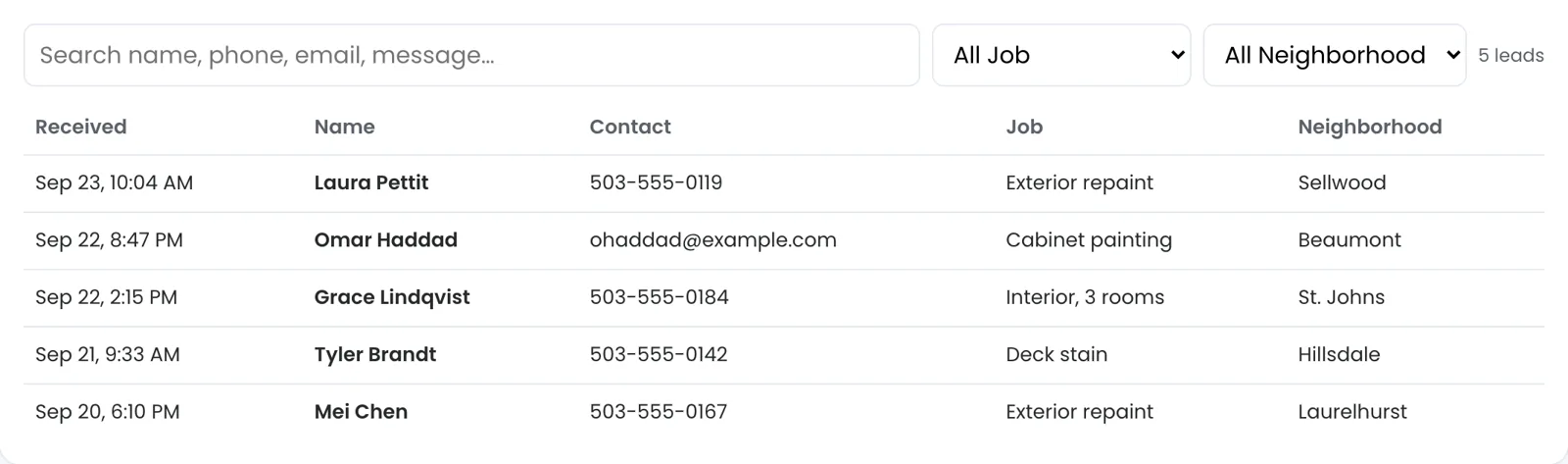

Your systems wrote each of those records.
What do I keep if I stop?
Everything you started with, plus every lead already emailed to your team. Every tier is month to month. Stop, tell us the date, revoke our manager access in your own Google consoles, and we empty your seat list. Your CRM, Stripe and booking platform were always yours and stay yours, in your hands the whole time, with no export to run.

Where each first-party record sits.
| Record | Who holds it | What TruLata does with it |
|---|---|---|
| Website form submissions | A lead sheet your site writes on every submission, where your forms feed one | Reads it newest first; keeps the outcome you set in a separate record, so the sheet stays as your site wrote it |
| CRM contacts and pipeline | Your CRM, whichever you run | Reads stages and sources; a change there is a logged request |
| Payments and subscriptions | Your Stripe account | Reads records; never creates a charge or refund |
| Jobs and job pipeline | Your booking platform, where you run on one | Reads it live |
| Email campaign statistics | Your email platform | Reads statistics, live |
| Inbox, calendar | Connected where your engagement calls for it | Reads what you connect; card data stays with Stripe, never read |
A form submission written server-side is the record, an ad platform's conversion count is a measurement of it, and when the two disagree the record wins.
Questions, answered.
What is the difference between first-party and third-party data?
Who collected it. You collect first-party data yourself, on your own properties, from people who dealt with you. A vendor collects third-party data from people who never dealt with you and sells it on, usually to more than one buyer.
Is Google Analytics first-party data?
Its origin is; its measurement is not. It watches your own property, but a tag in the browser takes the measurement, Google's system holds it and it publishes hours behind. Treat it as measurement about your records, not the record itself.
Is a lead I buy from a marketplace first-party data?
It is third-party: the marketplace collected it on its own property, and it is a shared lead. TruLata counts leads from your own forms and your own CRM.
Who owns the lead sheet?
The rows are yours. The sheet itself is held in our Google account today, and every lead is emailed to your team as it lands. TruLata reads the sheet; the outcome you set on a lead lives in a separate record on our service, so the sheet stays as your site wrote it.
Do you read my customers' card data?
Stripe holds it, and we never read it. We read payment and subscription records, and the connection is read only: it never creates a charge or refund.
What do I keep if I leave?
Everything you started with: your CRM, Stripe, booking platform and Google accounts, with our access revoked by you, plus every lead already emailed to your team.
See how it would run
for your business.
15 minutes with TruLata. We show you what your marketing brings in, what each lead costs, and what we would change first.
Book a demo or start a 7-day free trial
No card. It ends on its own after 7 days unless you add one. See pricing.
New here? See what TruLata is. Prefer to write? Send us the one thing you want to know.
Start here: AI marketing platform · AI marketing software · all-in-one marketing platform · marketing automation software · marketing software for small business.
- Refreshed when you open itLive data on page load, never a monthly PDF
- Counted from your own formsLeads recorded server-side, compared daily with Ads and GA4
- Seen in AI answersHow often ChatGPT, Gemini, Claude, Grok, Manus, Google AI Overviews, Perplexity, Meta AI and DeepSeek name you, measured
- Every send loggedProspect emails leave from a review-first queue, and every send is logged.