

Run every location from one screen, and know which one each number belongs to.
A second location, a second brand under the same owner or six trucks across three towns break a single-account dashboard: the numbers merge, and a blended number hides which half is working. TruLata keeps each business's numbers under the business they belong to.

Run two businesses on one account and read each one on its own.
Put two businesses on one TruLata dashboard and their traffic, search and listing numbers are pulled, stored and shown separately. Behind every TruLata sits a per-client connection map with one row per account we read, and where one owner runs two businesses our team configures the workspace per business at setup: each business's Google Analytics property, content track, Search Console site and Business Profile listing are pulled, stored and shown under that business, with a switcher between them and a home that puts them side by side. Every account reaches your screen through a confirmed row. During setup we surface the likely matches, a person confirms each account your dashboard reads, and a channel your business runs without is recorded as not applicable. A gap is a deliberate answer, not a blank.
Two unrelated businesses under one owner are not summed on the traffic, search, content or listing views. A combined session count or a combined lead count would describe a company that exists on paper alone, so the workspace keeps each business's count its own. The same configuration keeps a second location readable on its own instead of folded into a total.
One map, a row per account
- Business one: its GA4 property, Search Console site and listing
- Business two: its own property, site and listing
- Each shown under its own business
- A switcher between them
- Never summed into one count
Read every Business Profile listing as its own location.
Each listing gets its own row in the map. Add our Google account as a manager on every listing you want read. We list the locations that access exposes, and a person confirms each one into the map. Reads run one listing at a time, so one listing's reviews, rating and listing performance are stored under that listing alone. The Business Profile connection page covers what is read and what is not.
Grant manager access in your own console and revoke it there, per listing. We hold no password for any of them.

Know which location or service line produced each lead.
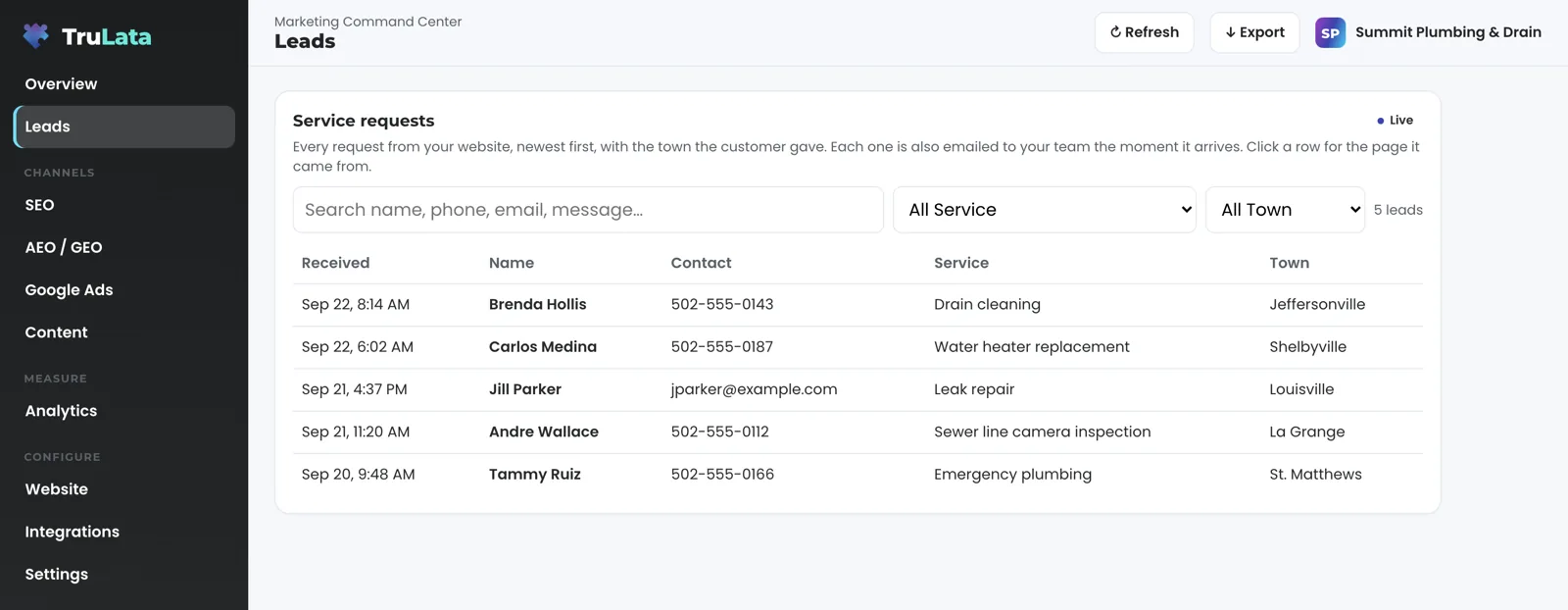
The lead row tells you. When a visitor submits a form on your site, the form handler appends a row to a lead sheet server-side. Where we build your forms to capture it, that row carries the page the form sat on and the town the visitor gave. The Leads view reads that sheet newest first, with the town on each row and the page in its detail. If your site separates locations or service lines by page, the row already names which one produced the lead. The row itself needs no tag to fire and no cookie to survive: it is written the moment the form lands. The landing page, referrer, traffic source and campaign identifier ride with it when the page captured them on the way in.
For a multi-truck business, the town field carries the location. A quote request from the edge of your service area shows as exactly that. Set the outcome from the screen (contacted, quoted, won, lost, not a lead) and it is stored against the lead and shown on its row. A call straight to a truck counts where your CRM records it, and where you run a call-tracking platform with an API it is connected during setup. The lead ledger page explains why the count is kept server-side, and the attribution use case follows one lead from click to won job.
See each location's spend and cost per conversion on its own row.
You get it per campaign. The Ads view reports spend, conversions and cost per conversion for every campaign across every account in the map. Where each location or business runs its own campaigns, that location's figure is its own campaign row. The account-level totals sum every mapped account, which is why campaigns, not accounts, carry the location. Google publishes performance hours behind, so the Ads view reads through yesterday. The daily change watch covers every mapped account, not only the first: at 7:05am Eastern it reads each account's change history and its user list, and raises material changes made by anyone other than us, including a setting Google switches on by itself and any change to who has access. The ads reporting page describes the watch and the rules it sorts by.
Where the business runs on a CRM or booking platform, the Jobs view reads jobs and the job pipeline live. It appears once that connection exists. Pipeline stages and sources come from your CRM, whichever you run.
An account total
- Every mapped account summed
- Says what the business spent
- Not which location spent it
A campaign row
- One per location, where each runs its own
- Spend, conversions and cost per conversion
- Every mapped account watched at 7:05am ET

Campaigns, not accounts, carry the location.
Give each location manager their own sign-in.
Invite each manager from the Team view. It shows the seats on your plan and who holds them; add a manager by typing their email and choosing Member or Admin. They sign in at login.trulata.com with a single-use magic link, so each manager signs in without setting or sharing a password. Every seat opens the same workspace: a manager sees the screen you see, and every request from it goes to your team as a logged ticket. Remove a seat from the Team view and it stops working within thirty seconds.
Seat counts follow the tier: three on Starter, three on Launch, ten on Growth and unlimited on Command. A manager per location needs a seat each; the tier table has the numbers and the team view page has the detail on roles and revocation.
- Invite from the Team viewThe manager's email, then Member or Admin
- They sign inAt login.trulata.com with a single-use magic link
- The same workspaceEvery request from it reaches your team as a logged ticket
- Remove a seatAccess ends within thirty seconds
Connect several accounts in the same setup.
Setup is the same, with more rows in the map. Access comes first: manager invitations on each Google property, account and listing, plus the access you grant our team to connect your CRM, Stripe, your booking platform, ActiveCampaign and your forms from the inside, so your side is the grant. Then comes the first pull, the baselines and keyword set per business, and the ads watch on each account. After that come the content cadence, the ads reports, the email flows and the goals. Views appear as their sources connect, so a location confirmed during setup is on screen before a location whose owner has not yet granted access.
If you already run the marketing across several locations yourself, the local services marketing page describes the agency side of the same work, run by our team on the same screen.
Setup, with more rows in the map
- Accessmanager invitations on every property, account and listing
- First pullbaselines and keywords per business, the ads watch on each account
- Runningcontent cadence, ads reports, email flows, goals
- Each locationon screen once its access is granted
What stays separate, and how fresh it is.
| What | How it is kept apart | How fresh |
|---|---|---|
| Sessions, sources, pages, key events | One GA4 property per business | Hours behind intraday, set by Google |
| Campaign spend, conversions, cost per conversion | One row per campaign, across every mapped account | Through yesterday; change history read daily at 7:05am Eastern |
| Queries, impressions, clicks, average position | One Search Console site per business | 2 to 3 days behind, set by Google |
| Reviews, rating, listing performance | One Business Profile listing per location | Through yesterday, on Google's schedule |
| Leads | One row per submission; page and town on the row; landing page, referrer, traffic source and campaign identifier on the sheet where the form captures them | Live, the moment a form is submitted |
| Seats | One per manager, Member or Admin | Removed from the Team view; access ends within 30 seconds |
Every account your dashboard reads was suggested by us and confirmed by a person, and a location whose access is still to be granted gets its own row the day the grant lands.
Questions, answered.
Can two businesses share one TruLata dashboard?
Yes. Our team configures the workspace per business at setup: each business's Google Analytics property, content track, Search Console site and Business Profile listing are pulled, stored and shown under that business, with a switcher between them. Traffic, search, content and listing numbers are not summed across the two; the Ads view carries the location on the campaign row.
Does each location need its own Google Business Profile listing connected?
Only the listings you want read. Add our Google account as a manager on each one; a person confirms it into the map on its own row, and it is read as that listing.
How do I know which location a lead came from?
From the lead row. Where we build the form to capture it, the row records the page the form sat on and the town the visitor gave, written server-side when the form is submitted, and the sheet keeps the landing page, referrer, traffic source and campaign identifier when the page captured them on the way in. The Leads view shows the town on the row and the page in the lead's detail.
Can each manager have a login?
Yes. Invite them by email as Member or Admin and they sign in with a single-use magic link. Seats are three on Starter, three on Launch, ten on Growth and unlimited on Command.
Does a manager's seat show only their location?
Every seat opens the same workspace today, and the separation is in the data rows; a per-location view is added as it is built.
Do you track calls to individual trucks?
Where your CRM records the call. Where you run a call-tracking platform with an API, it is connected during setup.
See how it would run
for your business.
15 minutes with TruLata. We show you what your marketing brings in, what each lead costs, and what we would change first.
Book a demo or start a 7-day free trial
No card. It ends on its own after 7 days unless you add one. See pricing.
New here? See what TruLata is. Prefer to write? Send us the one thing you want to know.
Start here: AI marketing platform · AI marketing software · all-in-one marketing platform · marketing automation software · marketing software for small business.
- Refreshed when you open itLive data on page load, never a monthly PDF
- Counted from your own formsLeads recorded server-side, compared daily with Ads and GA4
- Seen in AI answersHow often ChatGPT, Gemini, Claude, Grok, Manus, Google AI Overviews, Perplexity, Meta AI and DeepSeek name you, measured
- Every send loggedProspect emails leave from a review-first queue, and every send is logged.