

Your numbers on one screen early in setup, and you keep every password.
Send four manager invitations and our team connects the rest with access you grant. Your Overview fills with live numbers, and the engines run on a schedule.

How do I connect everything without handing over a password?
Send four manager invitations and your part is mostly done. Add our Google account as a manager on your Analytics property, your Search Console site, your Google Ads account and your Business Profile listing. Each takes a few minutes in your own console. Each can be revoked there on the day you choose. We never ask for your account passwords.
Our team connects the rest from the inside with access you grant: your CRM, Stripe, your booking platform, your email platform and your website's forms. Anything with an API connects, and a connector we have not built yet is built during setup, so your part ends at granting access. Stripe is read only; nothing here creates a charge or a refund.
Your instance is built by one command and checked before anyone opens it. It is copied from the canonical engine, and a preflight stops the deploy if the engine files differ from canonical, the Access gate is missing, the redirect is a 301 instead of a 302, the fallback snapshot is absent, or any other account's name appears anywhere in your files.
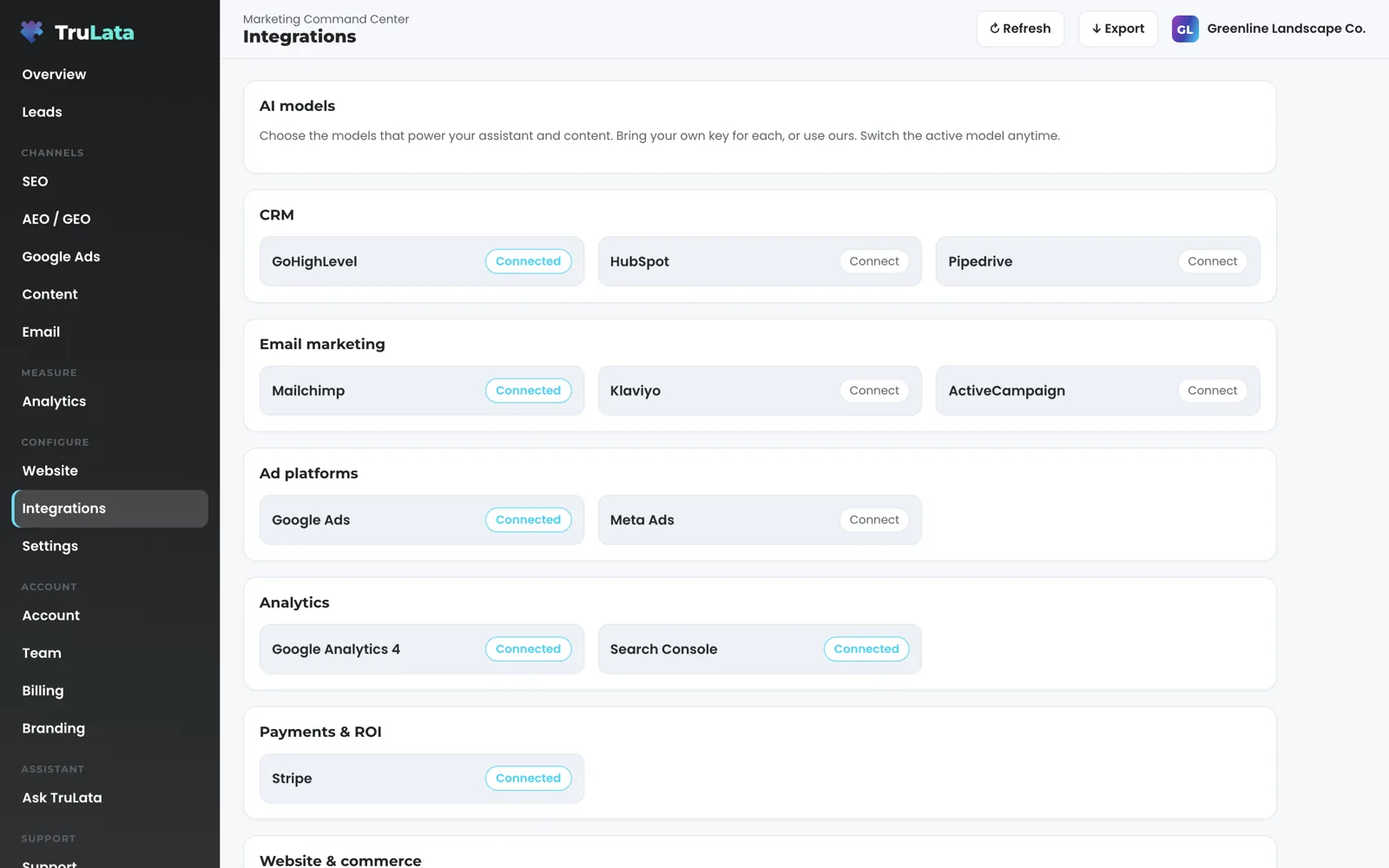
Your login works by the end of the week. Sign in with a single-use magic link from login.trulata.com, a link in your inbox in place of a password, and if you hold more than one seat a chooser asks which to open. Open the Integrations view and read the state of every source: Connected where the link is live, Connect where an invitation is still waiting. Invite your team from the Team view by email, as Member or Admin. The view counts seats used against plan seats and says Seat limit reached when you are at it. Seats are three on Starter, three on Launch, ten on Growth and unlimited on Command. A removed seat stops working within 30 seconds.
What we need from you: the four invitations, and a written note of which accounts are which.
- Send four invitationsAnalytics, Search Console, Google Ads and Business Profile, each from your own console
- We link the restYour CRM, Stripe, booking platform, email platform and forms, with access you grant
- Your instance is builtFrom the canonical engine, and a preflight stops the deploy if anything is off
- Your login worksA single-use link from login.trulata.com, no password
When do I see my own numbers?
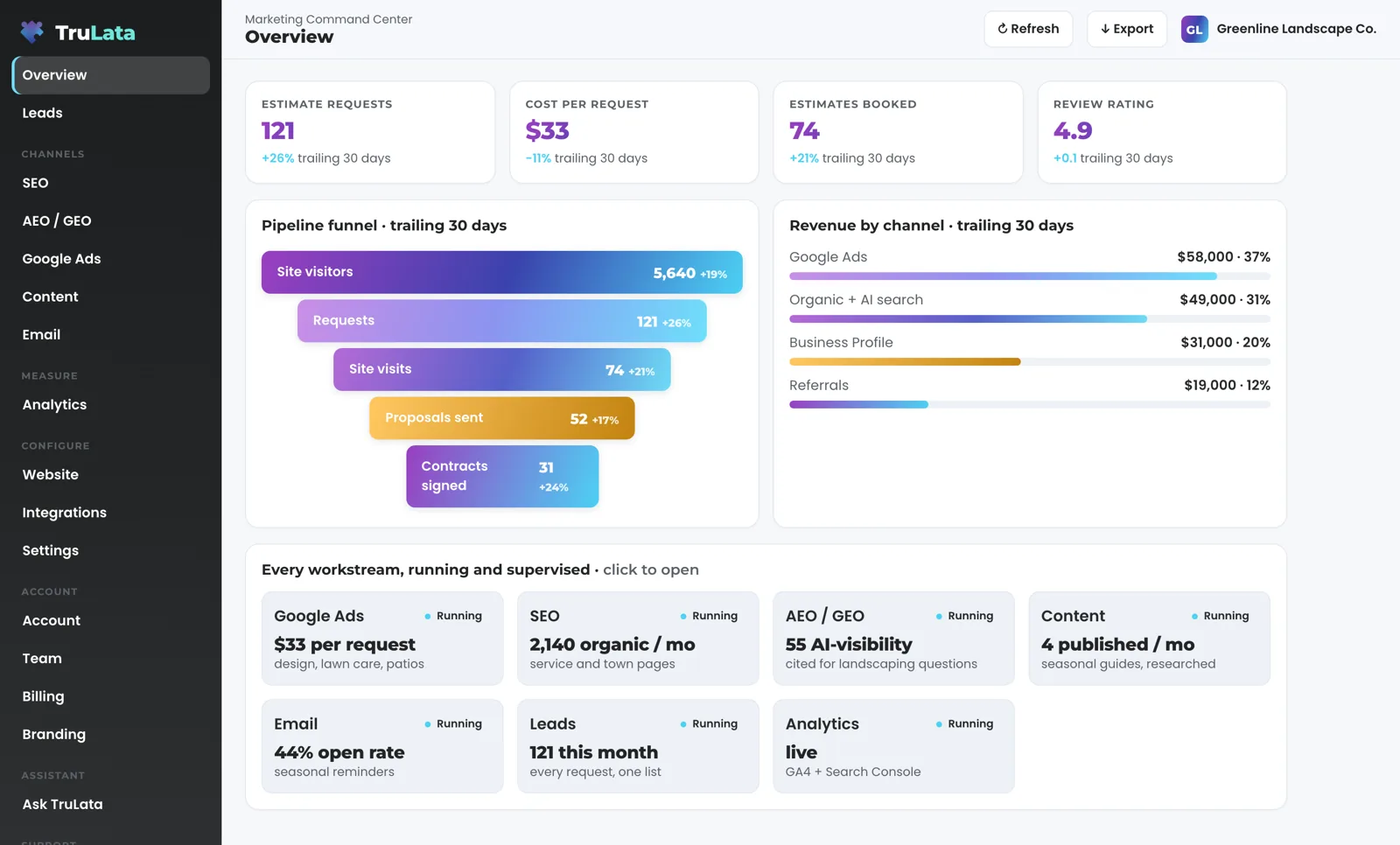
Open the Overview and the first live pull has filled it from the accounts connected during setup. The headline cards sit at the top; click one and it opens with the number now, the change and the window. Below them sit the pipeline funnel, revenue by channel and a grid of every workstream with its status. The stamp in the header, on the line above the page title, gives the time of the last pull. The Refresh button at the right of the same bar starts a new one.
Baselines are taken this week so that later movement means something. Your question set is written with you, worded the way a buyer types it, and put to ChatGPT, Gemini, Claude, Grok, Manus, Google AI Overviews, Perplexity, Meta AI and DeepSeek through an API. A blank answer is recorded as a measurement error and leaves the denominator; it is never scored as a miss. The first run reads baseline, carries its date, and is re-run as the program moves.
The keyword set for the search view is agreed the same week. Its positions are Search Console average positions, and Search Console runs two to three days behind, so the first search numbers you read are two to three days old. Search volumes come from Google's keyword planner through our Ads access. Google AI Overviews are measured on this search view, not on the answer-engine view.
The Google Ads change watch starts on your account. Every morning at 7:05 Eastern it reads the change history, separates our own writes and routine noise from material changes made by anyone else, and reads the account's user list directly, because a change to who can see your account never logs as a change event.
What we need from you: the questions your customers ask, in their words.
Baselines are taken this week so that later movement means something.
When does the work start running on a schedule?
On Launch, Growth and Command, the content cadence is set and the first piece moves through the pipeline: queued, researching, writing, draft, then approved and posted, with your approval if you want one. A topic passes two checks before anyone writes it: real search volume above a floor and below the head terms a small firm cannot win, and a top ten that big publishers do not already own. A missing answer fails the gate, so every topic that reaches writing has measured demand behind it. Dedupe reads the titles already published on your site, and the research step cites current sources. Each piece is filed as a Google Doc in a Drive folder kept for your account, with a featured image generated for it. Auto-publish is a setting on your instance.
The ads watch has read your account every morning since it was connected, and a material finding is reported the same morning. It reads the change history and the account's user list together, sets our own writes and Google's routine churn aside, and raises a material change made by anyone else. A setting switched on under any login reaches your team the next morning. A new address given access reaches it the same way, because the user list is read directly.
Where your website's forms feed the lead sheet, the lead watch starts at 7:20 Eastern every morning. It runs five checks across the sheet, Analytics and Ads, and each names a plain failure: the site's tracking tag is broken, website leads are not being counted, paid leads are not reaching Google Ads, an ad campaign has gone dark, the lead form has gone quiet. The leads that landed are checked against the conversions Google counted, so a dead tag, a blind ad account or a stalled form is flagged the next day rather than at the end of the quarter. The second check compares the sheet with Analytics, which is where a lead your site received and a tag missed shows up.
Email flows are confirmed running where you send through your email platform. Program goals are set on the Overview, in a card titled what we hold ourselves to, so the target sits next to what happened. As setup completes, every view whose source is connected is on your screen with your numbers in it. A source still waiting on its connection shows Connect in the Integrations view, and its view arrives the moment the link is live. The Jobs view appears where your CRM or booking platform runs your jobs, and it shows a coming-soon card until its data is trustworthy.
Once setup is running
- Ads change watchMaterial findings reported the same morning
- Lead watchFive checks, where your forms feed the sheet
- ContentQueued to posted, filed as a Google Doc, on Launch, Growth and Command
- Email flowsConfirmed running where you send through your email platform
- Program goalsThe target beside what happened

The scheduled work runs whether anyone is at a desk.
What do I have to do after setup?
Open the screen. The scheduled work runs whether anyone is at a desk. The page pulls live when you open it, and a pull runs behind the request when the snapshot is older than five minutes. The fallback snapshot bakes at 12:01am Central every night, and a night's pull that fails leaves the previous page up rather than an empty one. The ads watch reads at 7:05am Eastern, the lead watch at 7:20am Eastern where it applies. Prospects are sourced weekly on Command, and content moves on your cadence on Launch, Growth and Command.
The judged work stays with a person. Prospect emails leave from a review-first queue; a person releases them, or the queue releases on the schedule set for the engagement, and every send is logged with the draft, the mailbox and the time. Replies are classified and shown, and not-interested or bounced addresses are suppressed from further sends. Hand-picked named accounts are always reviewed by a person before a send. Budget and bid changes in your ad accounts are made within the limits set for your engagement and land in your account's own change history.
Ask for changes from the screen. Set an outcome on a lead and it writes to the lead record. Request a website change, a content topic, a keyword, a category or a targeting change and it goes to your team with a ticket number, and the ticket lands in your Support tab. A request from the screen goes to your team as a logged ticket; the engine's writes to your ad accounts and your site go through their APIs and land in each account's own change history.
Know the ceiling before you open it. Your CRM, Stripe, your booking platform, website leads and email stats are live. Google Ads and Analytics intraday numbers lag by hours. Search Console runs two to three days behind. Meta metrics arrive on Meta's schedule where it is connected. Customer card data is never read, and your inbox and calendar stay outside the screen today, connecting where your engagement calls for it. A phone lead counts when your CRM records it, and a call-tracking platform you already run connects during setup like any other source with an API. Hover the stamp and it says which of two things happened: pulled live when you opened the page, or live refresh unreachable and showing the last saved snapshot.
Know the ceiling before you open it
Live
- Your CRM
- Stripe
- Your booking platform
- Website leads
- Email stats
Hours behind
- Google Ads
- Analytics intraday
Days behind
- Search Console, two to three days back
What does setup cost?
Setup is included. Starter is $400 a month, Launch $650, Growth $1,200, and Command is scoped per engagement. Every tier is month to month and nothing is metered. An annual commitment takes twenty percent off the monthly. Command carries no number on the site. A managed strategy retainer is an add-on on any tier, scoped with you.
Leaving is the same shape as arriving. Revoke our manager access in your own consoles and the Google connections end there.
Arriving
- Add our Google account as a manager in four consoles
- Grant access to your CRM, Stripe and forms
Leaving
- Revoke our manager access in your own consoles
- The Google connections end there
- Month to month on every tier
What should I check in the demo before I sign?
Open demo.trulata.com. It opens with your name and email. The company is fictional and every number is illustrative, and the engine code is the same code your instance will run, so the screen you see is the screen you get.
Check two things on the screen, and know the third. Open the Integrations view and read how a source is labelled: Connected where the link is live, Connect where it is not; that is your own first days as invitations land. Open the Overview and find the stamp in the header line above the page title; on your instance it reads the time of the last pull. Refresh appears on your instance, where accounts are connected; the demo, with a fictional company behind it, shows the stamp alone. On your instance, Refresh sits at the right of the top bar: a pull takes from two seconds to a little over three minutes, the page polls until the snapshot moves, then it reloads to the view you were reading. Every path through it ends in a reloaded page, never an error.
Then check your own accounts against the ceiling above, on three points. Which of your sources are live and which lag. Whether your jobs run on a CRM or booking platform, because that decides when the Jobs view appears; anything with an API connects. Whether your website's forms feed the lead sheet, because that is where the lead watch runs. Write to us with the answers.
Setup, step by step.
| What | Where it comes from | How fresh |
|---|---|---|
| Access | Access and connections; instance built from the canonical engine and preflighted | You: four manager invitations |
| First pull | First live pull; answer-engine baseline; keyword set; ads change watch on | You: your customers' questions |
| Running | Content cadence and first piece on Launch, Growth and Command; ads findings; lead watch; email flows; program goals | You: approvals if you want them |
| After | Live pull on open; nightly bake 12:01am CT; ads watch 7:05am ET; lead watch 7:20am ET; weekly sourcing on Command | You: open the screen |
| Ceiling | CRM, Stripe, booking platform, leads and email stats live; Ads and Analytics lag hours; Search Console 2 to 3 days | The header stamp gives the time of the last pull |
A source still waiting on its invitation shows Connect in your Integrations view, and its view arrives the moment the link is live, filled with your numbers rather than a sample.
Questions, answered.
What happens during setup?
Access during setup, the first live pull and the baselines early in setup, the engines running on a schedule as setup completes.
What do I have to do?
Send four manager invitations from your Google consoles, confirm in writing which accounts are which, and give us the questions your customers ask in their words. On Command, describe the customer profile prospects are sourced to.
Can I see my numbers before setup is finished?
Yes. The first live pull early in setup fills the Overview, each view appears as its source connects, and the stamp in the header says when the data was pulled.
What if one of my sources is not connected yet?
It connects. Anything with an API connects, and a connector we have not built yet is built during setup. Until a source is live it shows Connect in the Integrations view and its view waits, then arrives filled with your numbers rather than a sample. Everything else runs.
Is there a wizard or a form to fill?
Your part is four manager invitations. Our team makes every other connection from the inside with access you grant, so the keys and the consent screens are ours to handle.
Do I hand over any passwords?
You keep every password. Every Google connection is a grant you can revoke in your own console, and the rest are made by our team with access you grant. Customer card data is never read, and your inbox and calendar stay outside the screen today, connecting where your engagement calls for it.
Is there a setup fee?
Setup is included. Every tier is month to month with nothing metered.
See how it would run
for your business.
15 minutes with TruLata. We show you what your marketing brings in, what each lead costs, and what we would change first.
Book a demo or start a 7-day free trial
No card. It ends on its own after 7 days unless you add one. See pricing.
New here? See what TruLata is. Prefer to write? Send us the one thing you want to know.
Start here: AI marketing platform · AI marketing software · all-in-one marketing platform · marketing automation software · marketing software for small business.
- Refreshed when you open itLive data on page load, never a monthly PDF
- Counted from your own formsLeads recorded server-side, compared daily with Ads and GA4
- Seen in AI answersHow often ChatGPT, Gemini, Claude, Grok, Manus, Google AI Overviews, Perplexity, Meta AI and DeepSeek name you, measured
- Every send loggedProspect emails leave from a review-first queue, and every send is logged.