

See every job, its stage and what you won, without opening your CRM.
Open the Jobs tab and your pipeline is on the screen, read live from your CRM or booking platform, beside the leads and the ad spend that produced it. You count jobs, not leads, so the dashboard counts jobs too.

Which quote requests became jobs, and where does each one stand?
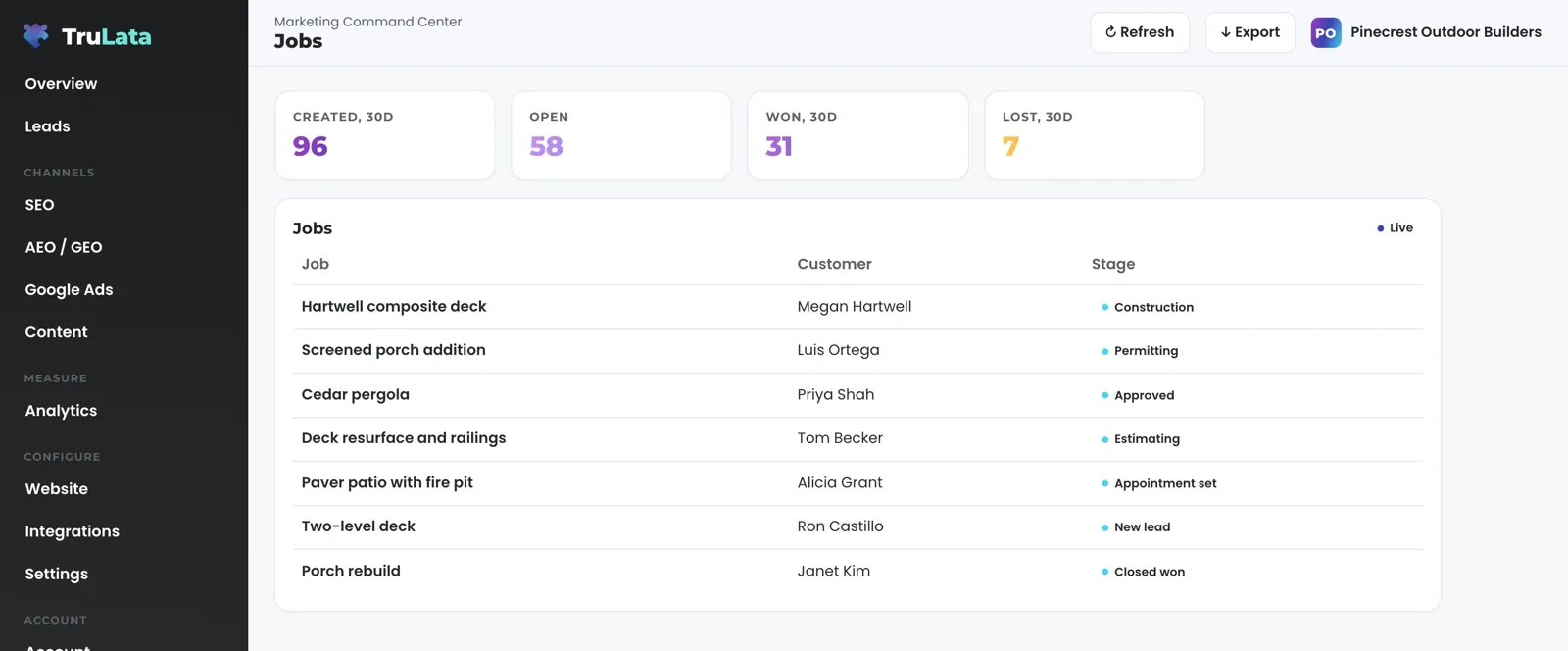
Open the Jobs tab and the table loads in front of you: every job in your pipeline, its customer and its stage, under a Live badge. Click a row and it opens to the customer, the stage and whether the job is closed. The stage text is the one your team set in your CRM or booking platform, and each stage reaches the screen under the name your team gave it.
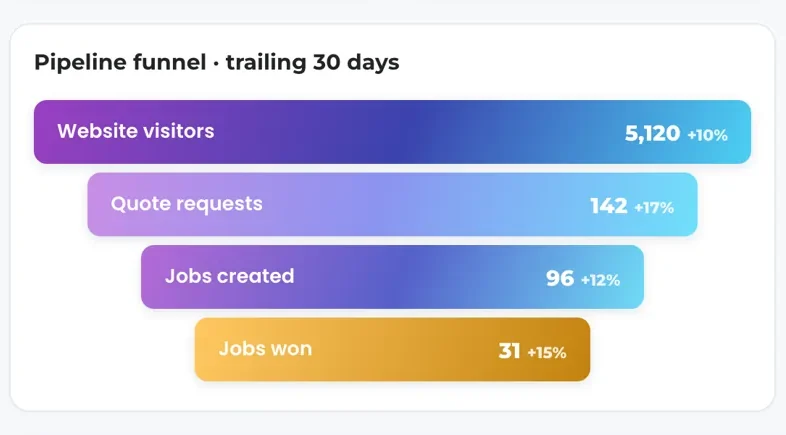
Four counts ride on the same feed: jobs created, open, won and lost. The Overview funnel reads two of them, jobs created and jobs won, so the path from website visit to won job reads top to bottom on one card. The feed also returns how many jobs sit at each stage, so a funnel that looks stale is explained rather than guessed at.
The read runs every time you open the tab. A job your office created an hour ago is on the screen the next time anyone opens it, and the Refresh button in the topbar pulls again. Export the table as a CSV in one click. Every tab exports what it shows.
The view reads. Your team creates, edits and closes jobs in the platform it already works in, and the tab reflects each change on the next open.
How does a lead on my website turn into a job on this screen?
Three systems each do one thing, side by side. Your website's form handler appends every submission to a lead sheet server-side and emails your team the moment it arrives. The Leads view reads that sheet newest first. Your team turns the request into a job in your CRM or booking platform and moves it through stages. The Jobs view reads those stages as they stand.
Know which leads you paid for. On one instance we run, the form stamps each row with where the visitor came from, resolved from click ids, campaign tags and the first page they landed on, and the Leads list shows it beside the page they submitted on. Where the booking platform holds a source of its own, the list borrows it for the same name: a paid click reads as Google Ads and a referral reads as a referral. Where no record matches, the row carries no source label rather than a guess.
Once the platform is connected and its data holds up, the Overview funnel grows two stages, jobs created and jobs won. Visitors, leads, jobs, won: one card, top to bottom, with your ad spend one tab over.
Three systems, one job each
- Your form handler: the lead sheet and the email
- The Leads view: the sheet, newest first
- The Jobs view: each stage as it stands
- The Overview funnel: jobs created and jobs won
What does one job look like, from quote request to won?
Take a contractor whose pipeline runs New lead, Appointment set, Estimating, Approved, Permitting, Construction, then Closed won or Closed lost. A homeowner submits a quote request on Tuesday. The lead sheet gets the row and your team gets the email the same minute. Your office creates the job, and it appears on the Jobs tab as New lead the next time anyone opens it.
Thursday the estimator moves it to Estimating, and the badge changes the next time the tab loads. The following week it reads Approved, then Construction. When the office marks it Closed won, the won count moves by one on the last stage of the Overview funnel. A job counts as won when its stage reads Closed won or it carries a close date, as lost when the stage reads Closed lost, and as open otherwise.
Nobody has to remember to set a close date. On the instance this pipeline comes from, no one ever set one, and a count that read close dates alone reported zero won no matter what the team sold. The count reads the stage first for that reason.
Records named test, and practice jobs filed against your own staff, are filtered out before the count is taken, so the funnel measures customers, not setup. The screen fills itself. The stages move in the platform your team already works in, and the tab reflects them.
One job, stage by stage
- New leadFrom the quote form; the sheet row and the email the same minute
- EstimatingThe badge changes on the next load
- ApprovedThen Construction
- WonThe last funnel stage moves by one

Nobody has to remember to set a close date.
Why is there no Jobs tab on my account yet?
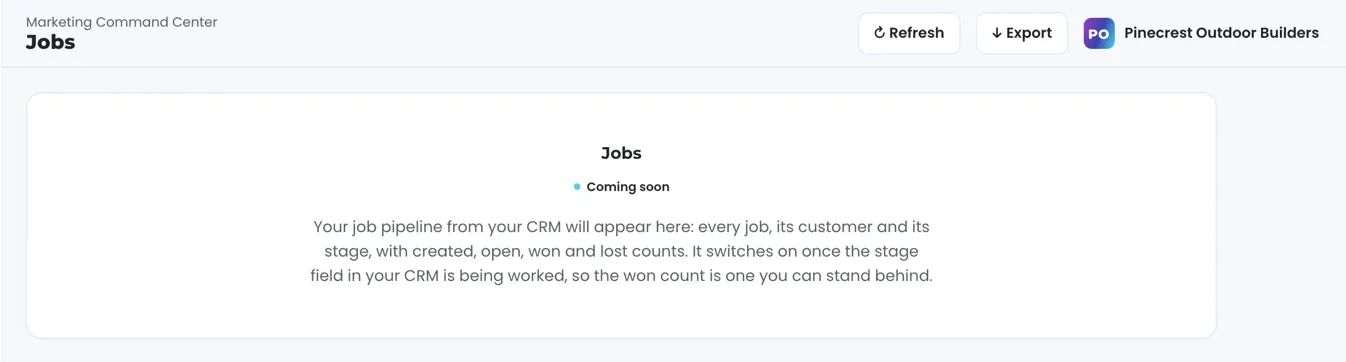
Your CRM or booking platform is not connected yet, or its data is not yet worth putting in front of you. A business that runs on neither keeps a navigation without the tab, and the tab arrives the day a platform is connected. A business whose connection exists but whose data is not yet trustworthy sees a coming-soon card: the view's title, a Coming soon badge and one paragraph saying what will appear there.
Trustworthy has a specific meaning here. On one instance we run, the feed was wired and working, and after the setup records were filtered out it held three real jobs, one past New lead and none marked won. Publishing that table would have printed zero won as if it were a result, when it was a team that had not started working the stage field. The card stayed up instead. It flips to the live table by removing one setting, with no code change.
The same rule runs across the whole product: a tile is filled honestly or it is labelled. The nightly bake at 12:01am Central leaves the previous page up rather than ship an empty or broken one, so a failed pull leaves you reading yesterday's page.
A tile is filled honestly or it is labelled.
What runs on its own, and what stays with my team?
The reads run on a schedule whether anyone is at a desk. The page loads last night's snapshot first, asks a cache for the live payload, and if the snapshot is older than five minutes starts a pull in the background. The Jobs table itself is fetched from your platform on every open of the tab. Refresh starts an async pull that takes from two seconds to a little over three minutes, and the page reloads when the stamp moves, with the stamp saying how old the data is. The 12:01am Central bake rebuilds the fallback snapshot for every client from one registry.
The stages stay with your team. Your CRM, your booking platform and your Business Profile hold their own records, and the dashboard reads them as they stand. What the screen writes is short: an outcome on a lead, to the lead record; a website change request, or a content, keyword, category or targeting change request, to our team, logged. Budget and bid changes in your ad accounts are made within the limits set for your engagement and land in your account's own change history.
Connecting it is our work, not yours. First you grant access and our team connects your CRM or booking platform from the inside. Then the first pull lands with your baselines. Your side is the grant, and we never ask for your account passwords. The platform key lives server-side as a secret on the edge function behind your login, so it stays out of the browser.
- You grant accessYour side ends there
- We connect itYour CRM or booking platform, from the inside
- First pullYour baselines land
- Every openThe table is fetched from your platform
What does the Jobs tab show today, and what should I check in the demo?
Today the table carries the job, the customer and the stage, and the counts are counts. The money sits on the Revenue view, read from Stripe where you take payment there, and a job value column is added as the platform read grows. A job counts as won when your team marks it won: the count is as good as the stage field, which is why the tab waits at coming soon until that field is being worked.
Cost per won job is two numbers today. Spend and cost per conversion sit on the Google Ads view, the won count sits here and on the funnel, and dividing one by the other takes a moment; the single printed figure is added as it is built. Phone calls count where your CRM or booking platform records them, and where you run a call-tracking platform with an API it is connected during setup. Your inbox and calendar stay outside the read today, and card data is never read.
When your platform is unreachable, the tab says so. The table reads Could not load right now, the funnel leaves its two job stages off until the next pull, and the header stamp says when the last good pull ran. A connected pipeline with no jobs in it reads No jobs in the pipeline yet.
Any CRM or booking platform with an API connects, and a connector not built yet is built during setup. Where your business runs on neither, the Leads view keeps counting, and the Revenue view reads Stripe where you take payment there.
In the demo, check the shape rather than the tab. The fictional company in the demo shows the Overview funnel rather than a Jobs tab. What it has is the Overview funnel, from website visitors down to jobs won, which is the card the Jobs view extends on a connected account. Click a stage and watch it open. Press Refresh and watch the header stamp move. Open the Leads view to see the ledger a job starts from. Every client runs the same engine code the demo runs, so what you see there is what your account will do.
What the Jobs view reads.
| What | Where it comes from | How fresh |
|---|---|---|
| Job pipeline | Your CRM or booking platform, through its API | Live, each time you open the tab |
| Job, customer and stage | Your CRM or booking platform | Live |
| Counts: created, open, won, lost | Derived from the pipeline; won reads the stage or a close date | Live |
| Funnel stages on the Overview | Jobs created and jobs won, added once the data holds up | Live |
| Visibility | Shown only when connected; a coming-soon card until trustworthy | Per account |
| Writes from the tab | Requests to your team, logged as tickets; stages stay in your platform | As you send them |
The Jobs tab appears when your CRM or booking platform is connected, shows a coming-soon card until its data is trustworthy, and prints the pipeline as soon as its data holds up.
Questions, answered.
Which job platform is supported?
Any CRM or booking platform with an API: GoHighLevel, HubSpot, Salesforce, Pipedrive, Insightly and others, and a connector not built yet is built during setup. Where your business runs on neither, the Leads view keeps counting, and the Revenue view reads Stripe where you take payment there.
Does it change anything in my CRM or booking platform?
The view reads the pipeline as your team set it. Stages move in the platform your team already works in, and the tab reflects them on the next open.
Why is my Jobs tab missing?
Because your CRM or booking platform is not connected on your account yet. The tab appears once it is, and shows a coming-soon card until its data is trustworthy.
What does coming soon mean on the Jobs view?
The connection exists and the data behind it is not yet worth putting in front of you. Removing one setting flips the card to the live table, with no code change.
Is the pipeline live?
Yes. The table is read from your CRM or booking platform each time you open the tab, and the Refresh button pulls again.
What happens when my platform is down?
The table reads Could not load right now, and the Overview funnel leaves its two job stages off until the next pull. The header stamp says when the last good pull ran.
Can I see cost per won job?
As two numbers today. Spend and cost per conversion sit on the Google Ads view, the won count sits here and on the Overview funnel, and you divide the one by the other; the single printed figure is added as it is built.
Is the Jobs view on every plan?
It ships with TruLata dashboard, on all tiers, and it appears once your CRM or booking platform is connected.
Does a phone call count as a job?
Where your CRM or booking platform records it. Where you run a call-tracking platform with an API, it is connected during setup.
See how it would run
for your business.
15 minutes with TruLata. We show you what your marketing brings in, what each lead costs, and what we would change first.
Book a demo or start a 7-day free trial
No card. It ends on its own after 7 days unless you add one. See pricing.
New here? See what TruLata is. Prefer to write? Send us the one thing you want to know.
Start here: AI marketing platform · AI marketing software · all-in-one marketing platform · marketing automation software · marketing software for small business.
- Refreshed when you open itLive data on page load, never a monthly PDF
- Counted from your own formsLeads recorded server-side, compared daily with Ads and GA4
- Seen in AI answersHow often ChatGPT, Gemini, Claude, Grok, Manus, Google AI Overviews, Perplexity, Meta AI and DeepSeek name you, measured
- Every send loggedProspect emails leave from a review-first queue, and every send is logged.