

See which searches show your business, and which ones earn the click.
Add our Google account to your Search Console property. The search view then reads the queries your site appeared for, with impressions, clicks, click-through rate, average position and the pages that earned them, two to three days behind on Google's schedule, and it says so on the screen.

Which searches show my business, and do people click?
Read five numbers, all from Google's own search analytics for the property you connect: the queries your site appeared for, the impressions each earned, the clicks each earned, the click-through rate the two produce, and the average position your result was shown at. Next to the queries, see the pages that earned the clicks and the split by device and by country. Pick any date range, add a comparison window, and every query and page shows its prior value and the change.
Totals stay honest across any window. Clicks and impressions add up. Click-through rate and position do not, so the view recomputes both from the totals instead of averaging day by day, where a day with two impressions would weigh the same as a day with two thousand. Week and month views fold up from the daily rows.
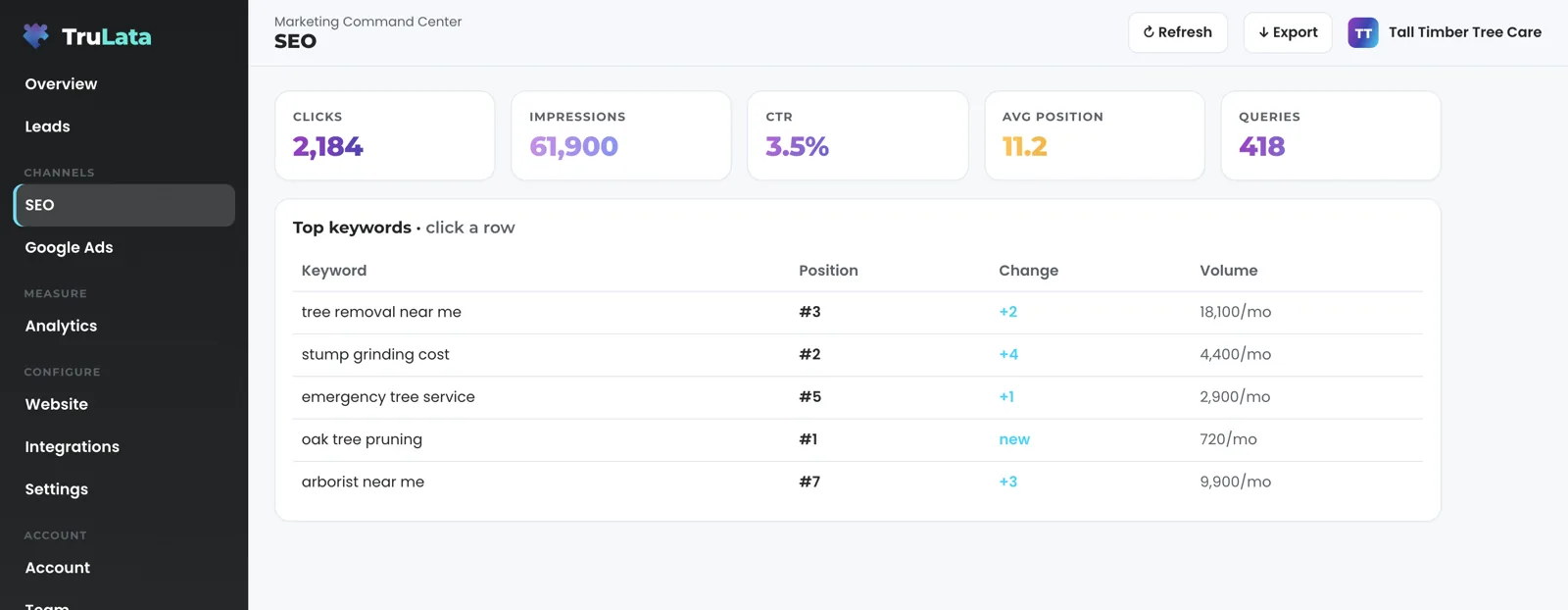

See which searches show your business, and which ones earn the click.
Where do I see it on my dashboard?
Open the search view of TruLata. Under the range picker, the tiles and the trend chart, the rankings table comes first, sorted best position first: keyword, rank, prior rank, change and searches. Lower is better, and inside ten means the first page. It leads the page and runs to sixty queries, because a table sorted by clicks hides a term at number one that nobody has clicked yet. Below it sit the top queries by clicks and the top pages, then devices and countries. Three tiles above carry clicks, impressions and click-through rate for the range.
The live panel switches on once a Search Console property is mapped to your business. Until then the view shows last night's snapshot. Google's AI Overviews are measured here on the search view. The answer-engine view is separate and covers ChatGPT, Gemini, Claude, Grok, Manus, Google AI Overviews, Perplexity, Meta AI and DeepSeek.
- TilesClicks, impressions and click-through rate for the range
- Where you rank on GoogleBest position first, up to sixty queries
- Top queries by clicksQuery, clicks, prior and change
- Top pagesPage, clicks, prior and change
- Devices and countriesClicks by each
Is the position column a rank I can trust?
Trust it for what it is: Search Console's average position, not a rank tracker. Across every impression a query earned in the window, it is the mean of where your result appeared, weighted by those impressions. A rank tracker asks Google one question from one place on one day and writes down one number. Search Console records the real searches that showed you and averages them, so the same phrase can read one number in a tracker and another here without either being wrong. You see the number Google measured, named for what it is.
Two rules keep the column honest. A query with fewer than three impressions in the window stays off the rankings table, because one stray impression is not a ranking. A change shows only against the prior window's average for the same query, and a phrase with no prior reads as new, so a move in the column is a real move rather than the arrival of a new phrase.
A rank tracker
- Asks Google one question
- From one place, on one day
- Writes down one number
Search Console average position
- Every real search that showed you in the window
- Averaged, weighted by impressions
- Fewer than three impressions stays off the table
You see the number Google measured, named for what it is.
How fresh is my search data?
Two to three days behind, set by Google. Search Console releases performance data two to three days after the searches happen, so the last days of any window are still filling in when you look. A window that ends today has empty trailing days on every site, not only yours. The view says so in a note, so the empty right edge of a chart reads as days still filling in, not a drop.
Every source on the dashboard runs at its own ceiling. Your CRM, Stripe, your booking platform, website leads and email statistics are live. Google Ads and the analytics connection run hours behind intraday. Search Console runs days behind. Press Refresh and the dashboard pulls again and moves what can move; Google releases its data on its own schedule, and the view shows the newest day released and says so. What live means per source is written down in one place.
Why the right edge of the chart is empty
- People searchYour result is shown
- Still filling inThe view says so in a note
- Google releases the dataThe newest day released is the one you see
What do I have to do to connect it?
Send one invitation. In your Search Console, add our Google account as a user on the property. Read access is all the product asks for: its Search Console scope is read only, so it cannot change anything on your property even if you grant more. Our team maps the property to your business in the per-client map, the same map that holds your analytics property and your ads account, and the live panel switches on the next time the view opens. The view reads one Search Console property per business today, the one mapped at setup, and a second website is mapped as its own property where it is set up for your instance.
The invitation is the whole setup on your side, and no password changes hands. Revoke the invitation in the same screen you granted it in, whenever you choose. The invitation goes out during setup of setup, alongside the analytics and ads invitations. The security page lists every write path the product has; this connection reads. The numbers this connection reads are how you measure the program our team runs on your site, on the same screen where you read them.

What the connection reads.
| What | Where it comes from | How fresh |
|---|---|---|
| Queries: clicks, impressions, CTR, position | Google Search Console, your property | 2 to 3 days behind, set by Google |
| Top pages by clicks | Google Search Console | 2 to 3 days behind, set by Google |
| Average position | Search Console average, weighted by impressions | 2 to 3 days behind, set by Google |
| Devices and countries | Google Search Console | 2 to 3 days behind, set by Google |
| Comparison window | Two Search Console windows, prior value per row | 2 to 3 days behind, set by Google |
| Property | Search Console site list for our account | Chosen at setup |
A position tells you where your result appeared, a click tells you someone chose it, and a lead tells you what the site sent you. That is why the clicks column sits beside the position column, and why the Leads view counts what your own forms recorded.
Questions, answered.
What does the Search Console connection read?
Queries, impressions, clicks, click-through rate and average position, the pages that earned the clicks, and the split by device and country, for any date range with an optional comparison window.
Is the position a live rank?
It is Search Console's average position: the mean of where your result appeared across every impression in the window, weighted by impressions, and the view labels it that way rather than as a rank tracker.
Can you make the data fresher than two to three days?
Google releases Search Console data two to three days after the fact, on its own schedule. The view shows the newest day released and notes that the last days are still filling in, and every live source on the dashboard moves on the same Refresh.
Do I have to give you a password?
You add our Google account as a user on the property in your own Search Console, and you remove it there whenever you choose, so no password changes hands. The product's Search Console scope is read only.
Does it show Google's AI Overviews?
Through the search view, not the answer-engine view. This connection feeds it, and Google reports the appearances inside the same queries, impressions and clicks rather than as a separate report. The answer-engine view is separate and covers ChatGPT, Gemini, Claude, Grok, Manus, Google AI Overviews, Perplexity, Meta AI and DeepSeek.
What if I have more than one website?
One Search Console property is read per business today, the one mapped at setup. A second website is mapped as its own property where it is set up for your instance.
See how it would run
for your business.
15 minutes with TruLata. We show you what your marketing brings in, what each lead costs, and what we would change first.
Book a demo or start a 7-day free trial
No card. It ends on its own after 7 days unless you add one. See pricing.
New here? See what TruLata is. Prefer to write? Send us the one thing you want to know.
Start here: AI marketing platform · AI marketing software · all-in-one marketing platform · marketing automation software · marketing software for small business.
- Refreshed when you open itLive data on page load, never a monthly PDF
- Counted from your own formsLeads recorded server-side, compared daily with Ads and GA4
- Seen in AI answersHow often ChatGPT, Gemini, Claude, Grok, Manus, Google AI Overviews, Perplexity, Meta AI and DeepSeek name you, measured
- Every send loggedProspect emails leave from a review-first queue, and every send is logged.