

Know what your ad spend bought, and catch the changes nobody made on purpose.
Connect Google Ads and the ads view shows what each campaign spent and what it bought. At 7:05 Eastern every morning a watch reads your change history and your user list, and every change the engine or our team makes lands in your account's own change history.

What do I see for each campaign?
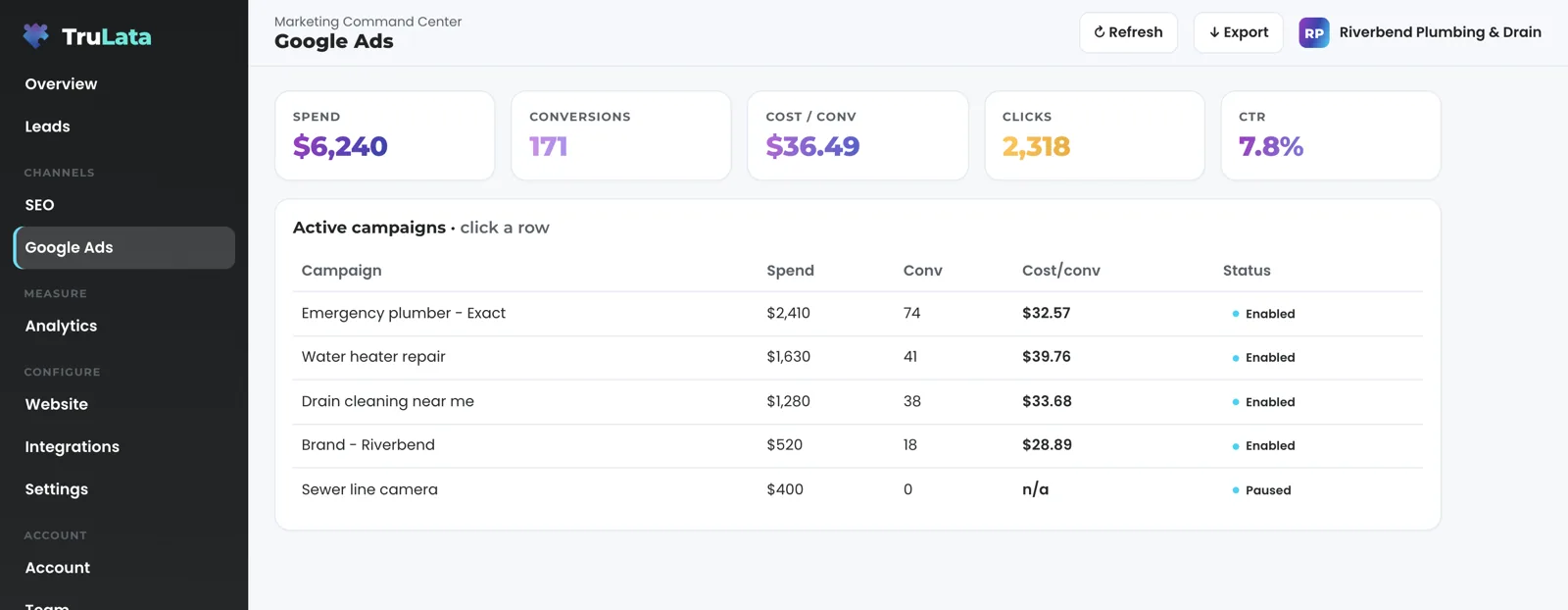
See one row per campaign: spend, conversions, clicks, click-through rate and status. Removed campaigns drop out. Cost per conversion, click-through rate and cost per click at the top of the view are calculated from the totals of the range you pick rather than averaged across campaigns, so each campaign counts by its weight. Every figure covers an explicit date window, not a preset that quietly caps at thirty days. The total at the top of the ads view is summed from those rows, so the headline and the table under it agree.
Google publishes Ads performance a few hours after the fact. The view shows the newest point Google has released, and the header stamp says how old it is. Open the dashboard on a snapshot older than five minutes and a pull starts in the background. A nightly bake keeps a fallback page in place, so there is always a page to open.
How do I connect my account, and how do I revoke it?
Grant access. We never ask for your account password. Link your account to our manager account, or grant our Google account access from your own account's access settings. The same code reads both routes, so the view is the same whichever way you connect. Remove either grant in your own console at any time and the connection ends there.
Our team maps the account to your business during setup. The first pull runs, and the change watch is on your account before setup ends. The setup page walks through those weeks.
Two ways in, one view
- A link to our manager account
- User access you grant in your own account
- The same ads view either way
- No password held
- Revoke in your own Ads console at any time
How do I know who changed my account, and when?
At 7:05 Eastern every morning, one job reads the change history of every mapped account: what was edited, when, under whose login and through which tool. That last field tells a recommendation Google applied on its own apart from a person's edit. Three classes are judged before anything is filtered: an AI setting switched on, a change to who has access, and a change to how conversions are counted. A change of that kind is always raised, even when our own tooling made it. Our own API writes, the bulk of the history, are then set aside as noise, along with routine churn such as negative keyword hygiene. What remains is judged against a fixed rule table, and a material change reaches the team the same morning.
Two things Google's change history leaves out are read separately. Google logs no change event when someone is given access, so the watch snapshots your account's user list every day, with each person's role, the date of the grant and who made it, and compares it with the previous run. It snapshots your conversion actions and conversion goals the same way, so a change to how conversions are counted shows even when nobody touched a campaign. Most of what a change history holds is routine, so what reaches you each morning is the short list that is not.
- ReadThe change history of every mapped account: what, when, whose login and which tool
- Judge firstAn AI setting switched on, a change to access, a change to how conversions count: always raised
- Set asideOur own API writes and routine churn such as negative keyword hygiene
- RaiseWhat remains is judged against a fixed rule table; a material change reaches the team the same morning
Most of what a change history holds is routine, so what reaches you each morning is the short list that is not.
What does it catch that a report would miss?
A performance report tells you the spend moved. It does not tell you who moved it, and that is the question the watch answers every morning. An AI-driven setting switched on under any login is raised the same day, whether a person switched it or Google's own recommendation applied it. So is a new address given access to the account. So is a change to how conversions are counted. Those three classes are judged before any filtering, so they reach the team even when our own tooling made the change.
Two of those three are invisible to a report. A grant of access writes no change event at all, and a conversion setting can move without a campaign being touched, so the watch reads your user list and your conversion actions directly and compares each run with the one before. The third sits in a history that is mostly routine writes, which is why the watch sorts that history for you rather than handing you the raw log. All three reach the team the morning after they happen.
A performance report
- Tells you the spend moved
- Leaves out who moved it
- Shows nothing for a grant of access, which writes no change event
The 7:05am watch
- Who changed it, under which login, through which tool
- An AI setting switched on under any login
- A new address given access, read from the user list
- A change to how conversions are counted

Know what your ad spend bought, and catch the changes nobody made on purpose.
Are the keyword search volumes Google's own numbers?
Yes. They come from Google's keyword planner, requested through our Ads access. For a list of phrases the connection returns average monthly searches, competition level and the low and high top-of-page bid, defaulting to United States and English. Those figures are the demand side of the content engine's topic gate: a topic is written when people search for it. An empty answer from the planner counts as unknown rather than zero demand. The gate then judges the strongest secondary phrase that did resolve; if none did, it holds the topic as unverifiable and records the reason, so every piece written has demand behind it.
The same Ads access serves the reporting and the planner, and a keyword tool you already run, such as Semrush, Ahrefs or Moz, is connected beside it during setup.
From Google's keyword planner
- Average monthly searchesPer phrase, through our Ads access
- CompetitionGoogle's level for the phrase
- Top-of-page bidThe low and the high
- DefaultsUnited States and English
- An empty answerCounted as unknown, never as zero demand
Do Google's conversions match my real leads, and who edits my campaigns?
Where your website forms feed the server-side lead ledger and we have wired the comparison for your site, a second job at 7:20 Eastern each day compares that ledger with what Ads and GA4 counted. It reads the gap in both directions: paid leads landing while Ads reports zero, which points at a dead tag or a blind account, and a form that has gone quiet against its own recent pace. Where it is wired, the comparison runs every morning, so a broken count is flagged the next day rather than at the end of the quarter.
A request from the screen goes to your team as a logged ticket; the engine's writes to your ad accounts and your site go through their APIs and land in each account's own change history. A targeting or keyword request made from the screen goes to the team and is logged; the security page lists every write path the product has. Our team manages Google Ads search on all tiers, and every edit we make lands in the same change history the watch reads, so your own record shows what we did and when. Budget and bid changes are made within the limits set for your engagement and land in your account's own change history. Where you or your existing agency run the account, the changes are yours; on every account mapped to us the view reports and the watch guards. Tiers are on the pricing page; the fully managed alternative is paid media services.
Every morning, on a mapped account
- Ads change watchChange history, user list and conversion actions, against the run before
- Lead ledger checkYour form ledger against what Ads and GA4 counted, where it is wired
- FlaggedA dead tag, a blind account or a quiet form, rather than at the end of the quarter
What the Google Ads connection reads.
| What | Where it comes from | How fresh |
|---|---|---|
| Campaign performance | Google Ads API, one row per campaign | Hours behind, set by Google |
| Account totals | Summed from the campaign rows | Hours behind |
| Change history | Google Ads change events, every mapped account | Read daily at 7:05am Eastern |
| Account users | Google Ads account access list, compared run to run | Read daily, because Google logs no change event for an access grant |
| Conversion actions and goals | Snapshot, compared run to run | Read daily |
| Keyword search volumes | Google keyword planner, through our Ads access | Average monthly searches as published by Google |
| Lead comparison | Your server-side ledger vs Ads conversions vs GA4 | Daily at 7:20am Eastern, where forms feed the ledger and the comparison is wired for the site |
A request from the screen goes to your team as a logged ticket, the engine's writes go through Google's API, and every edit made in the account, ours included, shows in the change history the watch reads the next morning.
Questions, answered.
Do I have to give you my Google password?
Your password stays with you. Link your account to our manager account, or grant our Google account access from your own account's settings. Revoke either grant in your own console and the connection ends when you do.
How far behind are the ads numbers?
Hours, set by Google. The view shows the newest point Google has published and the header stamp says how old it is.
What time does the change watch run?
7:05am Eastern, every day, on every account mapped to a client.
Does it see when someone is given access to my account?
Yes. Google's change history has no event for an access grant, so the watch reads your account's user list directly each morning and compares it with the previous run.
Can the dashboard change my campaigns?
A request from the screen goes to your team as a logged ticket, and the engine's writes to your ad account go through Google's API and land in your account's own change history. Where our team manages the account, which is all tiers for search, edits are made in the account itself and show in the same change history.
Where do the keyword search volumes come from?
Google's keyword planner, requested through the same Ads access. It returns average monthly searches, competition and a top-of-page bid range, and an empty result counts as unknown rather than zero demand.
See how it would run
for your business.
15 minutes with TruLata. We show you what your marketing brings in, what each lead costs, and what we would change first.
Book a demo or start a 7-day free trial
No card. It ends on its own after 7 days unless you add one. See pricing.
New here? See what TruLata is. Prefer to write? Send us the one thing you want to know.
Start here: AI marketing platform · AI marketing software · all-in-one marketing platform · marketing automation software · marketing software for small business.
- Refreshed when you open itLive data on page load, never a monthly PDF
- Counted from your own formsLeads recorded server-side, compared daily with Ads and GA4
- Seen in AI answersHow often ChatGPT, Gemini, Claude, Grok, Manus, Google AI Overviews, Perplexity, Meta AI and DeepSeek name you, measured
- Every send loggedProspect emails leave from a review-first queue, and every send is logged.