

Open the page and see your pipeline, counted live from your own GoHighLevel sub-account.
GoHighLevel is one of the CRMs TruLata connects, read from your own sub-account. The funnel on your Overview counts the opportunities in a named pipeline in your own sub-account, live, and your pipeline stays yours to run; a request from the screen goes to your team as a logged ticket.

Which GoHighLevel account feeds my dashboard?
Your own sub-account feeds the dashboard. Two GoHighLevel connections exist, and they do different jobs. The first is your business's contact record in our CRM: one record, with our notes and tasks against it, so our team keeps your engagement on one thread. The second is your own sub-account, the location you run your pipeline from and, where we post for you, your social from. The dashboard reads the second. Both sit under one client identity in our per-client map, so neither is mistaken for the other, and the panel our team uses shows only the last four characters of your sub-account id.
Our team connects your sub-account in the first week of setup, with access you grant, and does the whole connection for you. The token stays server-side and never reaches a browser. The panel our team uses shows your sub-account id masked to its last four characters. Where we post your social through the same sub-account, the Social view reads its post analytics from there too.
Two GoHighLevel connections, one client
Your record in our CRM
- One contact for your business
- Our notes and tasks against it
- Keeps your engagement on one thread
Your own sub-account
- The location you run your pipeline from
- Pipelines, opportunities and sources, read live
- The one the dashboard reads
- Token server-side; our panel shows the last four characters
How does my pipeline show up on the first screen?
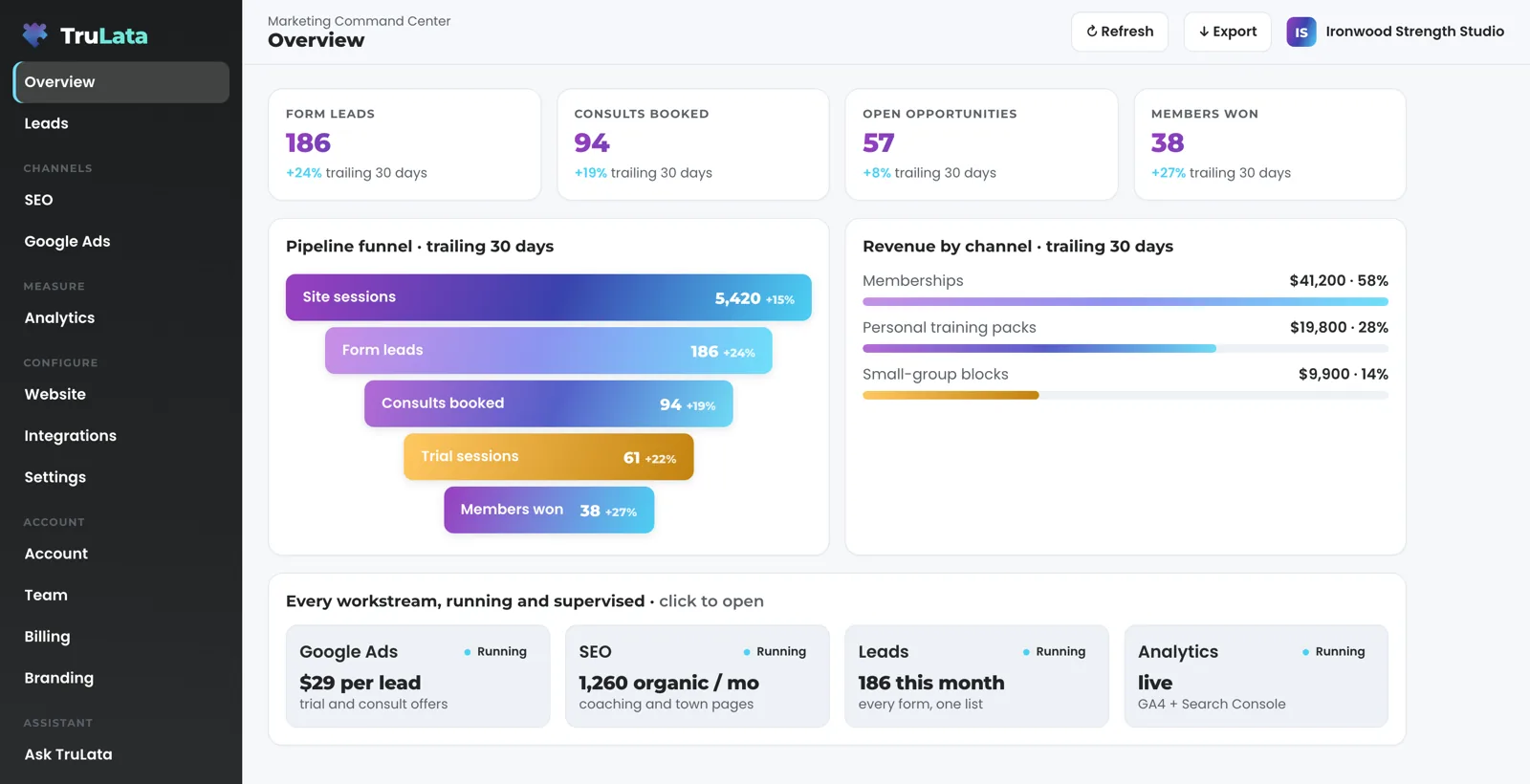
Your pipeline shows up as a funnel on the Overview: one bar per stage, widest at the top, a count in each and a line of context beside it. Setup builds the stages from the sources you connect: search impressions, site sessions, form leads and, where your CRM pipeline is connected, the opportunities it holds. The connection reads the pipelines in your sub-account by name and the opportunities in each. On the account reading today, a funnel row counts the contact-form cards in one named pipeline, the one your form writes to. Cards from other sources in the same pipeline are told apart by source and left out, so the number is form submissions, not tracked events.
Click a stage and a panel opens with its volume and what the stage counts. Spot a stage that fills and does not drain the moment you open the page, with no report to build. That is why the funnel sits on the first screen. If your jobs live in a booking platform, a separate Jobs view sits beside it, so the sales pipeline and the job pipeline each read from where they live.

Spot a stage that fills and does not drain the moment you open the page, with no report to build.
Can I see which channel each deal came from?
Not yet as a list. The connection reads the source field on each opportunity, plus its value and its status as your CRM records it: open, won, lost or abandoned. The source is read as written, with no attribution model layered on top. Today that read feeds counts: the funnel counts cards by pipeline and source, and a per-deal list with value and a won and lost split arrives on the view as it is built. A revenue by channel card exists on the Overview where it is set up for a client; today the one account that carries it builds it from payment records, not from the CRM source field.
Two records feed that screen, and the screen says which is which. The revenue view reads payments from Stripe. The source on a deal comes from your CRM. A lead's source on your own forms is a separate record, captured when the form is submitted; the glossary entry on how a source is captured and carried covers it.
Read from each opportunity
- Value, as recorded
- Status: open, won, lost or abandoned
- Source, read as written
- Counts by pipeline and source on the funnel today
- A per-deal list with a won and lost split, as the view is built

Your pipeline stays yours to run. The dashboard reads it.
How fresh is the number in front of me?
Live. Your CRM is a live source, and the page refreshes because you opened it. It loads last night's snapshot first so you see numbers at once, fetches the live payload from a cache, and runs a pull behind the page when that snapshot is older than five minutes. Press Refresh in the top bar to start a pull yourself: two seconds to a little over three minutes depending on the sources, and the page reloads when the time stamp moves, whatever the sources did.
A nightly bake at 12:01am Central writes a fallback copy for every client, and a failed pull leaves the previous page up, so you always open a full page. Read the header stamp to see how old the numbers in front of you are. The live data page says what live means for every other source on the screen.
What does it need from me, and can it change my CRM?
Read access to your sub-account's pipelines, opportunities and contacts, which you grant during setup. Where we also post your social through the same sub-account, that access includes publishing those posts. The Integrations view lists the connection as Connected. We hold no GoHighLevel password, and no password for any other account on the dashboard.
Your pipeline, opportunities and contacts are read; the screen's own writes stay on our side. Set a lead outcome and it writes to the lead record on the Leads view. Request a website, content, keyword, category or targeting change and it goes to the team as a logged ticket; the engine's writes to your ad accounts and your site go through each platform's API and land in its change history. The Security page lists every write path.

What if my CRM is not GoHighLevel?
It connects too. TruLata connects to any CRM with an API: GoHighLevel, HubSpot, Salesforce, Pipedrive, Insightly or any other CRM with an API. GoHighLevel has this page because its two-part connection, your contact record in our CRM and your own sub-account, is worth explaining; the others are connected the same way during setup, through the access you grant. If your business runs its jobs on a CRM or booking platform, that is already a separate connection with its own Jobs view.
The full list of connections shows what reads on a real account today, and each one says what it reads and how fresh it can be. A view appears once its source is connected, with your own numbers in it.
- Any CRM with an APIGoHighLevel, HubSpot, Salesforce, Pipedrive, Insightly or another
- Connected during setupThrough the access you grant; our team does the work
- A view appearsOnce its source is connected, with your own numbers in it
What the GoHighLevel connection reads.
| What | Where it comes from | How fresh |
|---|---|---|
| Pipeline and opportunity counts | Form-submission cards in a named pipeline in your own sub-account, told apart from other cards by source | Live |
| Deal value and status | Each opportunity's value and its status as your CRM records it: open, won, lost or abandoned | Read by the connection; a view arrives as it is built |
| Source per deal | The source field on each opportunity, read as written | Read by the connection; a view arrives as it is built |
| Social post analytics | Social Planner in the same sub-account, where we post for you | On the networks' schedule |
| Your record in our CRM | One contact with our notes and tasks, used by our team | Not a dashboard source |
| Requests from the screen | A lead outcome to the lead record; every other request to your team as a logged ticket | Live, logged |
Your forms and your CRM are two records of the same buyer: the Leads view counts one, the funnel counts the other, and the screen says which is which.
Questions, answered.
Do I need to give you my GoHighLevel password?
Our team connects your sub-account during setup with access you grant, so no password changes hands. The token stays server-side and never reaches a browser.
Does the dashboard change anything in my CRM?
Your pipeline, opportunities and contacts are read and stay yours to run. Setting a lead outcome writes to the lead record, change requests go to the team as logged tickets, and where we post your social through the same sub-account, those posts go out under the approval you chose.
Is the funnel live?
Yes. The CRM read is live: the page refreshes when you open it, a snapshot older than five minutes triggers a pull, and the Refresh button starts one on demand. Rows built from GA4 or Search Console carry those sources' delay, and the header stamp says how old the numbers are.
Does it read my own stage names?
Yes. The connection reads the pipelines and stages in your sub-account by name, with the opportunities in each. On the account reading today a funnel row counts the contact-form cards in one named pipeline; a bar per CRM stage arrives as it is built.
Do phone calls show up in the funnel?
When your CRM records the call as a lead, and where a call-tracking platform with an API is connected during setup. Where a funnel stage is built from tracked site events, a phone tap on your site counts there as a contact action, and the stage says so.
Which CRMs do you connect?
GoHighLevel, HubSpot, Salesforce, Pipedrive, Insightly and any other CRM with an API, each connected during setup; a connector we have not built yet is built during setup. A business whose jobs live in a CRM or booking platform gets a Jobs view through that connection.
See how it would run
for your business.
15 minutes with TruLata. We show you what your marketing brings in, what each lead costs, and what we would change first.
Book a demo or start a 7-day free trial
No card. It ends on its own after 7 days unless you add one. See pricing.
New here? See what TruLata is. Prefer to write? Send us the one thing you want to know.
Start here: AI marketing platform · AI marketing software · all-in-one marketing platform · marketing automation software · marketing software for small business.
- Refreshed when you open itLive data on page load, never a monthly PDF
- Counted from your own formsLeads recorded server-side, compared daily with Ads and GA4
- Seen in AI answersHow often ChatGPT, Gemini, Claude, Grok, Manus, Google AI Overviews, Perplexity, Meta AI and DeepSeek name you, measured
- Every send loggedProspect emails leave from a review-first queue, and every send is logged.