

Change your own site in minutes. Your visitors load the page, and the editor stays with you.
Type the new words, press Save and Publish, and your change is live in about one to two minutes. We build the site by hand, host it as static files on your own domain, and keep the editor at a separate address behind its own login.

What runs behind my site? Three parts, each on its own page.
Your site has three parts: the editor you type into, the static pages a visitor loads, and the layers that decide who can open the editor at all. Read each on its own page, written from the code behind it.
What do you build and host for me?
You get a static website, built by a person for your business and served from Cloudflare Pages on your own domain. Your site has its own page templates and one content file that holds the words. We render the templates against that file into plain HTML, and those files are all a visitor downloads: static pages served from the edge, with the CMS, the database and the editor code staying on our side.
Three parts make up the line: the static output, the deploy that ships it, and an editor at a separate address. It runs on client sites and on our own concept sites today. A person built every site in it.
One site, rendered once
- Page templates, written for this business
- One content file, the words only
- Served from the edge, on your own domain
- The CMS, the database and the editor stay on our side
Can I change the words myself?
Yes. Open the link we send, enter the code Cloudflare Access emails to your work address, and your pages load as tabs. The editor sits at its own address, apart from your site. Each tab lists that page's fields with a plain label and the current text. Move between pages without losing anything. A touched tab is marked, so you see what you changed before you publish. Press one button, Save and Publish, and the lot ships.
The fields are the words: headings, paragraphs, service descriptions, questions and answers, the footer line. A fact your business publishes, a price, an opening hour, a rating, can sit outside the editable fields, so rewording a page leaves every number as it was. A few sentences carry a placeholder in double braces that the site fills in at build time; the editor tells you to edit the words around it and leave it alone. See the editor, field by field.
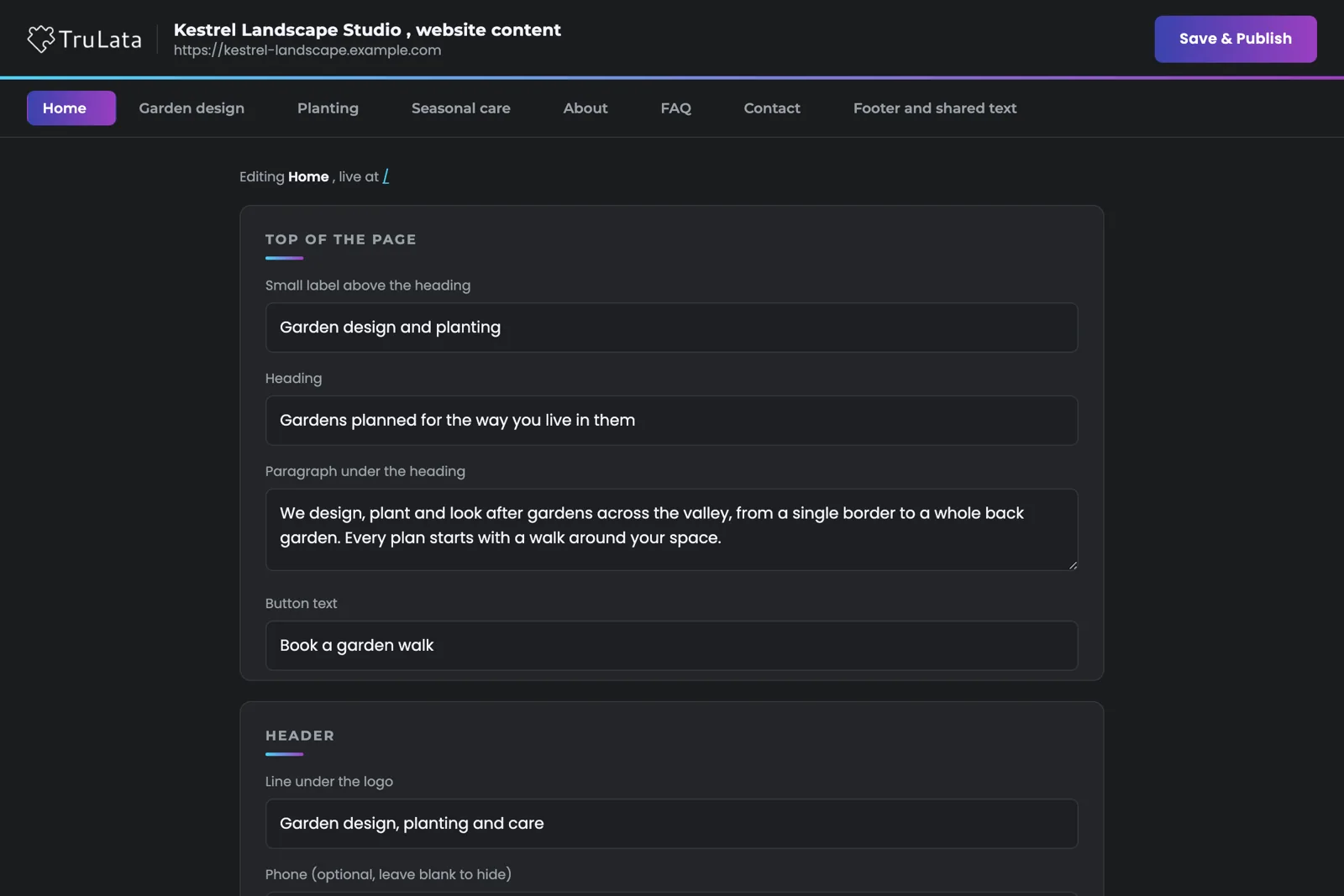

Type the new words, press Save and Publish, and your change is live.
What happens when I press Save and Publish?
Four steps run in order: normalise the dashes word processors insert, write the content file, re-render the site from its templates against the new content, deploy the result to Cloudflare Pages. A bad value is refused at the render step. The editor tells you the site will update in about one to two minutes.
A failed render leaves the live site as it was. The previous content file goes back and the editor says so, instead of shipping a broken page. Every deploy to Cloudflare Pages runs through one guarded script. It refuses a build missing the site's own marker text, refuses review furniture such as a draft banner on a live client domain, and refuses a live domain with no real 404 page, because without one Cloudflare Pages answers every wrong address with the homepage at status 200.
- NormaliseThe dashes word processors insert
- WriteThe content file
- RenderThe templates against the new content; a bad value is refused here
- DeployTo Cloudflare Pages, live in about one to two minutes
Will the editor slow my site down?
The editor runs apart from your site, as a separate application on a separate hostname, and your public pages are the rendered output only: static HTML and the assets it references, with zero runtime CMS and zero extra JavaScript for editing. A page builder that ships its editor to the visitor loads that weight on every visit, whether or not anyone is editing. Your visitor loads the page and its assets alone, so the page decides its own speed rather than the tool you edit it with.
A blog post reaches your site the same way. The piece slots into the site's data, the affected pages regenerate, and the site redeploys, still static. Why the public page stays static and the pipeline that writes the posts each have their own page.
A page builder that ships its editor
- The editor's weight loads on every visit
- Whether or not anyone is editing
This line
- The editor runs on a separate hostname
- Your visitor loads the page and its own assets
- Zero runtime CMS, zero editing JavaScript
Your visitor loads the page and its assets alone, so the page decides its own speed rather than the tool you edit it with.
Who can edit my site?
Only the people whose work email we list for your site, plus our own team. Three layers sit between the internet and the editor. First, the editor's hostname is its own Cloudflare Access application with its own guest list, and Access emails a One-Time PIN before anything loads, so you need no account and no password. Second, the tunnel behind that hostname answers only the editor's own paths; every other path returns a 404, so the hostname reaches the editor and the editor alone. Third, a per-site allowlist maps each verified email to the sites it may edit, so nobody can open another client's editor.
Your link is plain. It carries no key or token, because your Access session identifies you. Ask us to add or remove an address; someone not on the list is told to ask us. The three layers, in detail, and the product's write paths and seat rules are both published.
Three layers between the internet and the editor. Your link carries no secret.
Where do my form leads go?
To your team by email, and to your lead sheet where your site is wired to one, both server-side. The form posts to a small function on the site's own hosting, not in the visitor's browser. It emails the submission to your team and, on sites wired to a sheet, appends a row: when it arrived, who it was, what they wrote, and where the visit came from. Email goes first and the sheet is best effort, so a lead that has been emailed is kept whatever the sheet does.
Your dashboard's Leads view reads that same sheet, newest first, with our own test submissions filtered out. The site and the dashboard agree because they share one record. How that ledger is compared with what Google Ads and GA4 report is its own page, and the situation it exists for shows why the form is the record a web lead is counted from.
One form submission
- A visitor submits your form
- Emailed to your team, first
- One row appended to your lead sheet, where wired
- Your Leads view reads that sheet, newest first
The line, in one table.
| Part | What it is | Where it runs |
|---|---|---|
| Public site | Static files, rendered ahead of time; the CMS and the editor stay on our side | Cloudflare Pages, on your domain |
| Editor | Your pages as tabs, plain labels, Save and Publish | Its own hostname, behind its own Cloudflare Access app |
| Sign-in | One-Time PIN to an allowlisted work email; the PIN is the sign-in | Cloudflare Access |
| Save | Validate, write the content file, re-render, redeploy | Our backend, then Cloudflare Pages |
| Failed render | Previous content restored; the live site stays as it was | Our backend |
| Forms | Server-side handler: emails your team, appends your lead sheet where one is wired | A function on the site's own hosting |
| Site build | A person builds every site for one business | Our team, then Cloudflare Pages |
A person built every site in the line for one business, and the editor exists so you can reword that work without opening a ticket; the tooling behind it grows as it is built.
Questions, answered.
Do I need an account to edit my site?
The PIN is your sign-in. Cloudflare Access emails a One-Time PIN to your work address, which must be on the list for your site, and the link we send carries no secret.
Can a save break my site?
A failed re-render leaves the live site as it was: the previous content goes back and the editor tells you. The deploy step also refuses a build missing the site's marker, and a live domain with no real 404 page.
How long until my change is live?
About one to two minutes after you press Save and Publish. The editor says so when the save is accepted.
Is there a site builder or generator?
A person built every site in the line for one business, and the editor changes the words on that site; the tooling grows as it is built.
My site is on WordPress. Does any of this apply?
Partly. The editor is for the sites we build and host, so a WordPress site keeps its own editor. The content engine publishes to it through its API, and the Website view in TruLata shows its status either way.
Do leads from the site reach TruLata?
Yes, where your site's form is wired to a lead sheet. The handler appends each submission server-side and the Leads view reads that sheet newest first.
See how it would run
for your business.
15 minutes with TruLata. We show you what your marketing brings in, what each lead costs, and what we would change first.
Book a demo or start a 7-day free trial
No card. It ends on its own after 7 days unless you add one. See pricing.
New here? See what TruLata is. Prefer to write? Send us the one thing you want to know.
Start here: AI marketing platform · AI marketing software · all-in-one marketing platform · marketing automation software · marketing software for small business.
- Refreshed when you open itLive data on page load, never a monthly PDF
- Counted from your own formsLeads recorded server-side, compared daily with Ads and GA4
- Seen in AI answersHow often ChatGPT, Gemini, Claude, Grok, Manus, Google AI Overviews, Perplexity, Meta AI and DeepSeek name you, measured
- Every send loggedProspect emails leave from a review-first queue, and every send is logged.