

Get a site that turns a visit into a lead, and counts it where you can see it.
We design and build your site by hand, host it as static files on your own domain, and wire your forms to the lead sheet your dashboard reads. Change the words yourself and the site is live again in about one to two minutes. Everything else reaches our team as a numbered ticket.
Rather build it yourself? Make your own site free with the website builder, and go live on your own address when it looks right.

What does a website from TruLata do for my business?
It records every lead where you can see it. When someone submits a form on your site, the form handler appends the submission to a lead sheet server-side and emails your team. The Leads view in your dashboard reads that sheet newest first, with our own test submissions filtered out. The site and the dashboard share one record, so a quote request that landed at 6am is on the screen when you open it, whether or not a tracking tag fired.
It stays current without a page builder. Change the words yourself in an editor at its own address behind its own login, press Save and Publish, and the site re-renders and redeploys in about one to two minutes. Drop finished-job photos into the folder on the Website view and a person reviews them before they reach a gallery. Type anything else into the request box and it reaches our team as a numbered ticket.
It is judged on leads, not on looks. Ranking is not earning, so the screen counts leads from your own forms beside the positions, and a position there is Search Console's average for that query rather than a rank tracker's guess. Every page is built to turn a visit into a form submission the record can count, and proving which dollar made the phone ring starts from that record.
One record for the site and the dashboard
- Someone submits a form on your site
- The Leads view, newest first
- An email to your team
- Our own test submissions filtered out
What does TruLata show me about my site?
Open the Website view. The first card is your live site: a Live badge, a short list of facts about your build set by our team, and a button that opens your domain in a new tab. Beside it, Add photos to your site lists the shared folders you drop new photos into. Below, Request a website change asks for the page, what should change and your name; the screen shows a ticket number the moment it is sent, and the card says simple changes are typically live within one business day. The Support tab lists every ticket, from the dashboard or from an email to support@trulata.com, with its status and our replies beneath it. The website view page walks through each card.
The Leads view reads the sheet your forms append to, newest first. Set an outcome on each lead from the screen and it is written to the lead record. GA4 adds sessions, sources, pages and key events, hours behind intraday. Search Console shows the queries you appeared for, impressions, clicks and average position, two to three days behind, and those positions are Search Console's own averages, not a rank tracker. Analytics and search visibility each have their own page.
The dashboard refreshes because you opened it. Last night's snapshot loads first, the live payload follows from a cache, and a pull runs behind the page when the snapshot is older than five minutes. A fallback snapshot is baked for every client at 12:01am Central, and a failed pull leaves the previous page up rather than an empty one. Live data covers the freshness ceiling for every source.
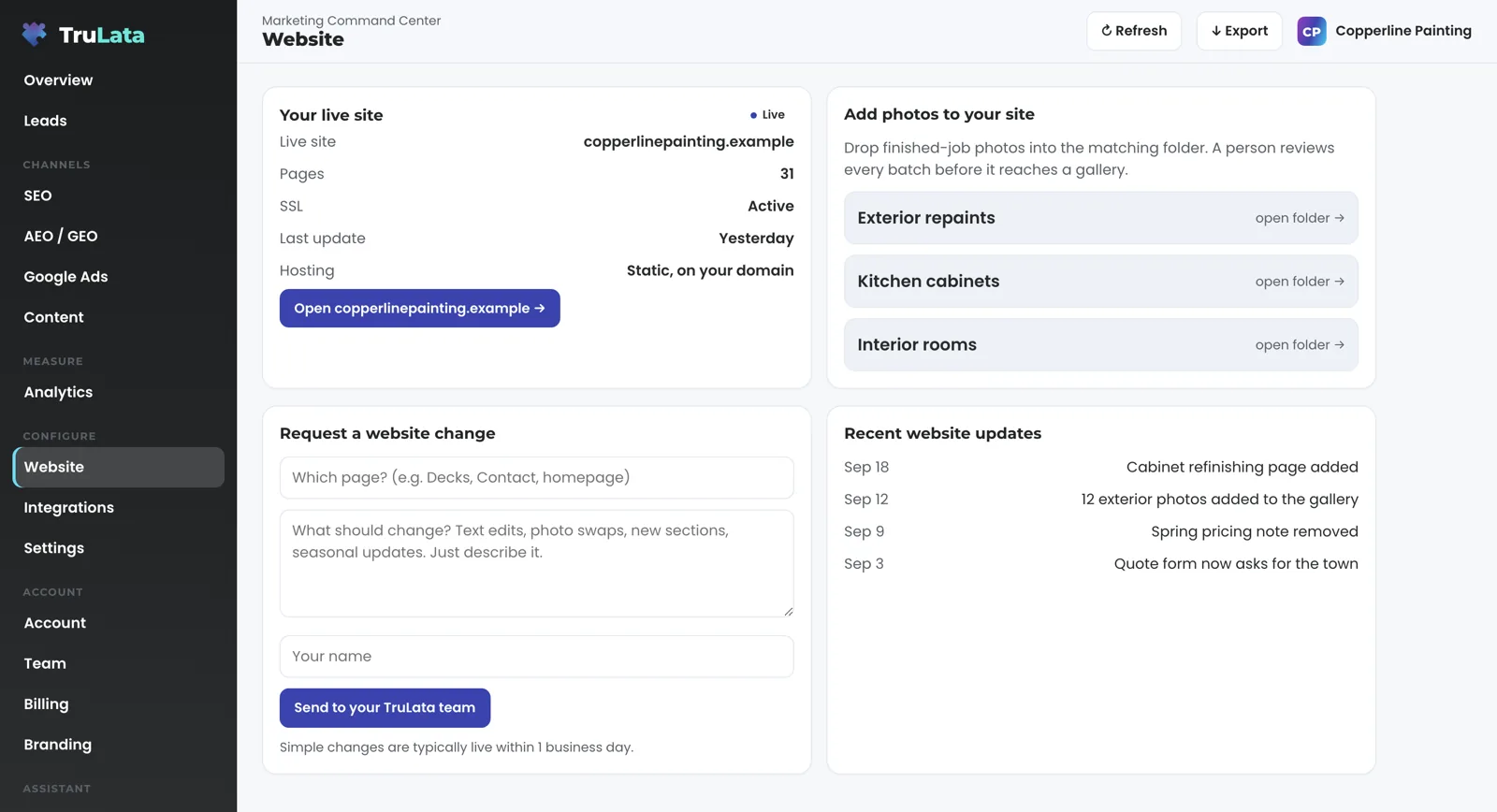

Drop finished-job photos into the folder, and a person reviews them before they reach a gallery.
What runs on a schedule, and what still needs a person?
Publishing runs itself. A site we build and host as static files sits on your own domain, and a change made in the editor reaches it by re-rendering the site from its content file and redeploying it. A save in the editor validates the fields, writes the content file, re-renders the site and redeploys; if the render fails, the previous content is restored and your live site stays as it was. A deploy to Cloudflare Pages runs through one guarded script that refuses review furniture on a live domain and refuses a live site with no real 404 page. The public site stays 100 percent static, with no runtime CMS and no editor script. Performance and access each have a page under the Sites line.
Articles run on your cadence. On Launch, Growth and Command, the content engine researches and drafts them: each topic passes a demand gate on real search volume and what already occupies the result page, the dedupe reads the titles already published on your site, and each piece is filed as a Google Doc in your Drive with a featured image generated for it. Auto-publish is a per-client setting, so a piece goes out on the cadence or waits, awaiting approval. On a static site we host, the post is added, the site is regenerated and redeployed; on WordPress it publishes through the site's API. Where your forms feed the sheet, a lead watch runs daily at 7:20am Eastern with five checks across the sheet, GA4 and Ads. It reads the leads that landed against the conversions Google counted, so a dead tag, a blind ad account or a stalled form is flagged the next morning instead of at the end of the quarter.
A person does the rest. Design and build are done by hand for one business. Every photo batch is reviewed before it reaches a gallery. Every change request is read by a person, who makes the change; the request is logged and ticketed and goes to that person, one of the write paths listed on the security page.
- Save and PublishThe editor validates the fields
- WriteThe content file is written
- RenderThe site re-renders from its content file
- RedeployLive on your domain in about one to two minutes
- If a render failsThe previous content is restored, and the live site stays as it was
It is judged on leads, not on looks.
How does your team build and run the site?
By hand, for one business, with TruLata as the record it reports into. Our team designs and codes the site, hosts it as static files on your domain, wires the forms to the lead sheet and to the email your team receives, and sets up the Website view: the status card, the photo folders and the request box. Where your site is on WordPress, the connection reads site status and publishes through its API with access you grant during setup. How it works lists the steps.
After launch the work continues as a service. On Command, which adds the outbound engine, social media management and your full marketing team, always on, our team makes the changes. On the managed strategy retainer, an add-on on any tier, strategy, optimization and the approvals sit on our side. Both are scoped with you, and neither carries a number on this site. Because the site is custom-coded, the same team can extend it through custom software, scoped with you.
See the view before you talk to anyone. Open the demo at demo.trulata.com: your name and email in front of it, a fictional company called Meridian, every number illustrative, and the same engine code every client dashboard runs. Click Website, read the status card, type a request and press Send; on the demo the message says that in a live account it goes straight to your TruLata team, and the demo keeps the request on the screen. Then open Support and read the two sample tickets, one from an email and one from the dashboard, with a reply beneath the resolved one.
By hand, for one business
- Designed and coded by handHosted as static files on your domain
- Forms to the lead sheetAnd to the email your team receives
- The Website viewStatus card, photo folders, request box
- Changes as a serviceOn Command or the managed strategy retainer
Which tier carries the website view?
The Website view is one screen of TruLata, and it appears once a site has been set up for it. Starter includes the TruLata dashboard, full analytics, leads, search visibility, the AI visibility program, managed Google Ads search, the assistant and briefings and support tickets. The content engine that publishes articles to your site runs on Launch, Growth and Command. Managed Google Ads search runs on all tiers. Meta ads are managed on Growth and Command. The outbound engine runs on Command. Command adds the outbound engine, social media management and your full marketing team, always on, is scoped per engagement and carries no number on this site.
Seats are three on Starter, three on Launch, ten on Growth and unlimited on Command. Starter is $400 a month, Launch $650, Growth $1,200, and Command is scoped per engagement. Every tier is month to month with nothing metered, and an annual commitment takes twenty percent off the monthly. The pricing page carries the same figures as every other page on this site.
The Website view
- Appears once a site has been set up for it
Articles to your site
- Launch, Growth and Command
Term
- Month to month
- Nothing metered
Can your team run the site for me?
Yes. Command adds the outbound engine, social media management and your full marketing team, always on, scoped per engagement, and the managed strategy retainer sits on top of any tier with strategy, optimization and the approvals on our side, scoped with you. On either, the website work is ours: photos, requests, copy, seasonal updates and new pages, each one a ticket you can read on the Support tab. The managed page covers both, and the pricing page shows where Command sits above the three published tiers.
TruLata is also a marketing services firm, and the site is one part of that work. Search, paid search, content, branding and analytics each have a services page, and the services hub lists all of them. The trades the product is built for, from plumbing companies to law firms, are on the industries page.
The website work is ours
- Photos
- Requests
- Copy
- Seasonal updates
- New pages
- Each one a ticket
- Read on the Support tab
What TruLata reads and writes for your site.
| What | Where it comes from | How fresh |
|---|---|---|
| Website leads | Your site's form handler, appended to a lead sheet server-side and emailed to your team | Live; on the Leads view when you open it |
| Site status | The Your live site card, set for your site by our team, with a button that opens your domain | Live on open; the Live badge is a label set by our team |
| Photos | Shared folders you drop photos into, reviewed before they reach the site | After a person reviews the batch |
| Change requests | The request box: page, what should change, your name; logged and ticketed | Live; ticket number shown on send |
| Copy edits | The editor at its own address, One-Time PIN, static sites we host | About 1 to 2 minutes after Save and Publish |
| Articles | The content engine on Launch, Growth and Command; regenerate and redeploy on a static site we host, the site's API on WordPress | On your cadence, or awaiting approval |
| Sessions, queries, clicks | Google Analytics 4 and Search Console | GA4 hours behind intraday; Search Console 2 to 3 days behind |
Every site is built by a person, and the editor changes the words on it. A phone lead counts when your CRM records it, and a call-tracking platform with an API is connected during setup. The Live badge on the status card is a label set by our team. Card data is never read.
Questions, answered.
Do you use a site builder or a generator?
Every site is designed and coded by a person for one business and hosted as static files on your own domain. The editor exists so you can change the words on that site without a ticket, and new pages come from our team.
Can I edit my site myself?
Yes, where we have set the editor up for your site. The editor lives at its own address behind a One-Time PIN sent to your work email, and one verified email maps to one site. A save validates the fields, writes the content file, re-renders the site and redeploys it, live in about one to two minutes, and a failed render leaves your live site as it was. WordPress sites keep their own editor.
Where do my form leads go?
To a lead sheet, appended server-side by the form handler, and to your team by email. The Leads view reads that sheet newest first. Where your forms feed the sheet, a watch runs daily at 7:20am Eastern and compares it with what Google Ads and GA4 counted.
I already have a WordPress site. Does any of this apply?
Yes. The Website view shows its status, the content engine publishes to it through its API on Launch, Growth and Command, and the request box works the same way. The editor is for the static sites we build and host; WordPress keeps its own.
What does a website cost?
The build is quoted for your site. TruLata it reports into is priced on the pricing page: Starter is $400 a month, Launch $650, Growth $1,200, and Command is scoped per engagement.
Can a change request or a save break my site?
A request is logged and ticketed and goes to a person, who makes the change and checks it. A save that fails to render restores the previous content and leaves your live site as it was, and the deploy script refuses review furniture on a live domain and a live site with no real 404 page.
See how it would run
for your business.
15 minutes with TruLata. We show you what your marketing brings in, what each lead costs, and what we would change first.
Book a demo or start a 7-day free trial
No card. It ends on its own after 7 days unless you add one. See pricing.
New here? See what TruLata is. Prefer to write? Send us the one thing you want to know.
Start here: AI marketing platform · AI marketing software · all-in-one marketing platform · marketing automation software · marketing software for small business.
- Refreshed when you open itLive data on page load, never a monthly PDF
- Counted from your own formsLeads recorded server-side, compared daily with Ads and GA4
- Seen in AI answersHow often ChatGPT, Gemini, Claude and Grok name you, measured
- Every send loggedProspect emails leave from a review-first queue, and every send is logged.