
 ™
Run your marketing from the ChatGPT window you already have open.
TruLata in ChatGPT reads your own TruLata account, your leads, website traffic, search, ads and AI visibility, and it does the work you would ask Addy for on your dashboard: record what happened with a lead, draft an article, change your website draft. Connect it once, sign in with TruLata and ask.

What can I ask ChatGPT about my business?
Questions about your own marketing, the way you would ask a person. Which leads came from Google Ads this month, and how that compares with last month. Who asked about a quote and has not been called back. Whether website visits went up after the new page went live. What your AI visibility score is, and which buyer questions AI assistants answer without you.
ChatGPT gets the answer from your TruLata account, the same sources your dashboard reads, with the numbers for this period and the one before so a comparison is never worked out by hand. A source you have not connected is said to be not connected, never filled with a guess.
From a question to your own numbers
- Leads by source
- Who needs a call back
- Visits, now and before
- AI visibility gaps
- An answer with this period and the last
- Not connected, said plainly
What does a conversation look like?
A real exchange from our own testing, with the names changed to a fictional plumbing company. You ask how many leads Google Ads brought this month. ChatGPT searches your leads by source and answers with the count for the last 30 days, the count for the 30 days before, and the people, each with what they asked about and when.
You ask it to add the caller you just spoke to, Jordan Example, who wants a water heater replaced. ChatGPT adds the lead to your Leads tab, the way a website form message arrives, and tells you it is there. You ask it to mark yesterday's lead lost because they went with someone else, and it records that with your note.
An example, fictional plumbing company
- How many leads did Google Ads bring this month?The count for the last 30 days, the count for the 30 before, and each person with what they asked.
- Add Jordan Example, wants a water heater replaced.Added to your Leads tab, the way a website form message arrives.
- Mark yesterday's lead lost, they went elsewhere.Marked lost, with your note.
Connect it once, sign in with TruLata and ask.
What can ChatGPT change, and what stays with you?
ChatGPT can add a lead, record what happened with a lead, draft an article, change your website draft, invite a teammate, ask for fresh numbers and open a support ticket. On a plan that includes it, it can also work your Google and Meta ads, such as pausing a campaign. These are the same changes the account owner or an admin can make with Addy on the dashboard, no more.
Website changes land in your draft with a preview link; putting them live is a separate step. ChatGPT cannot open another TruLata account, change your plan or billing, delete a lead or remove a teammate. Every tool that changes something is marked as a change, so ChatGPT can ask you to confirm it first.
ChatGPT can
- Add and mark leads
- Draft an article
- Change your website draft
- Invite a teammate
Stays with you
- Putting website changes live
- Your plan and billing
- Deleting a lead or removing a teammate
- Any other TruLata account
Who can connect it, and how do I turn it off?
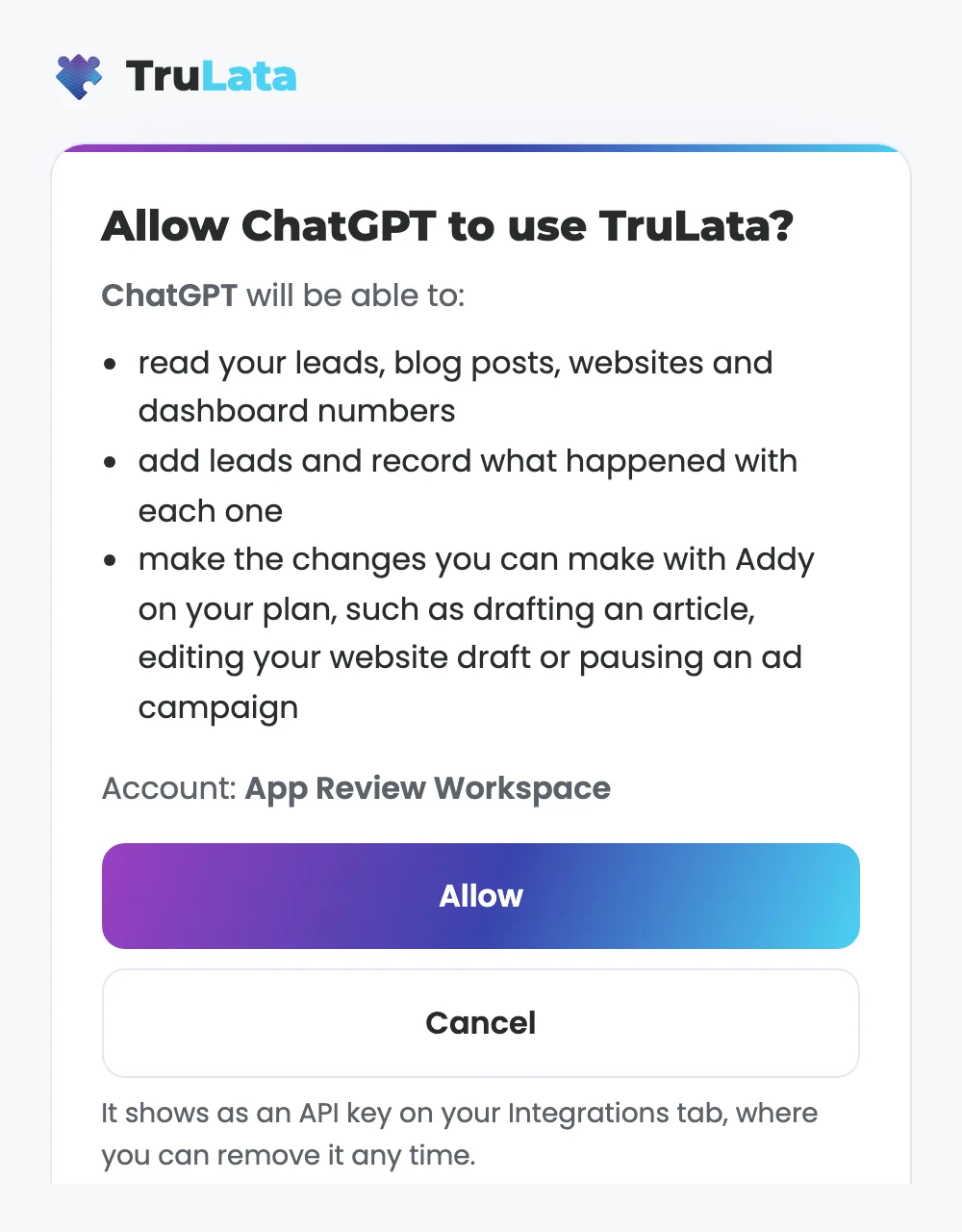
The account owner or an admin. You sign in with TruLata, choose the account and press Allow, and the connection opens that one account and nothing else.
It shows on the Integrations tab of your dashboard as a key named after ChatGPT. Revoke it there and ChatGPT loses access on its next request. Connecting again replaces its earlier key instead of adding another, so an account never fills up with old connections.
- Connect onceThe account owner or an admin presses Allow
- One accountThe connection opens the account chosen, nothing else
- Connect againReplaces its earlier key
- Turn it offRevoke its key on the Integrations tab
How do I set it up?
Open TruLata in ChatGPT and connect it. ChatGPT sends you to TruLata to sign in; choose your account and press Allow, and you are back in the chat.
Any assistant that adds an MCP server by address can use the same connection: https://api.trulata.com/mcp. The help article has the steps, and TruLata for Claude works the same way.
What TruLata in ChatGPT does.
| What | Where it comes from | How fresh |
|---|---|---|
| Where | ChatGPT, after you connect TruLata once | When you ask |
| Answers from | Your TruLata account, the same sources your dashboard reads | As fresh as each source |
| What it can change | What the owner or an admin can change with Addy on your plan | Every request |
| Website edits | Land in your draft with a preview link; going live is a separate step | Always |
| Who can connect | The account owner or an admin, one account per connection | Once |
| Turning it off | Revoke its key on the Integrations tab | Any time |
| Other assistants | Any MCP client, at https://api.trulata.com/mcp | Today |
ChatGPT answers from your own TruLata account and does the work you would ask Addy for, only for the owner or an admin who connected it.
Connect ChatGPT: sign in and approve.
- Open TruLata in ChatGPT and connect it.
- Sign in with TruLata, choose your account and press Allow. Only the account owner or an admin can allow it.
- Ask in plain words, for example: which leads came from Google Ads this month? The connection then shows on the Integrations tab as a key you can revoke.
Every integration, step by step: the ChatGPT help page and the help center. Stuck? Email support@trulata.com and we connect it with you.
Questions, answered.
Does TruLata work with ChatGPT?
Yes. Connect TruLata in ChatGPT, sign in with TruLata, choose your account and ask about your leads, traffic, ads and AI visibility.
Can ChatGPT change things in my TruLata account?
Yes, the same changes the account owner or an admin can make with Addy on your plan, such as adding or marking a lead, drafting an article or changing your website draft. Website edits land in your draft; going live is a separate step.
Do I need to paste an API key?
No. You sign in with TruLata and press Allow.
Who can connect ChatGPT to our account?
The account owner or an admin. The connection opens only the account they choose.
How do I disconnect ChatGPT?
Revoke its key on the Integrations tab of your dashboard. ChatGPT loses access on its next request.
Does it work with other AI assistants?
Yes. Claude has its own listing, and any assistant that adds an MCP server by address can use https://api.trulata.com/mcp.
See how it would run
for your business.
15 minutes with TruLata. We show you what your marketing brings in, what each lead costs, and what we would change first.
Pick a time right here: no card, and no contract to see it. Rather try it alone first? Start a 7-day free trial. See pricing.
New here? See what TruLata is. Prefer to write? Send us the one thing you want to know.
Start here: AI marketing platform · AI marketing software · all-in-one marketing platform · marketing automation software · marketing software for small business.